
AI Tools Expert & Founder
Quick answer
What should you do right after completing keyword research?
Clean out irrelevant or outdated terms, verify the search intent behind each query, and group related keywords into clusters around a shared reader task. Next, map each cluster to an existing URL you can improve or a new page to create, build a content brief, write and optimize the page with natural keyword placement and internal links, and measure results in Google Search Console.
Table of Contents
After completing keyword research, the next step is to turn your raw keyword list into an organized, page-by-page content and optimization plan before writing a single word. Start by cleaning out irrelevant or outdated queries, analyzing the search intent behind each phrase, and grouping related keywords into topic clusters around a shared reader task. From there, map each keyword cluster to an existing URL you can upgrade or a new page you need to create, prioritize the best-fit opportunities, build a structured content brief, write and optimize the page with natural on-page keyword placement and internal links, and measure impressions, clicks, and positions in Google Search Console.
Collecting hundreds of keywords in a spreadsheet is the easy part—the difficult part is deciding which searches actually deserve to be written and which page on your website should serve each task.
When Do It With AI Tools first launched, new pages often started with an idea that sounded helpful on paper: an SEO tutorial, a prompt template, or a browser utility. Serving the reader mattered from day one, yet topics were frequently chosen before checking real search demand, query phrasing, and page-level competition.
During the November 2026 SEO audit, the Do It With AI Tools team brought keyword exports and Google Search Console query logs directly into the editorial planning workflow. That data created a brand-new challenge: dozens of phrases looked promising on the surface, but some belonged on existing tool pages, others required a standalone step-by-step guide, and several did not fit the website's audience at all.
Here is the exact 10-step workflow Do It With AI Tools used to turn that raw keyword research into an actionable content plan—and how you can apply the same system to your own keyword list.
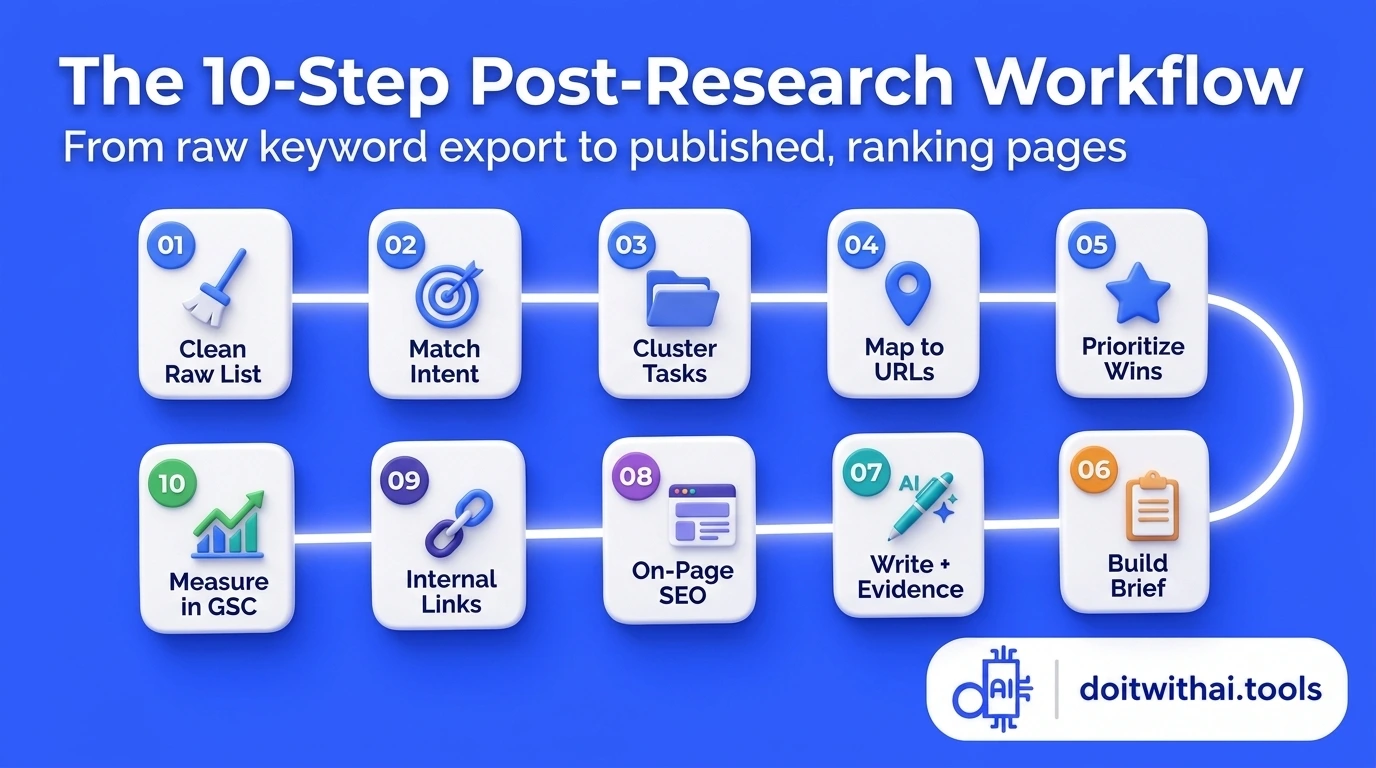
The complete 10-step post-keyword-research roadmap: transform raw keyword lists into search-intent clusters, content briefs, and measured rankings.
1. Clean your keyword research before choosing what to write
An exported keyword spreadsheet is a collection of possibilities, not an automatic publishing queue. Review and filter the raw list before assigning any topic to a writer or opening a blank document.
For every keyword on your sheet, ask whether your website can genuinely help the person making that search. Check for accidental duplicates, unrelated meanings, obsolete years, and queries that require a product, software feature, or service your business does not offer.
During the November 2026 Do It With AI Tools audit, the raw research export included the following real examples:
Real Keyword Filtering Decisions from the Do It With AI Tools Audit (November 2026)
| Keyword from the audit | Supplied volume | Supplied KD | Decision in the content plan |
|---|---|---|---|
keyword grouping software | 260 | 6 | Improve the existing Keyword Clustering Tool page |
semantic keyword grouping | 260 | 14 | Cover within the same grouping-tool opportunity |
keyword grouper software | 210 | 10 | Group with related tool wording on the clustering utility |
what to do after keyword research | 320 | 4 | Create this dedicated step-by-step supporting guide |
market research resume keywords | 320 | 7 | Exclude from the SEO content queue (job-seeker intent) |
best keyword research tools 2015 | 260 | 2 | Exclude the obsolete-year opportunity |
These figures came from the keyword datasets recorded in the November 2026 Do It With AI Tools audit. Because the target-country database was not locked to a single region for every row in that batch, treat the numbers as planning estimates rather than universal traffic guarantees. This real example documents editorial planning decisions rather than a finished traffic claim.
Notice why two low-difficulty keywords were immediately cut: the query market research resume keywords contains the words research and keywords, but the searcher is writing a job application—a completely different task from organizing website SEO keywords. Similarly, best keyword research tools 2015 had a supplied Keyword Difficulty (KD) of just 2, yet publishing an outdated 2015 roundup would waste crawl budget and fail current readers.
Removing those off-topic rows immediately gave the remaining high-fit opportunities the focus they deserved.
Keep the original export and a reason for each decision
Always save an untouched master copy of your raw keyword export. In your active working tab, keep the keyword, data provider, target country/market, collection date, available metrics, and a short column recording why each term was kept, merged, or excluded.
Remove exact duplicates while preserving meaningful modifiers that signal a different user need—such as a software category, local city, or specific workflow stage. Leave missing measurements blank rather than replacing an unknown KD with 0: an unmeasured difficulty score is not a zero-competition keyword.
2. Match search intent before deciding on a content format
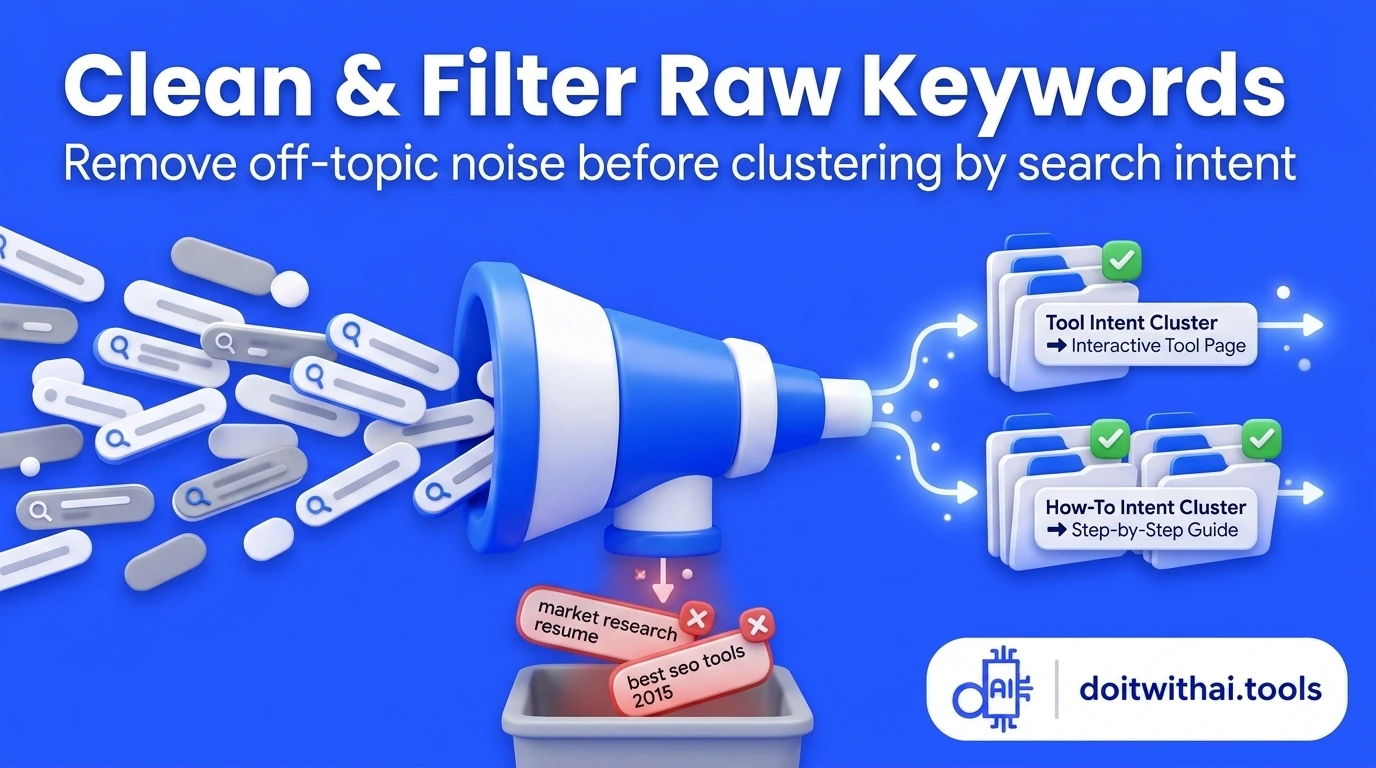
Filter out irrelevant queries early and match every keyword to the exact search intent format Google rewards.
Once irrelevant rows are removed, work out what the searcher actually wants to accomplish. In SEO, this is search intent: the real-world job behind the words typed into Google.
Compare the difference between these two searches from the audit:
- "Keyword grouping software" signals someone looking for an interactive utility they can use right away or evaluating software.
- "What to do after keyword research" signals someone who already has a list of keywords and needs a clear sequence of decisions, templates, and next actions.
Wording clues give you a strong starting hypothesis, but they are never a substitute for inspecting live Google search results. Search representative queries in your target market and study Page 1: are the top results interactive calculators, step-by-step tutorials, software comparison roundups, category hubs, or product landing pages? Open the top three results and note what a visitor can actually complete on those pages.
Instead of writing a vague label like "Informational" in your spreadsheet, write a specific task note such as: "The reader needs a reviewed keyword-to-page action plan, including how to decide between updating an existing page and writing a new article." Specific intent notes ensure your title tag, opening paragraph, and call-to-action all pull in the same direction.
To speed up this step, the free Search Intent Checker on Do It With AI Tools helps classify query wording and supplied SERP notes into primary and secondary intent buckets. Always confirm borderline terms against live search results before locking in your page format.
3. Cluster related keywords around a shared reader task
After clarifying search intent, group the keywords that can be satisfied by the exact same page. This process—keyword clustering (or keyword grouping)—prevents you from publishing five thin pages that compete against each other in Google.
In the Do It With AI Tools plan, keyword grouping software, keyword grouper software, and semantic keyword grouping all pointed to one shared reader task: organizing a raw keyword list into topic groups. Instead of spinning up a separate landing page for every wording variation, all three terms were consolidated into a single upgrade plan for the existing Keyword Clustering Tool.
Consolidating those terms also created an editorial responsibility: the tool page must accurately explain how its grouping method works and where human review is still required. Targeting a variation never justifies promising automated features a tool does not actually perform.
Use ChatGPT and clustering tools as a first draft you can inspect
You can sort a 20-row list manually in Google Sheets or Excel, or use the free Keyword Clustering Tool on Do It With AI Tools to generate editable topic clusters from your pasted keyword list. Inside the tool, you can inspect every proposed group, split or merge clusters, record target URLs, and export a clean implementation sheet.
Keep in mind that rule-based and ChatGPT-assisted grouping tools analyze wording and topical overlap—they do not compare live top-10 ranking URLs on Google. Keep your search volume and KD columns in your master spreadsheet, and write one clear sentence for each cluster explaining the shared reader task. If your sentence requires two or three unrelated outcomes (for example, "learn the history of title tags" and "use an interactive meta title generator right now"), split the cluster into separate pages: a tutorial guide like the Meta Title Optimization Guide and an interactive utility like the Meta Title Generator.
Leave uncertain terms in a review queue
Not every keyword has an obvious home on day one. Keeping a dedicated Review Queue tab lets you hold ambiguous queries until you inspect live SERPs, rather than forcing a weak page assignment just to finish the spreadsheet. You can also use the curated Topic Clustering & Topical Authority Prompts with ChatGPT to stress-test your proposed topic buckets.
4. Map keyword groups to existing pages before creating new ones
Once your keyword clusters are defined, assign each cluster a destination URL. Keyword mapping is the bridge between research and production—and the golden rule is to check your existing pages before planning a brand-new URL.
In the Do It With AI Tools audit, the grouping-software cluster already had a natural home on /tools/keyword-clustering-tool, whereas the broader workflow question (what to do after keyword research) required this dedicated guide. Meanwhile, discovery-focused queries belonged on the existing ChatGPT Keyword Research Guide and AI vs. Traditional Keyword Research Comparison.
Keyword-to-Page Mapping Matrix from the Do It With AI Tools Content Plan
| Shared reader task | Mapped destination URL | Content action | Editorial reason |
|---|---|---|---|
| Organize and group a supplied keyword list | Keyword Clustering Tool | Improve existing tool page | The site already offers a working clustering utility that serves this exact task |
| Turn completed keyword research into a content plan | What to Do After Keyword Research | Create new supporting guide | Readers need the complete 10-step post-research workflow, not only a grouping box |
| Generate and validate seed keyword ideas with ChatGPT | ChatGPT Keyword Research Guide | Retain & cross-link | Keyword discovery precedes post-research planning; cross-linking connects both stages |
| Check where existing pages rank in Google | How to Check Keyword Rankings | Create companion measurement guide | Measuring post-publish rankings is the natural follow-up after publishing mapped pages |
| Add market research keywords to a job resume | No destination on site | Exclude | Outside the SEO and content marketing workflow scope |
Choose a specific editorial action, not just a URL
Assign every keyword cluster one of five concrete actions:
- Improve an existing page that already targets the same core task but lacks depth, examples, or clear subheadings.
- Create a new page when the reader needs a distinct format or workflow that no current URL satisfies.
- Investigate overlapping coverage when two existing URLs split impressions for the same query.
- Hold for future release when you need original test data, screenshots, or a new tool feature first.
- Exclude when the query does not serve your target audience.
Be careful not to merge two pages just because both receive impressions for a broad term. Inspect their primary purpose and conversion role first. If you have a Google Search Console query-and-page export, run it through the free Keyword Cannibalization Finder on Do It With AI Tools to spot genuine URL conflicts before consolidating or redirecting anything.
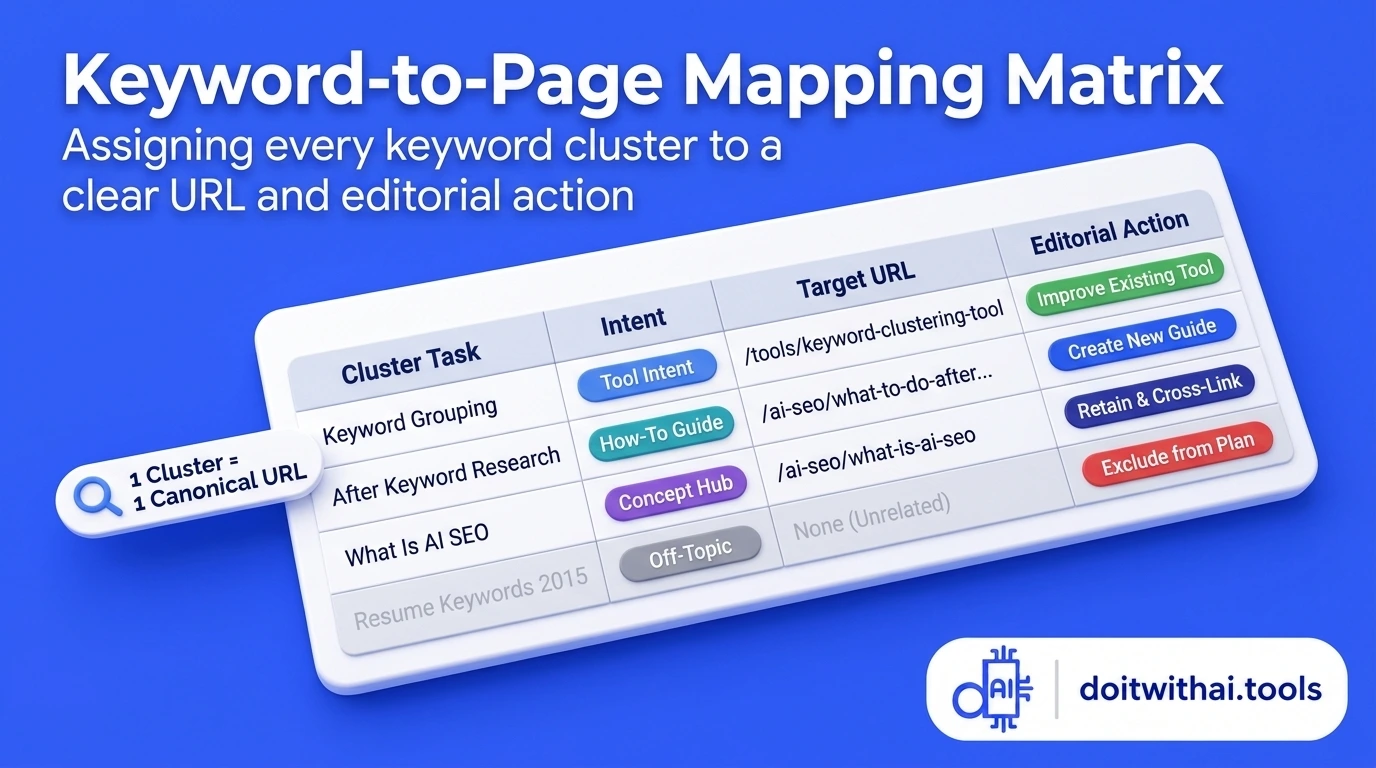
Practical keyword-to-page mapping: assign topic clusters to existing URLs, new content briefs, or exclusion buckets before writing.
5. Prioritize content you can make useful and distinctive
When you have 20 or 50 mapped pages on your spreadsheet, you still can't publish all of them today. Prioritization decides which page earns your focus first.
In the Do It With AI Tools plan, what to do after keyword research had a supplied KD of 4 and a monthly volume estimate of 320. Low competition made it attractive, but the decisive factor was capability fit: the site already had live interactive tools for intent checking, clustering, content briefing, internal linking, and GSC rank auditing, plus real audit decisions that could be shown transparently.
Score each candidate topic against these five practical questions:
- Audience fit: Does this task directly help the website's target audience and users?
- Promise delivery: Can the proposed page completely solve what its headline promises without fluff?
- Information gain: Does the team have original data, real workflow examples, screenshots, or interactive utilities that make the answer noticeably better than existing Page-1 results?
- Existing search traction: Does the website already earn impressions between Positions 8 and 20 for closely related queries in Google Search Console?
- Production effort vs. impact: Is the time required to produce this page sensible compared to upgrading an existing striking-distance URL?
Sort your approved topics into four simple buckets—Now, Next, Research Needed, and Hold—and pair related tool upgrades with their supporting guides. If your site already has Search Console data, drop your export into the free GSC Striking Distance Keyword Finder to see which existing pages are sitting at Positions 8–20 and can be pushed onto Page 1 before you write new articles from scratch.
6. Turn the selected keyword cluster into a structured content brief
A keyword tells you what someone typed into Google; a content brief defines what the finished page must help that person accomplish. Jumping straight from a keyword string into drafting is the #1 reason articles wander off-topic.
Here is the exact editorial brief created for this article during the Do It With AI Tools planning sprint:
- Target reader: A website owner, blogger, or marketer who has exported a list of keywords and needs to know what to do next.
- Reader outcome: Turn a raw keyword list into clean clusters, mapped page decisions (improve vs. create), a prioritized publishing queue, and a post-publish GSC measurement loop.
- Primary keyword:
what to do after keyword research(supported naturally byhow to use keywords after keyword researchandturning keyword research into a content plan). - Page format: Chronological, step-by-step implementation guide anchored by real decisions from the November 2026 Do It With AI Tools SEO audit.
- Original contribution (Information Gain): Show the exact keywords retained, grouped, mapped to
/tools/keyword-clustering-tool, or excluded (market research resume keywords,best keyword research tools 2015), and explain the reasoning behind each call. - Scope boundary: Link readers to the ChatGPT Keyword Research Guide for initial seed discovery, and link to How to Check Keyword Rankings in Google for deep post-publish rank tracking.
- Immediate next action for the reader: Take one reviewed keyword cluster, record its target URL decision, and open the Keyword Clustering Tool or SEO Content Brief Generator.
You can generate this exact structure for any topic in under two minutes using the free SEO Content Brief Generator, and then map out your H2 and H3 hierarchy in chronological decision order using the Article Outline Generator.
7. Write useful content with your own evidence and ChatGPT assistance
With your brief locked in, draft the page by answering the main question in the very first paragraph (see the Blog Introduction Guide) and then walking through each step with real examples, tables, and trade-offs.
Generic advice like "write high-quality content that matches search intent" does not help a reader make a decision. Showing why market research resume keywords was cut, why three keyword-grouping phrases were consolidated onto a single tool URL, and how to structure a page brief gives readers a concrete pattern they can copy immediately.
Use ChatGPT to organize the workflow, then verify every claim
ChatGPT and specialized SEO utilities are powerful accelerators when you supply the real data and constraints first. During the Do It With AI Tools audit, ChatGPT helped stress-test cluster boundaries, spot missing steps in briefs, and tighten draft prose—while human editorial review controlled all data tables, tool capabilities, and strategic calls.
When using ChatGPT to review a raw keyword list, use a constraint-driven prompt that forbids fabricated metrics:
Review this supplied keyword list for a website serving [describe audience] with these existing pages: [list URLs and their purpose]. Group the keywords by shared reader task and propose one action per group: Improve Existing Page, Create New Page, Investigate Overlap, Hold, or Exclude. Preserve all supplied volume and KD figures exactly as given and flag any missing data. Do not invent search volume, keyword difficulty, live Google SERP rankings, or traffic outcomes. Explain any ambiguous queries that require a live SERP check.
Google's official guidance on using generative AI content makes it clear that automation itself is not against Google Search rules—what matters is accuracy, originality, E-E-A-T (Experience, Expertise, Authoritativeness, and Trustworthiness), and genuine value for searchers. Never publish unreviewed AI text that invents statistics or rehashes ten other blog posts without adding your own evidence. You can audit your draft's unique depth before publishing with the free Information Gain Auditor and E-E-A-T Content Auditor.
Structure your page for Google AI Overviews as well as human readers
When someone searches a workflow question like what to do after keyword research, Google frequently displays an AI Overview (Position Zero) at the very top of the search results summarizing the core steps (group and cluster keywords, analyze search intent, map keywords to pages, optimize on-page elements, and track performance).
Google's official AI features documentation and generative search optimization guide emphasize that pages cited in AI Overviews must be indexed, eligible for standard snippets, and structured clearly. To maximize both AI Overview citation eligibility and human click-throughs:
- Place a chronological 40–60 word direct answer right under your H1 so both readers and language models can extract the complete sequence immediately.
- Use clear, action-oriented H2 and H3 headings that mirror the exact steps of the process (and validate your hierarchy with the Heading Structure Analyzer).
- Present comparisons and audits in clean HTML tables (
<table><thead><tbody>) rather than flattening everything into dense paragraphs. - Pair your written explanation with interactive tools and templates that a static AI summary cannot replicate on the SERP—giving users a compelling reason to click through to your site.
8. Place your keywords naturally across your website and on-page elements
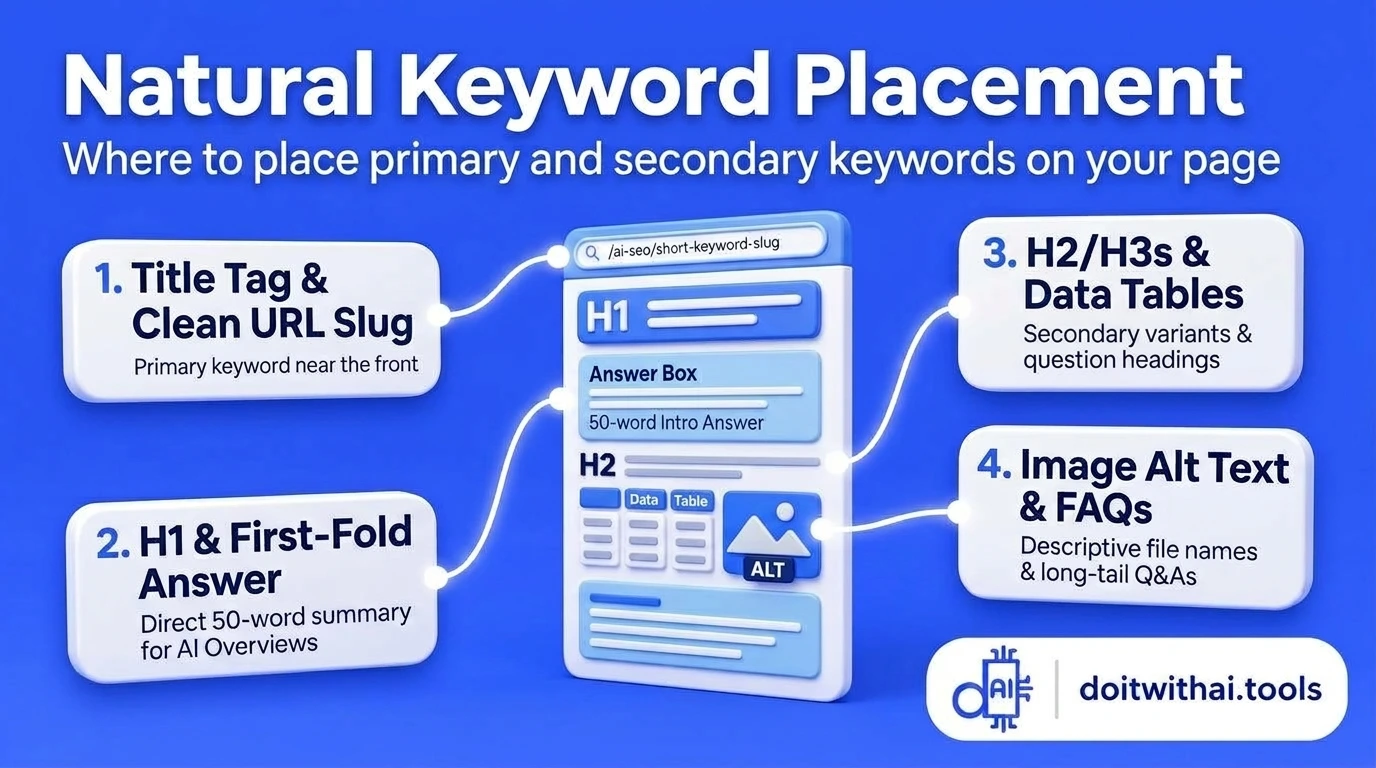
Where to place keywords naturally on page: align your title tag, H1 heading, direct answer block, and internal links without keyword stuffing.
A common question after keyword research is "Where do I actually put these keywords?" Keyword placement starts at the website architecture level before you ever tweak a sentence.
Every page type on your site has a distinct job: the homepage introduces your brand and core platform; category hubs organize topic areas; interactive tool or product pages complete a specific action; and articles teach a complete process. Assigning each cluster to the right page type keeps your site from competing with itself.
How to Use Keywords Naturally Across Different Website Page Types
| Website area | Primary job of the page | How Do It With AI Tools applies keyword research |
|---|---|---|
Homepage (/) | Explain the brand, audience, and core platform capabilities | Highlights free AI SEO, content, and Search Console workflow tools with direct paths to major tasks |
Category / Hub page (/ai-seo, /tools) | Help visitors browse and choose the right guide or utility | Organizes SEO guides and interactive utilities around keyword research, on-page optimization, and GSC analysis |
Interactive Tool page (/tools/keyword-clustering-tool) | Let the user complete a specific task immediately in the browser | Targets keyword clustering tool, keyword grouping tool, and keyword grouper with a working utility + workflow FAQs |
Step-by-Step Article (/ai-seo/what-to-do-after-keyword-research) | Answer a multi-step process question with real examples and tables | Walks through the 10-step post-keyword-research workflow using the November 2026 audit case study |
| Navigation, Breadcrumbs & Internal Links | Show clear hierarchy and guide readers to the next logical step | Connects Home → AI SEO → Article and links directly to the paired clustering, brief, and GSC tools |
Title tag, H1 heading, and URL slug
Your <title> tag, visible H1 heading, and URL slug are the three strongest topical signals on the page. Google's official title link documentation recommends concise, descriptive titles that accurately state the page's subject without repetitive keyword stuffing. Your title tag and H1 should align closely in promise while staying within pixel limits:
- SEO Title Tag (`<title>`):
What to Do After Keyword Research: 10-Step SEO Content Plan(see the Meta Title Guide and test yours in the Meta Title Generator) - Visible H1 Heading:
What to Do After Keyword Research: Turn Your List Into a Content Plan(follow the H1 Heading SEO Guide and H1 Heading Generator) - URL Slug:
/ai-seo/what-to-do-after-keyword-research(keep new URLs short, lowercase, and hyphen-separated using the SEO Slug URL Guide and Slug Generator; never change an existing ranking URL just to squeeze in an extra word without a full redirect reason)
Introduction, H2/H3 subheadings, and body copy
Include your primary keyword naturally in the opening 100 words where you directly answer the reader's question. Use your H2 and H3 subheadings to break down the logical steps of the task (Clean your keyword research, Match search intent, Cluster related keywords, Map keyword groups to existing pages), and weave secondary phrases (keyword mapping, search intent, content brief, topic clusters) into the sections where you actually explain those concepts.
Read your draft out loud before publishing: if a keyword phrase sounds forced or robotic, rewrite the sentence in plain English. There is no magic keyword-density percentage that unlocks Page 1.
Meta description, image filenames, alt text, and FAQs
Write a specific <meta name="description"> that summarizes the outcome and invites the searcher to click (learn how in the Meta Description Guide and test pixel length in the Meta Description Generator). While Google's official snippet documentation notes that Google may dynamically pull text from the page body when it better matches a query, a sharp meta description improves click-through rates whenever it is shown.
When adding screenshots or diagrams, follow Google's image SEO documentation: use descriptive filenames like keyword-to-page-mapping-spreadsheet-example.webp instead of IMG_0042.png, and write clear, accessible alt text that describes what the graphic actually shows (or generate clean attributes with the Image Alt Text Generator). Finally, answer genuine follow-up questions in an on-page FAQ section backed by matching FAQPage structured data.
9. Connect the page with bidirectional internal links and publish carefully
Once your page is drafted and optimized, connect it to the rest of your website using bidirectional internal links:
- Outgoing internal links (from this page to next steps): Link readers naturally to the tools and companion guides that help them execute each step—such as the Keyword Clustering Tool, Search Intent Checker, SEO Content Brief Generator, and How to Check Keyword Rankings in Google.
- Incoming internal links (from existing pages to this new page): Open your existing related articles—such as the ChatGPT Keyword Research Guide and AI vs. Traditional Keyword Research—and add contextual links pointing forward to this new implementation guide.
Following Google's official crawlable link guidelines, always use descriptive anchor text that tells readers and crawlers exactly what the destination page covers (for example, "use the free Keyword Clustering Tool to group your list" rather than "click here"). You can scan your draft for missing internal link placements using the free Internal Link Opportunity Finder and run a final pre-publish check with the On-Page AI SEO Analyzer.
Before hitting publish, run through this 6-point pre-flight checklist:
- The opening paragraph answers the primary question clearly in chronological order.
- Every data table, metric, and case-study example is accurately labeled.
- Referenced tools and templates match their real live functionality.
- All H2/H3 headings, tables, and callout cards render cleanly on mobile screens.
- Canonical URL, meta title, meta description, and JSON-LD schema (
Article+FAQPage+BreadcrumbList) are valid. - Bidirectional internal links are live and resolve with
200 OKstatus codes.
10. Measure performance in Google Search Console before making changes
Publishing the page is the beginning of the feedback loop, not the finish line. Once your URL is live and submitted in Google Search Console, monitor indexation first and then track Impressions, Clicks, CTR, and Average Position over 28-day windows (see the complete companion tutorial on How to Check Ranking for Keywords in Google).
Use Google's official Search Console metric documentation and filter by specific page, query, country, and device before diagnosing what to update next:
Post-Publish Google Search Console Diagnostic Playbook
| What you observe in Search Console | What to investigate and optimize next |
|---|---|
| The URL is not indexed after 7–14 days | Inspect URL access, noindex directives, canonical tags, sitemap inclusion, and incoming internal links from indexed pages |
| Impressions appear at Positions 11–20 (Page 2) | Add a dedicated question-matched H2/H3 for the exact striking-distance query, deepen examples, and add 3–5 internal links |
| Page-1 rankings (Positions 1–10) earn <2% CTR | Inspect the live SERP for AI Overviews and rewrite your <title> and <meta name="description"> using the GSC CTR Optimizer |
| Visitors read the guide but rarely click into paired tools | Place a clear above-the-fold Quick Start box and align mid-article tool callouts with the exact step being explained |
| An older ranking page loses clicks over 60–90 days | Compare consistent country/query filters and audit with the Content Decay & Refresh Analyzer |
Avoid rewriting a newly published article after just a few days of impressions. Unless there is a technical indexing bug or factual error, give search engines 3 to 4 weeks of consistent impression data before running a targeted refresh.
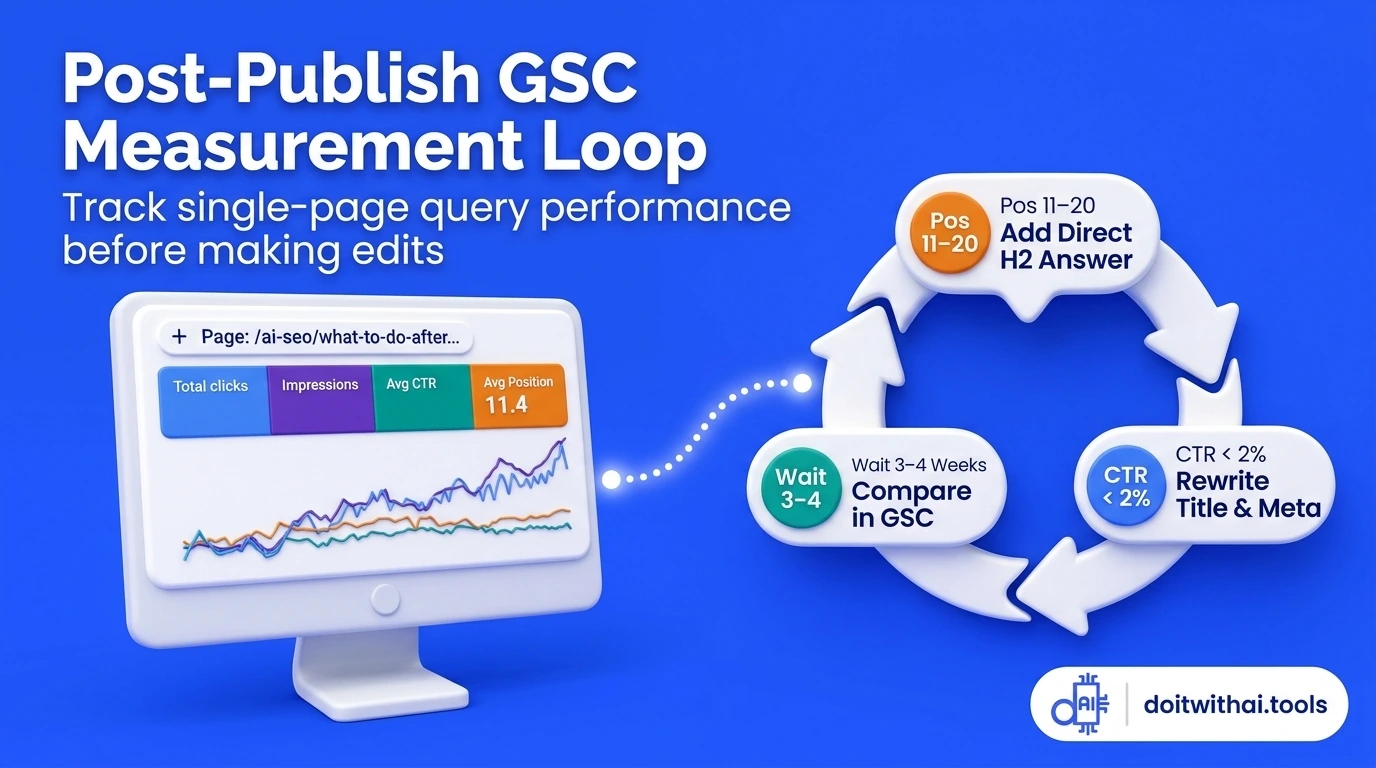
Close the feedback loop in Google Search Console by tracking page-level impression growth and striking-distance queries after publishing.
11. Common mistakes to avoid after keyword research
Even strong keyword research can fail during execution if the editorial plan gets sidelined. Keep this 7-point checklist beside your content calendar:
7 Common Post-Keyword-Research Mistakes and What to Do Instead
| Common mistake after keyword research | Better editorial action |
|---|---|
| Choosing a topic solely because Keyword Difficulty (KD) is low | Confirm audience fit and your ability to provide a genuinely useful, evidence-backed answer (e.g., excluding best keyword research tools 2015) |
| Publishing a separate article for every close keyword variation | Group variations around a shared reader task so one authoritative page ranks for the entire cluster |
| Writing a brand-new post without checking existing pages first | Audit your current URLs and upgrade an existing tool or guide when it already serves the same intent |
| Treating raw AI or automated clusters as final without checking Google | Verify borderline queries in live Google search results to confirm whether Page 1 rewards a tool, tutorial, or comparison |
| Adding up monthly search volumes of 10 variations as a traffic forecast | Treat supplied volumes as rough relative estimates and evaluate the cluster as one unified topic |
| Stuffing the primary keyword into every H2, paragraph, and image alt attribute | Use natural, task-focused subheadings and keep image alt text faithful to what the visual actually shows |
| Overhauling a page's title and structure after only 20 impressions | Wait for 3–4 weeks of filtered Search Console query data before diagnosing snippet CTR or ranking position |
Google's official Search spam policies specifically target keyword stuffing and scaled content abuse—publishing large amounts of unoriginal content that adds little value for users. Focusing on reader tasks, real examples, and honest tool integration keeps your site aligned with long-term search quality.
12. Start with one reviewed keyword group today
You do not need to map 500 keywords before publishing your next improvement. Pick one reviewed keyword group from your list right now: write down the reader's core task in one sentence, decide whether to upgrade an existing URL or create a new page, and build a focused brief.
If your spreadsheet is still an unsorted export, paste your list into the free Keyword Clustering Tool to organize your initial groups, generate your writer handoff in the SEO Content Brief Generator, and then track your post-publish progress using the step-by-step guide on How to Check Ranking for Keywords in Google.
Editorial & Data Note: Keyword volume estimates, difficulty scores, and mapping decisions in this guide are drawn directly from the Do It With AI Tools SEO audit and keyword plan completed in November 2026. This article documents a transparent content-planning workflow combined with human editorial review.
Frequently Asked Questions
Find quick answers to common questions
Not before cleaning your list, checking search intent, grouping related variations, and confirming whether an existing page on your site should be updated instead. Taking 15 minutes to map the cluster and write a short content brief prevents keyword cannibalization and wasted drafts.
No. Close keyword variations that share the same search intent and reader task belong on a single page. For example, in the Do It With AI Tools audit, 'keyword grouping software', 'keyword grouper software', and 'semantic keyword grouping' were all mapped to one existing clustering tool page rather than three separate URLs.
Choose one primary keyword that best represents the core topic for your title tag, H1, and opening answer, and then naturally address all closely related secondary queries and sub-questions within your H2/H3 sections and FAQs. Focus on complete task coverage rather than hitting an arbitrary keyword count.
Inspect the live Google results for the keyword and compare them with your existing page's purpose. If your current page already serves the same user task and format, upgrade it with better sections, examples, and internal links. If the keyword requires a completely different page experience (for example, a step-by-step tutorial vs. an interactive calculator), create a dedicated page and cross-link the two.
ChatGPT and interactive utilities like the Keyword Clustering Tool and SEO Content Brief Generator are excellent for organizing supplied keyword lists, drafting topic clusters, and structuring content briefs. However, you should always supply real search data, verify live Google SERPs yourself, and add your own first-hand examples and product knowledge.
Place your primary keyword naturally in the SEO title tag (<title>), visible H1 heading, URL slug, opening 100 words, and meta description. Use secondary variations and sub-questions in H2/H3 subheadings, table headers, and FAQ items. Across your site, use descriptive anchor text when linking related guides and tools together.
Open Google Search Console → Performance → Search results, filter to that specific URL and your target country, and check your Average Position. If you rank at Positions 11–20, add a sharp question-matched H2 section and internal links to push the page onto Page 1. If you already rank in Positions 1–10 with <2% CTR, rewrite your title tag and meta description to stand out below AI Overviews.
Confirm technical indexing in Google Search Console within the first few days, then allow 3 to 4 weeks of consistent impression data before judging ranking positions or rewriting your snippet. Reacting to 48-hour fluctuations often disrupts pages while Google is still testing them.
Still have questions? Contact our support team for personalized assistance.
Sufian Mustafa
Sufian Mustafa is an AI SEO Strategist, Developer, and the founder of Do It With AI Tools.
Following an 18-month deep-dive into AI-assisted development, Sufian built this platform from the ground up to serve as a hub for battle-tested workflows and practical AI resources.
By combining technical expertise with advanced prompt engineering, he builds high-performance content engines optimized for modern AI search (GEO/AEO)
Mission: Help creators 10x their productivity using the same strategies he uses to maintain 99% technical SEO health and top rankings.