
77 PROMPTS · EIGHT INFOGRAPHIC, CHART & DIAGRAM WORKFLOWS
77 AI Prompts for Infographics, Data Visualization, Charts & Strategy Diagrams
Convert long blog posts, raw statistics, and frameworks into 8-node visual infographics, Bar/Line/Donut chart cards, 2×2 strategy matrices, circular flywheels, `1000×1500` Pinterest pins, and 1-page HTML cheat sheets.
 Sufian MustafaFounder and author · Do It With AI ToolsPublished November 1, 2026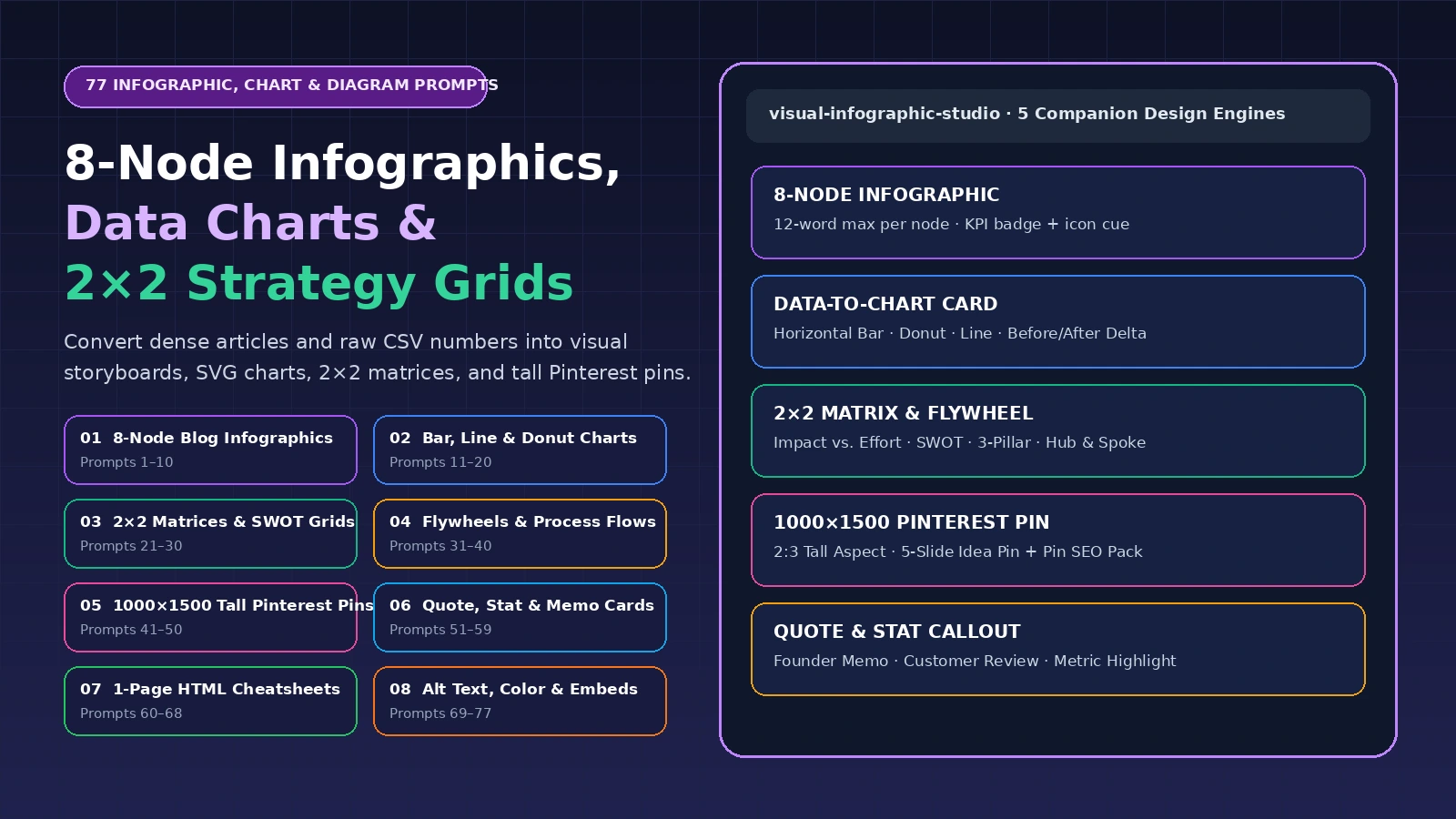
Turn walls of text into scannable, citable visual assets
The hardest part of creating an infographic, data chart, or 2×2 strategy diagram is not picking colors—it is distilling 2,000 words of prose into crisp 12-word visual nodes, insight-led chart titles, and balanced quadrant labels without losing accuracy.
These 77 prompts handle the information architecture first, giving you structured node maps, chart tables, and diagram specs that you can render immediately inside our 5 interactive Visual & Infographic Studios.
Fast Visual Creation Path: Start with Prompt 1 (8-Node Blog Infographic), select the right chart geometry with Prompt 11 (Chart Type Selector), map strategic trade-offs with Prompt 21 (2×2 Impact vs. Effort Matrix) and Prompt 31 (Circular Growth Flywheel), and package vertical pins with Prompt 41 (1000×1500 Tall Pinterest Pin).
Three rules of high-clarity information design
- Rule 1
Cut copy to 12 words per node
Every visual box needs one 4-word headline, one 12-word action sentence, and one 3-word metric or rule badge.
- Rule 2
Headline the takeaway, not the axis
Title your chart with the conclusion ('45-Word Passages Earn 2.4x More Citations') rather than a generic label.
- Rule 3
Include methodology & embed code
Add a 1-line source/sample-size footer on the graphic and provide an HTML embed snippet so blogs link back to you.
77 Infographic, data chart & diagram prompts by workflow
Choose the visual format you want to create—from 8-node blog infographics and quantitative bar/line/donut charts to 2×2 strategy matrices, circular flywheels, `1000×1500` Pinterest pins, founder memo cards, and 1-page HTML cheat sheets.
Customize your shared visual design brief (Updates all 77 prompts)
Enter your source article or dataset, target visual format, and viewer channel once below to pre-fill all 77 prompts. Paste specific paragraphs, CSV numbers, or step lists inside any individual prompt card.
77 of 77 prompts shown. Click any prompt card to customize, copy, or open it in ChatGPT.
Blog-to-infographic node extraction & 8-step visual storyboarding
Distill 2,000-word articles into 6-to-8 scannable infographic nodes with 4-word titles, 12-word descriptions, KPI badges, and icon cues.
Open companion studio: AI Blog to Visual Infographic Studio ↗1Convert a 2,000-word blog post into an 8-Node Vertical Infographic blueprint
Distill the supplied article into 8 sequential infographic nodes—giving each node a Number (`01`–`08`), a 3-to-5 word Bold Title, a 12-to-15 word Explanation, a 3-word KPI/Takeaway Badge, and an Icon suggestion.
Prepare: Full blog post text or H2 outline.
Act as a Principal Information Designer and Data Visualization Strategist. Work on this specific task using only the supplied material.

Source article, dataset or concept: {{Source}}
Target visual format & canvas dimensions: {{Format}}
Target viewer & publishing channel: {{Audience}}
Specific inputs: [Full blog post text or H2 outline: paste here]

Task
Distill the supplied article into 8 sequential infographic nodes—giving each node a Number (`01`–`08`), a 3-to-5 word Bold Title, a 12-to-15 word Explanation, a 3-word KPI/Takeaway Badge, and an Icon suggestion.

Output
Return Structured 8-node infographic specification ready to render in our Blog to Infographic Studio.

Information design & data accuracy boundaries
- Keep visual micro-copy ultra-concise (4-word node headers, 12-to-15 word descriptions) so cards remain legible on mobile screens.
- Never invent numbers, percentages, or benchmarks; preserve exact source values, sample sizes, and units.
- Enforce WCAG AA contrast, honest non-truncated bar chart baselines, and descriptive screen-reader alt text.Expected output: Structured 8-node infographic specification ready to render in our Blog to Infographic Studio.
2Write 5 punchy Infographic Header + Subtitle pairs (Under 9 words)
Draft five high-impact infographic header titles and 12-word explanatory subtitles that state the exact outcome of the visual at a glance.
Prepare: Infographic topic and target viewer.
Act as a Principal Information Designer and Data Visualization Strategist. Work on this specific task using only the supplied material.

Source article, dataset or concept: {{Source}}
Target visual format & canvas dimensions: {{Format}}
Target viewer & publishing channel: {{Audience}}
Specific inputs: [Infographic topic and target viewer: paste here]

Task
Draft five high-impact infographic header titles and 12-word explanatory subtitles that state the exact outcome of the visual at a glance.

Output
Return 5 Title + Subtitle pairs with word counts.

Information design & data accuracy boundaries
- Keep visual micro-copy ultra-concise (4-word node headers, 12-to-15 word descriptions) so cards remain legible on mobile screens.
- Never invent numbers, percentages, or benchmarks; preserve exact source values, sample sizes, and units.
- Enforce WCAG AA contrast, honest non-truncated bar chart baselines, and descriptive screen-reader alt text.Expected output: 5 Title + Subtitle pairs with word counts.
3Compress verbose paragraphs into '12-Word Infographic Micro-Copy'
Rewrite five 60-word paragraphs into crisp 12-word infographic node descriptions that start with an active verb and fit cleanly inside a mobile card.
Prepare: 5 verbose paragraphs from your draft.
Act as a Principal Information Designer and Data Visualization Strategist. Work on this specific task using only the supplied material.

Source article, dataset or concept: {{Source}}
Target visual format & canvas dimensions: {{Format}}
Target viewer & publishing channel: {{Audience}}
Specific inputs: [5 verbose paragraphs from your draft: paste here]

Task
Rewrite five 60-word paragraphs into crisp 12-word infographic node descriptions that start with an active verb and fit cleanly inside a mobile card.

Output
Return 5 parallel 12-word micro-copy blocks.

Information design & data accuracy boundaries
- Keep visual micro-copy ultra-concise (4-word node headers, 12-to-15 word descriptions) so cards remain legible on mobile screens.
- Never invent numbers, percentages, or benchmarks; preserve exact source values, sample sizes, and units.
- Enforce WCAG AA contrast, honest non-truncated bar chart baselines, and descriptive screen-reader alt text.Expected output: 5 parallel 12-word micro-copy blocks.
4Storyboard a 'Myth vs. Fact' Two-Column Split Infographic (6 Pairs)
Extract 6 common misconceptions and their verified realities from your topic, keeping each left-hand Myth and right-hand Fact under 14 words.
Prepare: Topic and common myths vs. verified facts.
Act as a Principal Information Designer and Data Visualization Strategist. Work on this specific task using only the supplied material.

Source article, dataset or concept: {{Source}}
Target visual format & canvas dimensions: {{Format}}
Target viewer & publishing channel: {{Audience}}
Specific inputs: [Topic and common myths vs. verified facts: paste here]

Task
Extract 6 common misconceptions and their verified realities from your topic, keeping each left-hand Myth and right-hand Fact under 14 words.

Output
Return 6-row Myth vs. Fact split infographic script.

Information design & data accuracy boundaries
- Keep visual micro-copy ultra-concise (4-word node headers, 12-to-15 word descriptions) so cards remain legible on mobile screens.
- Never invent numbers, percentages, or benchmarks; preserve exact source values, sample sizes, and units.
- Enforce WCAG AA contrast, honest non-truncated bar chart baselines, and descriptive screen-reader alt text.Expected output: 6-row Myth vs. Fact split infographic script.
5Storyboard a 'Chronological Timeline / Roadmap' Infographic (6 Milestones)
Organize a historical evolution, project implementation, or 30-60-90 day plan into 6 chronological timeline nodes with time labels and deliverables.
Prepare: Events or roadmap phases.
Act as a Principal Information Designer and Data Visualization Strategist. Work on this specific task using only the supplied material.

Source article, dataset or concept: {{Source}}
Target visual format & canvas dimensions: {{Format}}
Target viewer & publishing channel: {{Audience}}
Specific inputs: [Events or roadmap phases: paste here]

Task
Organize a historical evolution, project implementation, or 30-60-90 day plan into 6 chronological timeline nodes with time labels and deliverables.

Output
Return 6-milestone timeline infographic specification.

Information design & data accuracy boundaries
- Keep visual micro-copy ultra-concise (4-word node headers, 12-to-15 word descriptions) so cards remain legible on mobile screens.
- Never invent numbers, percentages, or benchmarks; preserve exact source values, sample sizes, and units.
- Enforce WCAG AA contrast, honest non-truncated bar chart baselines, and descriptive screen-reader alt text.Expected output: 6-milestone timeline infographic specification.
6Storyboard an 'Anatomy of a Perfect [Page / Email / Post]' Annotated Visual
Break down an ideal landing page, SEO article, or outreach email into 6 numbered callout pointers showing what each part does and why it works.
Prepare: Target asset type and its 6 key components.
Act as a Principal Information Designer and Data Visualization Strategist. Work on this specific task using only the supplied material.

Source article, dataset or concept: {{Source}}
Target visual format & canvas dimensions: {{Format}}
Target viewer & publishing channel: {{Audience}}
Specific inputs: [Target asset type and its 6 key components: paste here]

Task
Break down an ideal landing page, SEO article, or outreach email into 6 numbered callout pointers showing what each part does and why it works.

Output
Return 6-callout annotated anatomy graphic specification.

Information design & data accuracy boundaries
- Keep visual micro-copy ultra-concise (4-word node headers, 12-to-15 word descriptions) so cards remain legible on mobile screens.
- Never invent numbers, percentages, or benchmarks; preserve exact source values, sample sizes, and units.
- Enforce WCAG AA contrast, honest non-truncated bar chart baselines, and descriptive screen-reader alt text.Expected output: 6-callout annotated anatomy graphic specification.
7Storyboard a 'Do This / Not That' Visual Checklist Infographic
Create 6 paired rows where the left side shows a specific mistake (`✗ Don't...`) and the right side shows the exact fix (`✓ Do...`).
Prepare: 6 mistakes and their fixes.
Act as a Principal Information Designer and Data Visualization Strategist. Work on this specific task using only the supplied material.

Source article, dataset or concept: {{Source}}
Target visual format & canvas dimensions: {{Format}}
Target viewer & publishing channel: {{Audience}}
Specific inputs: [6 mistakes and their fixes: paste here]

Task
Create 6 paired rows where the left side shows a specific mistake (`✗ Don't...`) and the right side shows the exact fix (`✓ Do...`).

Output
Return 6-row Do This / Not That visual script.

Information design & data accuracy boundaries
- Keep visual micro-copy ultra-concise (4-word node headers, 12-to-15 word descriptions) so cards remain legible on mobile screens.
- Never invent numbers, percentages, or benchmarks; preserve exact source values, sample sizes, and units.
- Enforce WCAG AA contrast, honest non-truncated bar chart baselines, and descriptive screen-reader alt text.Expected output: 6-row Do This / Not That visual script.
8Design a 'Quick-Start Decision Tree' Infographic (Yes / No Branches)
Turn a multi-variable troubleshooting or buying decision into a 5-question Yes/No flowchart that leads the reader to the right recommendation.
Prepare: Decision criteria and 4–5 final recommendations.
Act as a Principal Information Designer and Data Visualization Strategist. Work on this specific task using only the supplied material.

Source article, dataset or concept: {{Source}}
Target visual format & canvas dimensions: {{Format}}
Target viewer & publishing channel: {{Audience}}
Specific inputs: [Decision criteria and 4–5 final recommendations: paste here]

Task
Turn a multi-variable troubleshooting or buying decision into a 5-question Yes/No flowchart that leads the reader to the right recommendation.

Output
Return Yes/No decision tree node map.

Information design & data accuracy boundaries
- Keep visual micro-copy ultra-concise (4-word node headers, 12-to-15 word descriptions) so cards remain legible on mobile screens.
- Never invent numbers, percentages, or benchmarks; preserve exact source values, sample sizes, and units.
- Enforce WCAG AA contrast, honest non-truncated bar chart baselines, and descriptive screen-reader alt text.Expected output: Yes/No decision tree node map.
9Extract 'Icon + Metric Badge' pairs for each section of an infographic
Assign a specific, recognizable visual icon concept and a 2-to-4 word numeric or rule badge (`45–55 Words`, `< 2.5s LCP`, `140c Max`) to every node in your outline.
Prepare: Infographic node list.
Act as a Principal Information Designer and Data Visualization Strategist. Work on this specific task using only the supplied material.

Source article, dataset or concept: {{Source}}
Target visual format & canvas dimensions: {{Format}}
Target viewer & publishing channel: {{Audience}}
Specific inputs: [Infographic node list: paste here]

Task
Assign a specific, recognizable visual icon concept and a 2-to-4 word numeric or rule badge (`45–55 Words`, `< 2.5s LCP`, `140c Max`) to every node in your outline.

Output
Return Node-by-node Icon + Metric Badge table.

Information design & data accuracy boundaries
- Keep visual micro-copy ultra-concise (4-word node headers, 12-to-15 word descriptions) so cards remain legible on mobile screens.
- Never invent numbers, percentages, or benchmarks; preserve exact source values, sample sizes, and units.
- Enforce WCAG AA contrast, honest non-truncated bar chart baselines, and descriptive screen-reader alt text.Expected output: Node-by-node Icon + Metric Badge table.
10Write a credible Infographic Footer (Source Attribution, Methodology & CTA)
Format a clean 2-line footer for the bottom of your infographic stating the primary data source, date/sample size, and canonical brand URL.
Prepare: Data sources, date, and brand URL.
Act as a Principal Information Designer and Data Visualization Strategist. Work on this specific task using only the supplied material.

Source article, dataset or concept: {{Source}}
Target visual format & canvas dimensions: {{Format}}
Target viewer & publishing channel: {{Audience}}
Specific inputs: [Data sources, date, and brand URL: paste here]

Task
Format a clean 2-line footer for the bottom of your infographic stating the primary data source, date/sample size, and canonical brand URL.

Output
Return Clean 2-line infographic attribution footer.

Information design & data accuracy boundaries
- Keep visual micro-copy ultra-concise (4-word node headers, 12-to-15 word descriptions) so cards remain legible on mobile screens.
- Never invent numbers, percentages, or benchmarks; preserve exact source values, sample sizes, and units.
- Enforce WCAG AA contrast, honest non-truncated bar chart baselines, and descriptive screen-reader alt text.Expected output: Clean 2-line infographic attribution footer.
Quantitative data-to-chart selection (Bar, Line, Donut & KPI cards)
Choose the right chart geometry for your dataset, write insight-led chart titles, and format clean CSV/JSON rows for high-resolution SVG/PNG chart cards.
Open companion studio: AI Data & Stat to Visual Chart Card Maker ↗11Select the best Chart Type for your dataset (Bar vs. Line vs. Donut vs. Delta)
Analyze the supplied table or numbers and recommend the clearest chart geometry (Horizontal Ranked Bar, Grouped Comparison, Time-Series Line, Part-to-Whole Donut, or Before/After Delta Card), explaining why.
Prepare: Raw data table or statistics.
Act as a Principal Information Designer and Data Visualization Strategist. Work on this specific task using only the supplied material.

Source article, dataset or concept: {{Source}}
Target visual format & canvas dimensions: {{Format}}
Target viewer & publishing channel: {{Audience}}
Specific inputs: [Raw data table or statistics: paste here]

Task
Analyze the supplied table or numbers and recommend the clearest chart geometry (Horizontal Ranked Bar, Grouped Comparison, Time-Series Line, Part-to-Whole Donut, or Before/After Delta Card), explaining why.

Output
Return Chart type recommendation + formatted data rows for our Data to Chart Studio.

Information design & data accuracy boundaries
- Keep visual micro-copy ultra-concise (4-word node headers, 12-to-15 word descriptions) so cards remain legible on mobile screens.
- Never invent numbers, percentages, or benchmarks; preserve exact source values, sample sizes, and units.
- Enforce WCAG AA contrast, honest non-truncated bar chart baselines, and descriptive screen-reader alt text.Expected output: Chart type recommendation + formatted data rows for our Data to Chart Studio.
12Write 'Insight-First Chart Titles' instead of generic axis labels
Replace boring descriptive chart titles ('Q1–Q4 Conversion Rates by Channel') with active takeaway headlines ('Organic Search Drives 58% of Demo Signups at Half the CAC') plus a neutral subtitle.
Prepare: Chart metric, axis labels, and key finding.
Act as a Principal Information Designer and Data Visualization Strategist. Work on this specific task using only the supplied material.

Source article, dataset or concept: {{Source}}
Target visual format & canvas dimensions: {{Format}}
Target viewer & publishing channel: {{Audience}}
Specific inputs: [Chart metric, axis labels, and key finding: paste here]

Task
Replace boring descriptive chart titles ('Q1–Q4 Conversion Rates by Channel') with active takeaway headlines ('Organic Search Drives 58% of Demo Signups at Half the CAC') plus a neutral subtitle.

Output
Return 5 Insight-First Chart Title + Subtitle pairs.

Information design & data accuracy boundaries
- Keep visual micro-copy ultra-concise (4-word node headers, 12-to-15 word descriptions) so cards remain legible on mobile screens.
- Never invent numbers, percentages, or benchmarks; preserve exact source values, sample sizes, and units.
- Enforce WCAG AA contrast, honest non-truncated bar chart baselines, and descriptive screen-reader alt text.Expected output: 5 Insight-First Chart Title + Subtitle pairs.
13Format messy text statistics into a clean 6-row Ranked Horizontal Bar Chart
Extract quantitative numbers buried inside prose paragraphs and normalize them into a 6-row table (`Label`, `Value`, `Unit`, `Highlight Flag`) ready for charting.
Prepare: Paragraphs containing scattered statistics.
Act as a Principal Information Designer and Data Visualization Strategist. Work on this specific task using only the supplied material.

Source article, dataset or concept: {{Source}}
Target visual format & canvas dimensions: {{Format}}
Target viewer & publishing channel: {{Audience}}
Specific inputs: [Paragraphs containing scattered statistics: paste here]

Task
Extract quantitative numbers buried inside prose paragraphs and normalize them into a 6-row table (`Label`, `Value`, `Unit`, `Highlight Flag`) ready for charting.

Output
Return Normalized 6-row chart dataset + highlight recommendation.

Information design & data accuracy boundaries
- Keep visual micro-copy ultra-concise (4-word node headers, 12-to-15 word descriptions) so cards remain legible on mobile screens.
- Never invent numbers, percentages, or benchmarks; preserve exact source values, sample sizes, and units.
- Enforce WCAG AA contrast, honest non-truncated bar chart baselines, and descriptive screen-reader alt text.Expected output: Normalized 6-row chart dataset + highlight recommendation.
14Design a 'Part-to-Whole Donut / Stacked Bar' breakdown card (Max 5 Slices)
Group a percentage breakdown into 4–5 clean segments (rolling tiny tail categories into 'Other') so the chart remains legible on mobile screens.
Prepare: Category percentage breakdown totaling 100%.
Act as a Principal Information Designer and Data Visualization Strategist. Work on this specific task using only the supplied material.

Source article, dataset or concept: {{Source}}
Target visual format & canvas dimensions: {{Format}}
Target viewer & publishing channel: {{Audience}}
Specific inputs: [Category percentage breakdown totaling 100%: paste here]

Task
Group a percentage breakdown into 4–5 clean segments (rolling tiny tail categories into 'Other') so the chart remains legible on mobile screens.

Output
Return 5-slice grouped dataset + callout annotation.

Information design & data accuracy boundaries
- Keep visual micro-copy ultra-concise (4-word node headers, 12-to-15 word descriptions) so cards remain legible on mobile screens.
- Never invent numbers, percentages, or benchmarks; preserve exact source values, sample sizes, and units.
- Enforce WCAG AA contrast, honest non-truncated bar chart baselines, and descriptive screen-reader alt text.Expected output: 5-slice grouped dataset + callout annotation.
15Design a 'Before vs. After Delta' metric comparison card
Structure a visual comparison showing Baseline Value, Post-Change Value, Percentage Delta (`+142%` or `-38%`), and the 1-sentence reason for the shift.
Prepare: Before metric, After metric, timeframe, and cause.
Act as a Principal Information Designer and Data Visualization Strategist. Work on this specific task using only the supplied material.

Source article, dataset or concept: {{Source}}
Target visual format & canvas dimensions: {{Format}}
Target viewer & publishing channel: {{Audience}}
Specific inputs: [Before metric, After metric, timeframe, and cause: paste here]

Task
Structure a visual comparison showing Baseline Value, Post-Change Value, Percentage Delta (`+142%` or `-38%`), and the 1-sentence reason for the shift.

Output
Return Before/After Delta card specification.

Information design & data accuracy boundaries
- Keep visual micro-copy ultra-concise (4-word node headers, 12-to-15 word descriptions) so cards remain legible on mobile screens.
- Never invent numbers, percentages, or benchmarks; preserve exact source values, sample sizes, and units.
- Enforce WCAG AA contrast, honest non-truncated bar chart baselines, and descriptive screen-reader alt text.Expected output: Before/After Delta card specification.
16Design a 4-Box 'Executive KPI Bento Grid' visual card
Select the 4 most important metrics from a report or case study and format each into a KPI Bento tile (Big Number + 3-word Label + Context vs. Benchmark).
Prepare: Report summary or case study metrics.
Act as a Principal Information Designer and Data Visualization Strategist. Work on this specific task using only the supplied material.

Source article, dataset or concept: {{Source}}
Target visual format & canvas dimensions: {{Format}}
Target viewer & publishing channel: {{Audience}}
Specific inputs: [Report summary or case study metrics: paste here]

Task
Select the 4 most important metrics from a report or case study and format each into a KPI Bento tile (Big Number + 3-word Label + Context vs. Benchmark).

Output
Return 4-tile KPI Bento Grid specification.

Information design & data accuracy boundaries
- Keep visual micro-copy ultra-concise (4-word node headers, 12-to-15 word descriptions) so cards remain legible on mobile screens.
- Never invent numbers, percentages, or benchmarks; preserve exact source values, sample sizes, and units.
- Enforce WCAG AA contrast, honest non-truncated bar chart baselines, and descriptive screen-reader alt text.Expected output: 4-tile KPI Bento Grid specification.
17Write a 15-word 'Chart Callout Annotation' pointing to the most important bar/point
Draft a concise annotation label that points directly to the outlier, inflection point, or winning row on your chart so viewers spot the insight in 2 seconds.
Prepare: Chart data and key outlier/winner.
Act as a Principal Information Designer and Data Visualization Strategist. Work on this specific task using only the supplied material.

Source article, dataset or concept: {{Source}}
Target visual format & canvas dimensions: {{Format}}
Target viewer & publishing channel: {{Audience}}
Specific inputs: [Chart data and key outlier/winner: paste here]

Task
Draft a concise annotation label that points directly to the outlier, inflection point, or winning row on your chart so viewers spot the insight in 2 seconds.

Output
Return 3 concise 15-word chart annotation labels.

Information design & data accuracy boundaries
- Keep visual micro-copy ultra-concise (4-word node headers, 12-to-15 word descriptions) so cards remain legible on mobile screens.
- Never invent numbers, percentages, or benchmarks; preserve exact source values, sample sizes, and units.
- Enforce WCAG AA contrast, honest non-truncated bar chart baselines, and descriptive screen-reader alt text.Expected output: 3 concise 15-word chart annotation labels.
18Audit a proposed chart for misleading axes, cherry-picked scales, or clutter
Review your chart setup for common visualization mistakes (truncated Y-axis on bar charts, dual axes with unrelated scales, 12-slice pie charts, or missing sample size `n=`).
Prepare: Proposed chart type, data values, and axis settings.
Act as a Principal Information Designer and Data Visualization Strategist. Work on this specific task using only the supplied material.

Source article, dataset or concept: {{Source}}
Target visual format & canvas dimensions: {{Format}}
Target viewer & publishing channel: {{Audience}}
Specific inputs: [Proposed chart type, data values, and axis settings: paste here]

Task
Review your chart setup for common visualization mistakes (truncated Y-axis on bar charts, dual axes with unrelated scales, 12-slice pie charts, or missing sample size `n=`).

Output
Return Data integrity critique + corrected chart specification.

Information design & data accuracy boundaries
- Keep visual micro-copy ultra-concise (4-word node headers, 12-to-15 word descriptions) so cards remain legible on mobile screens.
- Never invent numbers, percentages, or benchmarks; preserve exact source values, sample sizes, and units.
- Enforce WCAG AA contrast, honest non-truncated bar chart baselines, and descriptive screen-reader alt text.Expected output: Data integrity critique + corrected chart specification.
19Turn a multi-column CSV benchmark table into 3 standalone social chart cards
Slice a complex 5-column data table into three focused single-takeaway chart cards suitable for LinkedIn, X, and blog embeds.
Prepare: Multi-column data table.
Act as a Principal Information Designer and Data Visualization Strategist. Work on this specific task using only the supplied material.

Source article, dataset or concept: {{Source}}
Target visual format & canvas dimensions: {{Format}}
Target viewer & publishing channel: {{Audience}}
Specific inputs: [Multi-column data table: paste here]

Task
Slice a complex 5-column data table into three focused single-takeaway chart cards suitable for LinkedIn, X, and blog embeds.

Output
Return 3 standalone chart card specifications.

Information design & data accuracy boundaries
- Keep visual micro-copy ultra-concise (4-word node headers, 12-to-15 word descriptions) so cards remain legible on mobile screens.
- Never invent numbers, percentages, or benchmarks; preserve exact source values, sample sizes, and units.
- Enforce WCAG AA contrast, honest non-truncated bar chart baselines, and descriptive screen-reader alt text.Expected output: 3 standalone chart card specifications.
20Write the methodology footnote (`n=`, Date, Source) for a research chart
Format a compact, trustworthy 1-line chart footer specifying sample size, collection window, and primary source.
Prepare: Sample size, date, and source details.
Act as a Principal Information Designer and Data Visualization Strategist. Work on this specific task using only the supplied material.

Source article, dataset or concept: {{Source}}
Target visual format & canvas dimensions: {{Format}}
Target viewer & publishing channel: {{Audience}}
Specific inputs: [Sample size, date, and source details: paste here]

Task
Format a compact, trustworthy 1-line chart footer specifying sample size, collection window, and primary source.

Output
Return Standardized 1-line chart methodology footer.

Information design & data accuracy boundaries
- Keep visual micro-copy ultra-concise (4-word node headers, 12-to-15 word descriptions) so cards remain legible on mobile screens.
- Never invent numbers, percentages, or benchmarks; preserve exact source values, sample sizes, and units.
- Enforce WCAG AA contrast, honest non-truncated bar chart baselines, and descriptive screen-reader alt text.Expected output: Standardized 1-line chart methodology footer.
2×2 Strategy Matrices, SWOT grids & quadrant positioning diagrams
Map complex trade-offs (Impact vs. Effort, Cost vs. Speed, SWOT, and market positioning) into balanced 4-quadrant visual frameworks.
Open companion studio: AI 2×2 Matrix, SWOT & Diagram Builder ↗21Build a 2×2 Prioritization Matrix (`Impact` vs. `Implementation Effort`)
Plot 8–12 candidate initiatives or SEO/content tasks into four clear quadrants: (1) Quick Wins, (2) Major Strategic Projects, (3) Fill-Ins, and (4) Skip/Defer.
Prepare: List of 8–12 candidate tasks or features.
Act as a Principal Information Designer and Data Visualization Strategist. Work on this specific task using only the supplied material.

Source article, dataset or concept: {{Source}}
Target visual format & canvas dimensions: {{Format}}
Target viewer & publishing channel: {{Audience}}
Specific inputs: [List of 8–12 candidate tasks or features: paste here]

Task
Plot 8–12 candidate initiatives or SEO/content tasks into four clear quadrants: (1) Quick Wins, (2) Major Strategic Projects, (3) Fill-Ins, and (4) Skip/Defer.

Output
Return 4-quadrant 2×2 Matrix specification ready for our 2×2 Matrix Studio.

Information design & data accuracy boundaries
- Keep visual micro-copy ultra-concise (4-word node headers, 12-to-15 word descriptions) so cards remain legible on mobile screens.
- Never invent numbers, percentages, or benchmarks; preserve exact source values, sample sizes, and units.
- Enforce WCAG AA contrast, honest non-truncated bar chart baselines, and descriptive screen-reader alt text.Expected output: 4-quadrant 2×2 Matrix specification ready for our 2×2 Matrix Studio.
22Design a Competitive Positioning 2×2 Landscape Grid
Choose two honest, non-gimmicky axes (e.g., 'Self-Serve Speed vs. Enterprise Customization' or 'Single-Point Tool vs. All-in-One Suite') and map 4 archetypes across the quadrants.
Prepare: Your product/approach and 3 alternative approaches.
Act as a Principal Information Designer and Data Visualization Strategist. Work on this specific task using only the supplied material.

Source article, dataset or concept: {{Source}}
Target visual format & canvas dimensions: {{Format}}
Target viewer & publishing channel: {{Audience}}
Specific inputs: [Your product/approach and 3 alternative approaches: paste here]

Task
Choose two honest, non-gimmicky axes (e.g., 'Self-Serve Speed vs. Enterprise Customization' or 'Single-Point Tool vs. All-in-One Suite') and map 4 archetypes across the quadrants.

Output
Return Competitive 2×2 matrix with axis labels and quadrant takeaways.

Information design & data accuracy boundaries
- Keep visual micro-copy ultra-concise (4-word node headers, 12-to-15 word descriptions) so cards remain legible on mobile screens.
- Never invent numbers, percentages, or benchmarks; preserve exact source values, sample sizes, and units.
- Enforce WCAG AA contrast, honest non-truncated bar chart baselines, and descriptive screen-reader alt text.Expected output: Competitive 2×2 matrix with axis labels and quadrant takeaways.
23Create a Strategic SWOT Analysis Grid (Strengths, Weaknesses, Opportunities, Threats)
Populate a 4-quadrant SWOT diagram with 3 concrete, evidence-backed bullet points (under 10 words each) per quadrant—zero generic filler.
Prepare: Business, product, or campaign context.
Act as a Principal Information Designer and Data Visualization Strategist. Work on this specific task using only the supplied material.

Source article, dataset or concept: {{Source}}
Target visual format & canvas dimensions: {{Format}}
Target viewer & publishing channel: {{Audience}}
Specific inputs: [Business, product, or campaign context: paste here]

Task
Populate a 4-quadrant SWOT diagram with 3 concrete, evidence-backed bullet points (under 10 words each) per quadrant—zero generic filler.

Output
Return Balanced 4-quadrant SWOT grid specification.

Information design & data accuracy boundaries
- Keep visual micro-copy ultra-concise (4-word node headers, 12-to-15 word descriptions) so cards remain legible on mobile screens.
- Never invent numbers, percentages, or benchmarks; preserve exact source values, sample sizes, and units.
- Enforce WCAG AA contrast, honest non-truncated bar chart baselines, and descriptive screen-reader alt text.Expected output: Balanced 4-quadrant SWOT grid specification.
24Build a Content Format Matrix (`Production Effort` vs. `Long-Term Compounding Value`)
Plot content formats (Shorts, LinkedIn posts, Pillar Guides, Interactive Tools, Original Data Studies) onto a 2×2 grid to explain portfolio allocation.
Prepare: Content formats your team produces.
Act as a Principal Information Designer and Data Visualization Strategist. Work on this specific task using only the supplied material.

Source article, dataset or concept: {{Source}}
Target visual format & canvas dimensions: {{Format}}
Target viewer & publishing channel: {{Audience}}
Specific inputs: [Content formats your team produces: paste here]

Task
Plot content formats (Shorts, LinkedIn posts, Pillar Guides, Interactive Tools, Original Data Studies) onto a 2×2 grid to explain portfolio allocation.

Output
Return 2×2 Content Portfolio Matrix specification.

Information design & data accuracy boundaries
- Keep visual micro-copy ultra-concise (4-word node headers, 12-to-15 word descriptions) so cards remain legible on mobile screens.
- Never invent numbers, percentages, or benchmarks; preserve exact source values, sample sizes, and units.
- Enforce WCAG AA contrast, honest non-truncated bar chart baselines, and descriptive screen-reader alt text.Expected output: 2×2 Content Portfolio Matrix specification.
25Build an AI Automation vs. Human Editorial Judgment 2×2 Matrix
Map workflow tasks by `Risk of Hallucination` vs. `Repetitive Structure` to show exactly what to automate with prompts vs. what requires human sign-off.
Prepare: Workflow tasks in your department.
Act as a Principal Information Designer and Data Visualization Strategist. Work on this specific task using only the supplied material.

Source article, dataset or concept: {{Source}}
Target visual format & canvas dimensions: {{Format}}
Target viewer & publishing channel: {{Audience}}
Specific inputs: [Workflow tasks in your department: paste here]

Task
Map workflow tasks by `Risk of Hallucination` vs. `Repetitive Structure` to show exactly what to automate with prompts vs. what requires human sign-off.

Output
Return 4-quadrant AI vs. Human Governance Matrix.

Information design & data accuracy boundaries
- Keep visual micro-copy ultra-concise (4-word node headers, 12-to-15 word descriptions) so cards remain legible on mobile screens.
- Never invent numbers, percentages, or benchmarks; preserve exact source values, sample sizes, and units.
- Enforce WCAG AA contrast, honest non-truncated bar chart baselines, and descriptive screen-reader alt text.Expected output: 4-quadrant AI vs. Human Governance Matrix.
26Design an Eisenhower Urgency vs. Importance Triage Matrix for technical audits
Sort audit findings into 4 actionable quadrants (`Fix Immediately in P0`, `Schedule for Next Sprint`, `Automate/Delegate`, `Ignore Noise`).
Prepare: List of audit findings or operational issues.
Act as a Principal Information Designer and Data Visualization Strategist. Work on this specific task using only the supplied material.

Source article, dataset or concept: {{Source}}
Target visual format & canvas dimensions: {{Format}}
Target viewer & publishing channel: {{Audience}}
Specific inputs: [List of audit findings or operational issues: paste here]

Task
Sort audit findings into 4 actionable quadrants (`Fix Immediately in P0`, `Schedule for Next Sprint`, `Automate/Delegate`, `Ignore Noise`).

Output
Return 4-quadrant Triage Matrix specification.

Information design & data accuracy boundaries
- Keep visual micro-copy ultra-concise (4-word node headers, 12-to-15 word descriptions) so cards remain legible on mobile screens.
- Never invent numbers, percentages, or benchmarks; preserve exact source values, sample sizes, and units.
- Enforce WCAG AA contrast, honest non-truncated bar chart baselines, and descriptive screen-reader alt text.Expected output: 4-quadrant Triage Matrix specification.
27Create a 'Buyer Readiness vs. Problem Awareness' 2×2 Messaging Grid
Map how your hook, proof, and CTA change across 4 buyer states (Unaware, Problem-Aware, Solution-Comparing, Ready to Act).
Prepare: Product/service and buyer personas.
Act as a Principal Information Designer and Data Visualization Strategist. Work on this specific task using only the supplied material.

Source article, dataset or concept: {{Source}}
Target visual format & canvas dimensions: {{Format}}
Target viewer & publishing channel: {{Audience}}
Specific inputs: [Product/service and buyer personas: paste here]

Task
Map how your hook, proof, and CTA change across 4 buyer states (Unaware, Problem-Aware, Solution-Comparing, Ready to Act).

Output
Return 2×2 Buyer Messaging Matrix.

Information design & data accuracy boundaries
- Keep visual micro-copy ultra-concise (4-word node headers, 12-to-15 word descriptions) so cards remain legible on mobile screens.
- Never invent numbers, percentages, or benchmarks; preserve exact source values, sample sizes, and units.
- Enforce WCAG AA contrast, honest non-truncated bar chart baselines, and descriptive screen-reader alt text.Expected output: 2×2 Buyer Messaging Matrix.
28Design a 'Risk vs. Reversibility' (Type 1 vs. Type 2 Decisions) 2×2 Grid
Classify technical or marketing experiments by how easy they are to reverse vs. their upside potential.
Prepare: Proposed experiments or changes.
Act as a Principal Information Designer and Data Visualization Strategist. Work on this specific task using only the supplied material.

Source article, dataset or concept: {{Source}}
Target visual format & canvas dimensions: {{Format}}
Target viewer & publishing channel: {{Audience}}
Specific inputs: [Proposed experiments or changes: paste here]

Task
Classify technical or marketing experiments by how easy they are to reverse vs. their upside potential.

Output
Return 2×2 Decision Reversibility Matrix.

Information design & data accuracy boundaries
- Keep visual micro-copy ultra-concise (4-word node headers, 12-to-15 word descriptions) so cards remain legible on mobile screens.
- Never invent numbers, percentages, or benchmarks; preserve exact source values, sample sizes, and units.
- Enforce WCAG AA contrast, honest non-truncated bar chart baselines, and descriptive screen-reader alt text.Expected output: 2×2 Decision Reversibility Matrix.
29Write punchy 2-to-3 word Quadrant Archetype Names for your 2×2 Matrix
Create memorable, intuitive names for each of the 4 quadrants in your matrix so readers remember and quote your framework.
Prepare: X-axis, Y-axis, and meaning of each quadrant.
Act as a Principal Information Designer and Data Visualization Strategist. Work on this specific task using only the supplied material.

Source article, dataset or concept: {{Source}}
Target visual format & canvas dimensions: {{Format}}
Target viewer & publishing channel: {{Audience}}
Specific inputs: [X-axis, Y-axis, and meaning of each quadrant: paste here]

Task
Create memorable, intuitive names for each of the 4 quadrants in your matrix so readers remember and quote your framework.

Output
Return 5 sets of memorable 4-quadrant names.

Information design & data accuracy boundaries
- Keep visual micro-copy ultra-concise (4-word node headers, 12-to-15 word descriptions) so cards remain legible on mobile screens.
- Never invent numbers, percentages, or benchmarks; preserve exact source values, sample sizes, and units.
- Enforce WCAG AA contrast, honest non-truncated bar chart baselines, and descriptive screen-reader alt text.Expected output: 5 sets of memorable 4-quadrant names.
30Write the 100-word analytical explanation to place directly beneath a 2×2 Matrix
Draft a clear paragraph explaining how to read the axes, why the top-right quadrant wins, and the #1 mistake teams make in the bottom-right quadrant.
Prepare: Your 2×2 matrix details.
Act as a Principal Information Designer and Data Visualization Strategist. Work on this specific task using only the supplied material.

Source article, dataset or concept: {{Source}}
Target visual format & canvas dimensions: {{Format}}
Target viewer & publishing channel: {{Audience}}
Specific inputs: [Your 2×2 matrix details: paste here]

Task
Draft a clear paragraph explaining how to read the axes, why the top-right quadrant wins, and the #1 mistake teams make in the bottom-right quadrant.

Output
Return 100-word matrix walkthrough paragraph.

Information design & data accuracy boundaries
- Keep visual micro-copy ultra-concise (4-word node headers, 12-to-15 word descriptions) so cards remain legible on mobile screens.
- Never invent numbers, percentages, or benchmarks; preserve exact source values, sample sizes, and units.
- Enforce WCAG AA contrast, honest non-truncated bar chart baselines, and descriptive screen-reader alt text.Expected output: 100-word matrix walkthrough paragraph.
Circular flywheels, 3-pillar architectures, hub-and-spoke & process flows
Visualize compounding growth loops, 3-pillar foundations, topical hub-and-spoke graphs, and sequential step-by-step workflows.
Open companion studio: AI 2×2 Matrix, SWOT & Diagram Builder ↗31Design a 4-or-5 Stage Circular Growth Flywheel diagram
Map a self-reinforcing loop where Stage 1 feeds Stage 2, Stage 2 drives Stage 3, Stage 3 accelerates Stage 4, and Stage 4 compounds Stage 1.
Prepare: Your growth, content, or product loop.
Act as a Principal Information Designer and Data Visualization Strategist. Work on this specific task using only the supplied material.

Source article, dataset or concept: {{Source}}
Target visual format & canvas dimensions: {{Format}}
Target viewer & publishing channel: {{Audience}}
Specific inputs: [Your growth, content, or product loop: paste here]

Task
Map a self-reinforcing loop where Stage 1 feeds Stage 2, Stage 2 drives Stage 3, Stage 3 accelerates Stage 4, and Stage 4 compounds Stage 1.

Output
Return Circular Flywheel specification (Central Goal + 4–5 Stage Nodes + Connector Verbs).

Information design & data accuracy boundaries
- Keep visual micro-copy ultra-concise (4-word node headers, 12-to-15 word descriptions) so cards remain legible on mobile screens.
- Never invent numbers, percentages, or benchmarks; preserve exact source values, sample sizes, and units.
- Enforce WCAG AA contrast, honest non-truncated bar chart baselines, and descriptive screen-reader alt text.Expected output: Circular Flywheel specification (Central Goal + 4–5 Stage Nodes + Connector Verbs).
32Design a '3-Pillar Strategic Architecture' diagram (Roof + 3 Pillars + Foundation)
Structure a classic architectural diagram with a North-Star Outcome at the top, 3 supporting Pillars (with 3 bullets each) in the middle, and a shared Technical/Data Foundation at the base.
Prepare: Core strategy, 3 pillars, and underlying foundation.
Act as a Principal Information Designer and Data Visualization Strategist. Work on this specific task using only the supplied material.

Source article, dataset or concept: {{Source}}
Target visual format & canvas dimensions: {{Format}}
Target viewer & publishing channel: {{Audience}}
Specific inputs: [Core strategy, 3 pillars, and underlying foundation: paste here]

Task
Structure a classic architectural diagram with a North-Star Outcome at the top, 3 supporting Pillars (with 3 bullets each) in the middle, and a shared Technical/Data Foundation at the base.

Output
Return 3-Pillar Architecture specification ready for our Diagram Builder Studio.

Information design & data accuracy boundaries
- Keep visual micro-copy ultra-concise (4-word node headers, 12-to-15 word descriptions) so cards remain legible on mobile screens.
- Never invent numbers, percentages, or benchmarks; preserve exact source values, sample sizes, and units.
- Enforce WCAG AA contrast, honest non-truncated bar chart baselines, and descriptive screen-reader alt text.Expected output: 3-Pillar Architecture specification ready for our Diagram Builder Studio.
33Design a 'Hub-and-Spoke Ecosystem / Topical Map' visual diagram
Map a central Hub node connected radially to 6 distinct Spoke nodes (with 3-word titles and 8-word descriptions).
Prepare: Central hub topic/product and 6 connected spokes.
Act as a Principal Information Designer and Data Visualization Strategist. Work on this specific task using only the supplied material.

Source article, dataset or concept: {{Source}}
Target visual format & canvas dimensions: {{Format}}
Target viewer & publishing channel: {{Audience}}
Specific inputs: [Central hub topic/product and 6 connected spokes: paste here]

Task
Map a central Hub node connected radially to 6 distinct Spoke nodes (with 3-word titles and 8-word descriptions).

Output
Return Hub-and-Spoke diagram specification.

Information design & data accuracy boundaries
- Keep visual micro-copy ultra-concise (4-word node headers, 12-to-15 word descriptions) so cards remain legible on mobile screens.
- Never invent numbers, percentages, or benchmarks; preserve exact source values, sample sizes, and units.
- Enforce WCAG AA contrast, honest non-truncated bar chart baselines, and descriptive screen-reader alt text.Expected output: Hub-and-Spoke diagram specification.
34Design a 5-Stage Horizontal Process Pipeline (`Input -> Process -> Output`)
Break a sequential workflow into 5 left-to-right pipeline stages showing the Stage Name, Action Taken, and Artifact Produced at each step.
Prepare: Sequential workflow steps.
Act as a Principal Information Designer and Data Visualization Strategist. Work on this specific task using only the supplied material.

Source article, dataset or concept: {{Source}}
Target visual format & canvas dimensions: {{Format}}
Target viewer & publishing channel: {{Audience}}
Specific inputs: [Sequential workflow steps: paste here]

Task
Break a sequential workflow into 5 left-to-right pipeline stages showing the Stage Name, Action Taken, and Artifact Produced at each step.

Output
Return 5-stage horizontal pipeline diagram specification.

Information design & data accuracy boundaries
- Keep visual micro-copy ultra-concise (4-word node headers, 12-to-15 word descriptions) so cards remain legible on mobile screens.
- Never invent numbers, percentages, or benchmarks; preserve exact source values, sample sizes, and units.
- Enforce WCAG AA contrast, honest non-truncated bar chart baselines, and descriptive screen-reader alt text.Expected output: 5-stage horizontal pipeline diagram specification.
35Design a 4-Tier Funnel or Pyramid Hierarchy diagram
Organize a hierarchy (such as TOFU/MOFU/BOFU intent or Maslow-style technical hierarchy from Crawlability -> Indexing -> Ranking -> Citations) into 4 stacked tiers.
Prepare: 4 tiers from broad base to focused apex.
Act as a Principal Information Designer and Data Visualization Strategist. Work on this specific task using only the supplied material.

Source article, dataset or concept: {{Source}}
Target visual format & canvas dimensions: {{Format}}
Target viewer & publishing channel: {{Audience}}
Specific inputs: [4 tiers from broad base to focused apex: paste here]

Task
Organize a hierarchy (such as TOFU/MOFU/BOFU intent or Maslow-style technical hierarchy from Crawlability -> Indexing -> Ranking -> Citations) into 4 stacked tiers.

Output
Return 4-tier pyramid/funnel diagram specification.

Information design & data accuracy boundaries
- Keep visual micro-copy ultra-concise (4-word node headers, 12-to-15 word descriptions) so cards remain legible on mobile screens.
- Never invent numbers, percentages, or benchmarks; preserve exact source values, sample sizes, and units.
- Enforce WCAG AA contrast, honest non-truncated bar chart baselines, and descriptive screen-reader alt text.Expected output: 4-tier pyramid/funnel diagram specification.
36Visualize a 'Content Repurposing Waterfall' diagram (1 Pillar -> 8 Assets)
Show how 1 long-form article or video flows downward into 8 channel-specific micro-assets.
Prepare: Pillar content type and target distribution channels.
Act as a Principal Information Designer and Data Visualization Strategist. Work on this specific task using only the supplied material.

Source article, dataset or concept: {{Source}}
Target visual format & canvas dimensions: {{Format}}
Target viewer & publishing channel: {{Audience}}
Specific inputs: [Pillar content type and target distribution channels: paste here]

Task
Show how 1 long-form article or video flows downward into 8 channel-specific micro-assets.

Output
Return Content waterfall diagram blueprint.

Information design & data accuracy boundaries
- Keep visual micro-copy ultra-concise (4-word node headers, 12-to-15 word descriptions) so cards remain legible on mobile screens.
- Never invent numbers, percentages, or benchmarks; preserve exact source values, sample sizes, and units.
- Enforce WCAG AA contrast, honest non-truncated bar chart baselines, and descriptive screen-reader alt text.Expected output: Content waterfall diagram blueprint.
37Design a 'System Architecture / RAG Data Flow' conceptual diagram for non-engineers
Translate a complex technical data flow (e.g., how AI search engines retrieve, chunk, rerank, and cite web pages) into a clean 5-box conceptual diagram.
Prepare: Technical system steps.
Act as a Principal Information Designer and Data Visualization Strategist. Work on this specific task using only the supplied material.

Source article, dataset or concept: {{Source}}
Target visual format & canvas dimensions: {{Format}}
Target viewer & publishing channel: {{Audience}}
Specific inputs: [Technical system steps: paste here]

Task
Translate a complex technical data flow (e.g., how AI search engines retrieve, chunk, rerank, and cite web pages) into a clean 5-box conceptual diagram.

Output
Return Plain-English 5-box architecture diagram spec.

Information design & data accuracy boundaries
- Keep visual micro-copy ultra-concise (4-word node headers, 12-to-15 word descriptions) so cards remain legible on mobile screens.
- Never invent numbers, percentages, or benchmarks; preserve exact source values, sample sizes, and units.
- Enforce WCAG AA contrast, honest non-truncated bar chart baselines, and descriptive screen-reader alt text.Expected output: Plain-English 5-box architecture diagram spec.
38Create a 'Feedback Loop / Continuous Improvement' diagram
Map a closed-loop testing cycle (`Publish -> Measure in GSC -> Identify Decay/Gaps -> Refresh & Re-index`) with specific metrics on each arrow.
Prepare: Your optimization loop and metrics.
Act as a Principal Information Designer and Data Visualization Strategist. Work on this specific task using only the supplied material.

Source article, dataset or concept: {{Source}}
Target visual format & canvas dimensions: {{Format}}
Target viewer & publishing channel: {{Audience}}
Specific inputs: [Your optimization loop and metrics: paste here]

Task
Map a closed-loop testing cycle (`Publish -> Measure in GSC -> Identify Decay/Gaps -> Refresh & Re-index`) with specific metrics on each arrow.

Output
Return 4-step feedback loop diagram specification.

Information design & data accuracy boundaries
- Keep visual micro-copy ultra-concise (4-word node headers, 12-to-15 word descriptions) so cards remain legible on mobile screens.
- Never invent numbers, percentages, or benchmarks; preserve exact source values, sample sizes, and units.
- Enforce WCAG AA contrast, honest non-truncated bar chart baselines, and descriptive screen-reader alt text.Expected output: 4-step feedback loop diagram specification.
39Audit a complex diagram to reduce visual noise and overlapping arrows
Simplify a cluttered 15-box flowchart into a clean 5-to-7 node diagram that communicates the core mental model in 5 seconds.
Prepare: Description of your current complex flowchart.
Act as a Principal Information Designer and Data Visualization Strategist. Work on this specific task using only the supplied material.

Source article, dataset or concept: {{Source}}
Target visual format & canvas dimensions: {{Format}}
Target viewer & publishing channel: {{Audience}}
Specific inputs: [Description of your current complex flowchart: paste here]

Task
Simplify a cluttered 15-box flowchart into a clean 5-to-7 node diagram that communicates the core mental model in 5 seconds.

Output
Return Simplified 6-node mental model diagram.

Information design & data accuracy boundaries
- Keep visual micro-copy ultra-concise (4-word node headers, 12-to-15 word descriptions) so cards remain legible on mobile screens.
- Never invent numbers, percentages, or benchmarks; preserve exact source values, sample sizes, and units.
- Enforce WCAG AA contrast, honest non-truncated bar chart baselines, and descriptive screen-reader alt text.Expected output: Simplified 6-node mental model diagram.
40Name your proprietary framework so readers remember and cite it
Generate 5 clear, non-cheesy names (alliterative, numbered, or acronym-based) for your 3-pillar or 4-stage methodology.
Prepare: The steps or pillars of your methodology.
Act as a Principal Information Designer and Data Visualization Strategist. Work on this specific task using only the supplied material.

Source article, dataset or concept: {{Source}}
Target visual format & canvas dimensions: {{Format}}
Target viewer & publishing channel: {{Audience}}
Specific inputs: [The steps or pillars of your methodology: paste here]

Task
Generate 5 clear, non-cheesy names (alliterative, numbered, or acronym-based) for your 3-pillar or 4-stage methodology.

Output
Return 5 memorable framework names with taglines.

Information design & data accuracy boundaries
- Keep visual micro-copy ultra-concise (4-word node headers, 12-to-15 word descriptions) so cards remain legible on mobile screens.
- Never invent numbers, percentages, or benchmarks; preserve exact source values, sample sizes, and units.
- Enforce WCAG AA contrast, honest non-truncated bar chart baselines, and descriptive screen-reader alt text.Expected output: 5 memorable framework names with taglines.
Tall Pinterest 2:3 infographic pins (1000×1500) & 5-slide Idea Pins
Design scroll-stopping 1000×1500 vertical checklist pins, step-by-step recipe/how-to pins, and Pinterest SEO Title/Description/Board packs.
Open companion studio: AI Blog to Pinterest Tall Pin Studio (1000×1500) ↗41Design a 1000×1500 Tall Pinterest Infographic Pin (2:3 Aspect Ratio)
Extract a 6-step vertical visual layout for a `1000×1500` Pinterest Pin with a bold 6-word top banner, 6 numbered visual steps (under 10 words each), and a bottom domain footer.
Prepare: Blog post topic and key steps.
Act as a Principal Information Designer and Data Visualization Strategist. Work on this specific task using only the supplied material.

Source article, dataset or concept: {{Source}}
Target visual format & canvas dimensions: {{Format}}
Target viewer & publishing channel: {{Audience}}
Specific inputs: [Blog post topic and key steps: paste here]

Task
Extract a 6-step vertical visual layout for a `1000×1500` Pinterest Pin with a bold 6-word top banner, 6 numbered visual steps (under 10 words each), and a bottom domain footer.

Output
Return 1000×1500 Tall Pin specification ready for our Pinterest Pin Visual Studio.

Information design & data accuracy boundaries
- Keep visual micro-copy ultra-concise (4-word node headers, 12-to-15 word descriptions) so cards remain legible on mobile screens.
- Never invent numbers, percentages, or benchmarks; preserve exact source values, sample sizes, and units.
- Enforce WCAG AA contrast, honest non-truncated bar chart baselines, and descriptive screen-reader alt text.Expected output: 1000×1500 Tall Pin specification ready for our Pinterest Pin Visual Studio.
42Write a complete Pinterest SEO Pack (100c Pin Title + 500c Description + Alt Text + Board)
Draft a keyword-aligned Pinterest Pin Title (under 100 characters), a natural 350-to-500 character Pin Description, screen-reader Alt Text, and 5 suggested Board names.
Prepare: Pin topic, primary Pinterest search keyword, and destination URL.
Act as a Principal Information Designer and Data Visualization Strategist. Work on this specific task using only the supplied material.

Source article, dataset or concept: {{Source}}
Target visual format & canvas dimensions: {{Format}}
Target viewer & publishing channel: {{Audience}}
Specific inputs: [Pin topic, primary Pinterest search keyword, and destination URL: paste here]

Task
Draft a keyword-aligned Pinterest Pin Title (under 100 characters), a natural 350-to-500 character Pin Description, screen-reader Alt Text, and 5 suggested Board names.

Output
Return Complete Pinterest SEO metadata pack.

Information design & data accuracy boundaries
- Keep visual micro-copy ultra-concise (4-word node headers, 12-to-15 word descriptions) so cards remain legible on mobile screens.
- Never invent numbers, percentages, or benchmarks; preserve exact source values, sample sizes, and units.
- Enforce WCAG AA contrast, honest non-truncated bar chart baselines, and descriptive screen-reader alt text.Expected output: Complete Pinterest SEO metadata pack.
43Storyboard a 5-Slide Pinterest Idea Pin / Carousel (`1000×1500` Deck)
Structure a 5-card vertical Pin deck (Card 1: Scroll-Stopping Cover, Cards 2–4: 3 Actionable Steps/Tips, Card 5: Checklist Recap + Save Reminder).
Prepare: Topic and 3 core tips.
Act as a Principal Information Designer and Data Visualization Strategist. Work on this specific task using only the supplied material.

Source article, dataset or concept: {{Source}}
Target visual format & canvas dimensions: {{Format}}
Target viewer & publishing channel: {{Audience}}
Specific inputs: [Topic and 3 core tips: paste here]

Task
Structure a 5-card vertical Pin deck (Card 1: Scroll-Stopping Cover, Cards 2–4: 3 Actionable Steps/Tips, Card 5: Checklist Recap + Save Reminder).

Output
Return 5-card Pinterest carousel storyboard.

Information design & data accuracy boundaries
- Keep visual micro-copy ultra-concise (4-word node headers, 12-to-15 word descriptions) so cards remain legible on mobile screens.
- Never invent numbers, percentages, or benchmarks; preserve exact source values, sample sizes, and units.
- Enforce WCAG AA contrast, honest non-truncated bar chart baselines, and descriptive screen-reader alt text.Expected output: 5-card Pinterest carousel storyboard.
44Create 5 'Fresh Pin' text-overlay variations for the same blog URL
Pinterest rewards fresh visual pins over repeating the same graphic. Write 5 distinct Pin Cover Headline angles (How-To, Checklist, Mistake Fix, Quick Cheat Sheet, Beginner Guide) for one URL.
Prepare: Blog post URL, summary, and target keywords.
Act as a Principal Information Designer and Data Visualization Strategist. Work on this specific task using only the supplied material.

Source article, dataset or concept: {{Source}}
Target visual format & canvas dimensions: {{Format}}
Target viewer & publishing channel: {{Audience}}
Specific inputs: [Blog post URL, summary, and target keywords: paste here]

Task
Pinterest rewards fresh visual pins over repeating the same graphic. Write 5 distinct Pin Cover Headline angles (How-To, Checklist, Mistake Fix, Quick Cheat Sheet, Beginner Guide) for one URL.

Output
Return 5 distinct Pin overlay headlines + matching descriptions.

Information design & data accuracy boundaries
- Keep visual micro-copy ultra-concise (4-word node headers, 12-to-15 word descriptions) so cards remain legible on mobile screens.
- Never invent numbers, percentages, or benchmarks; preserve exact source values, sample sizes, and units.
- Enforce WCAG AA contrast, honest non-truncated bar chart baselines, and descriptive screen-reader alt text.Expected output: 5 distinct Pin overlay headlines + matching descriptions.
45Design a 'Printable Checklist / Cheat Sheet' Tall Pin
Format 7 actionable checklist items with checkbox icons and a 'Save for Later' badge optimized for high Pinterest save rates.
Prepare: Checklist topic and items.
Act as a Principal Information Designer and Data Visualization Strategist. Work on this specific task using only the supplied material.

Source article, dataset or concept: {{Source}}
Target visual format & canvas dimensions: {{Format}}
Target viewer & publishing channel: {{Audience}}
Specific inputs: [Checklist topic and items: paste here]

Task
Format 7 actionable checklist items with checkbox icons and a 'Save for Later' badge optimized for high Pinterest save rates.

Output
Return 7-item Checklist Tall Pin specification.

Information design & data accuracy boundaries
- Keep visual micro-copy ultra-concise (4-word node headers, 12-to-15 word descriptions) so cards remain legible on mobile screens.
- Never invent numbers, percentages, or benchmarks; preserve exact source values, sample sizes, and units.
- Enforce WCAG AA contrast, honest non-truncated bar chart baselines, and descriptive screen-reader alt text.Expected output: 7-item Checklist Tall Pin specification.
46Design a 'Before & After Transformation / Comparison' Tall Pin
Split a `1000×1500` vertical canvas into a Top 'Before / Common Mistake' half and a Bottom 'After / Pro Fix' half with clear callout labels.
Prepare: Before state and After fix.
Act as a Principal Information Designer and Data Visualization Strategist. Work on this specific task using only the supplied material.

Source article, dataset or concept: {{Source}}
Target visual format & canvas dimensions: {{Format}}
Target viewer & publishing channel: {{Audience}}
Specific inputs: [Before state and After fix: paste here]

Task
Split a `1000×1500` vertical canvas into a Top 'Before / Common Mistake' half and a Bottom 'After / Pro Fix' half with clear callout labels.

Output
Return Top/Bottom Split Tall Pin specification.

Information design & data accuracy boundaries
- Keep visual micro-copy ultra-concise (4-word node headers, 12-to-15 word descriptions) so cards remain legible on mobile screens.
- Never invent numbers, percentages, or benchmarks; preserve exact source values, sample sizes, and units.
- Enforce WCAG AA contrast, honest non-truncated bar chart baselines, and descriptive screen-reader alt text.Expected output: Top/Bottom Split Tall Pin specification.
47Design a 'Step-by-Step Formula / Template' Tall Pin
Present a fill-in-the-blank template or 4-part formula inside a high-contrast `1000×1500` card that writers, marketers, or creators save to their reference boards.
Prepare: Template or formula steps.
Act as a Principal Information Designer and Data Visualization Strategist. Work on this specific task using only the supplied material.

Source article, dataset or concept: {{Source}}
Target visual format & canvas dimensions: {{Format}}
Target viewer & publishing channel: {{Audience}}
Specific inputs: [Template or formula steps: paste here]

Task
Present a fill-in-the-blank template or 4-part formula inside a high-contrast `1000×1500` card that writers, marketers, or creators save to their reference boards.

Output
Return Formula Tall Pin visual specification.

Information design & data accuracy boundaries
- Keep visual micro-copy ultra-concise (4-word node headers, 12-to-15 word descriptions) so cards remain legible on mobile screens.
- Never invent numbers, percentages, or benchmarks; preserve exact source values, sample sizes, and units.
- Enforce WCAG AA contrast, honest non-truncated bar chart baselines, and descriptive screen-reader alt text.Expected output: Formula Tall Pin visual specification.
48Design a 'Numbered Listicle (`7 Ways to...`)' Mini-Infographic Pin
Condense a 7-point listicle into a two-column or staggered vertical `1000×1500` grid where all 7 titles are legible in the mobile feed.
Prepare: 7 listicle points.
Act as a Principal Information Designer and Data Visualization Strategist. Work on this specific task using only the supplied material.

Source article, dataset or concept: {{Source}}
Target visual format & canvas dimensions: {{Format}}
Target viewer & publishing channel: {{Audience}}
Specific inputs: [7 listicle points: paste here]

Task
Condense a 7-point listicle into a two-column or staggered vertical `1000×1500` grid where all 7 titles are legible in the mobile feed.

Output
Return 7-point Mini-Infographic Pin specification.

Information design & data accuracy boundaries
- Keep visual micro-copy ultra-concise (4-word node headers, 12-to-15 word descriptions) so cards remain legible on mobile screens.
- Never invent numbers, percentages, or benchmarks; preserve exact source values, sample sizes, and units.
- Enforce WCAG AA contrast, honest non-truncated bar chart baselines, and descriptive screen-reader alt text.Expected output: 7-point Mini-Infographic Pin specification.
49Research Pinterest Search Autocomplete keywords & board taxonomy
Organize seed topics into 5 dedicated Pinterest Boards with keyword-rich Board Titles and 250-character Board Descriptions.
Prepare: Core website niche and content categories.
Act as a Principal Information Designer and Data Visualization Strategist. Work on this specific task using only the supplied material.

Source article, dataset or concept: {{Source}}
Target visual format & canvas dimensions: {{Format}}
Target viewer & publishing channel: {{Audience}}
Specific inputs: [Core website niche and content categories: paste here]

Task
Organize seed topics into 5 dedicated Pinterest Boards with keyword-rich Board Titles and 250-character Board Descriptions.

Output
Return 5 Pinterest Board Titles + 250c Board Descriptions.

Information design & data accuracy boundaries
- Keep visual micro-copy ultra-concise (4-word node headers, 12-to-15 word descriptions) so cards remain legible on mobile screens.
- Never invent numbers, percentages, or benchmarks; preserve exact source values, sample sizes, and units.
- Enforce WCAG AA contrast, honest non-truncated bar chart baselines, and descriptive screen-reader alt text.Expected output: 5 Pinterest Board Titles + 250c Board Descriptions.
50Audit a Tall Pin design for mobile feed legibility (Typography & Contrast check)
Review your Pin text overlay word count, font hierarchy, and background contrast so the headline is readable at 180px thumbnail width on a phone.
Prepare: Proposed Pin headline, subtext, and color scheme.
Act as a Principal Information Designer and Data Visualization Strategist. Work on this specific task using only the supplied material.

Source article, dataset or concept: {{Source}}
Target visual format & canvas dimensions: {{Format}}
Target viewer & publishing channel: {{Audience}}
Specific inputs: [Proposed Pin headline, subtext, and color scheme: paste here]

Task
Review your Pin text overlay word count, font hierarchy, and background contrast so the headline is readable at 180px thumbnail width on a phone.

Output
Return Mobile legibility audit + tightened overlay copy.

Information design & data accuracy boundaries
- Keep visual micro-copy ultra-concise (4-word node headers, 12-to-15 word descriptions) so cards remain legible on mobile screens.
- Never invent numbers, percentages, or benchmarks; preserve exact source values, sample sizes, and units.
- Enforce WCAG AA contrast, honest non-truncated bar chart baselines, and descriptive screen-reader alt text.Expected output: Mobile legibility audit + tightened overlay copy.
Viral quote cards, stat callouts, founder memos & testimonial visuals
Extract punchy pull-quotes, big-number KPI cards, Apple-Notes style founder memos, and customer review highlight graphics.
Open companion studio: AI Quote, Founder Memo & Testimonial Card Studio ↗51Extract 5 standalone Viral Quote Cards from an article or interview
Pull five self-contained, punchy 15-to-25 word quotes from your text, specifying the exact 3–4 words to highlight in accent color on the visual card.
Prepare: Article text or interview transcript.
Act as a Principal Information Designer and Data Visualization Strategist. Work on this specific task using only the supplied material.

Source article, dataset or concept: {{Source}}
Target visual format & canvas dimensions: {{Format}}
Target viewer & publishing channel: {{Audience}}
Specific inputs: [Article text or interview transcript: paste here]

Task
Pull five self-contained, punchy 15-to-25 word quotes from your text, specifying the exact 3–4 words to highlight in accent color on the visual card.

Output
Return 5 Quote Card scripts with accent-highlight markers.

Information design & data accuracy boundaries
- Keep visual micro-copy ultra-concise (4-word node headers, 12-to-15 word descriptions) so cards remain legible on mobile screens.
- Never invent numbers, percentages, or benchmarks; preserve exact source values, sample sizes, and units.
- Enforce WCAG AA contrast, honest non-truncated bar chart baselines, and descriptive screen-reader alt text.Expected output: 5 Quote Card scripts with accent-highlight markers.
52Design a 'Clean X / Social Post Screenshot' visual card for cross-posting
Format a sharp 240-character insight into a clean social post card (Author Avatar, Name, Handle, Verified Badge, Body Copy, and Timestamp/Footer) for LinkedIn and Instagram.
Prepare: Core insight and author profile details.
Act as a Principal Information Designer and Data Visualization Strategist. Work on this specific task using only the supplied material.

Source article, dataset or concept: {{Source}}
Target visual format & canvas dimensions: {{Format}}
Target viewer & publishing channel: {{Audience}}
Specific inputs: [Core insight and author profile details: paste here]

Task
Format a sharp 240-character insight into a clean social post card (Author Avatar, Name, Handle, Verified Badge, Body Copy, and Timestamp/Footer) for LinkedIn and Instagram.

Output
Return Social Post Screenshot card copy + companion caption.

Information design & data accuracy boundaries
- Keep visual micro-copy ultra-concise (4-word node headers, 12-to-15 word descriptions) so cards remain legible on mobile screens.
- Never invent numbers, percentages, or benchmarks; preserve exact source values, sample sizes, and units.
- Enforce WCAG AA contrast, honest non-truncated bar chart baselines, and descriptive screen-reader alt text.Expected output: Social Post Screenshot card copy + companion caption.
53Design an 'Apple Notes / Founder Memo' checklist card
Write a 5-line founder memo with a bold header and checkmarks (`✓`) that looks personal, immediate, and native in social feeds.
Prepare: Topic and 4–5 key reminders.
Act as a Principal Information Designer and Data Visualization Strategist. Work on this specific task using only the supplied material.

Source article, dataset or concept: {{Source}}
Target visual format & canvas dimensions: {{Format}}
Target viewer & publishing channel: {{Audience}}
Specific inputs: [Topic and 4–5 key reminders: paste here]

Task
Write a 5-line founder memo with a bold header and checkmarks (`✓`) that looks personal, immediate, and native in social feeds.

Output
Return Founder Memo card specification.

Information design & data accuracy boundaries
- Keep visual micro-copy ultra-concise (4-word node headers, 12-to-15 word descriptions) so cards remain legible on mobile screens.
- Never invent numbers, percentages, or benchmarks; preserve exact source values, sample sizes, and units.
- Enforce WCAG AA contrast, honest non-truncated bar chart baselines, and descriptive screen-reader alt text.Expected output: Founder Memo card specification.
54Design a 'Big Stat Callout + Source' visual card
Format one dramatic statistic (`79%`, `2.4×`, `$14.2K`) with a bold 7-word headline, 18-word context line, and verified source badge.
Prepare: Statistic, context, and source.
Act as a Principal Information Designer and Data Visualization Strategist. Work on this specific task using only the supplied material.

Source article, dataset or concept: {{Source}}
Target visual format & canvas dimensions: {{Format}}
Target viewer & publishing channel: {{Audience}}
Specific inputs: [Statistic, context, and source: paste here]

Task
Format one dramatic statistic (`79%`, `2.4×`, `$14.2K`) with a bold 7-word headline, 18-word context line, and verified source badge.

Output
Return Stat Callout visual card specification.

Information design & data accuracy boundaries
- Keep visual micro-copy ultra-concise (4-word node headers, 12-to-15 word descriptions) so cards remain legible on mobile screens.
- Never invent numbers, percentages, or benchmarks; preserve exact source values, sample sizes, and units.
- Enforce WCAG AA contrast, honest non-truncated bar chart baselines, and descriptive screen-reader alt text.Expected output: Stat Callout visual card specification.
55Design a 'Customer Review / Case Study Highlight' visual card
Turn a long customer testimonial into a 25-word pull quote with a 5-star header, a highlighted outcome phrase, and a verified customer title.
Prepare: Full customer testimonial and outcome metric.
Act as a Principal Information Designer and Data Visualization Strategist. Work on this specific task using only the supplied material.

Source article, dataset or concept: {{Source}}
Target visual format & canvas dimensions: {{Format}}
Target viewer & publishing channel: {{Audience}}
Specific inputs: [Full customer testimonial and outcome metric: paste here]

Task
Turn a long customer testimonial into a 25-word pull quote with a 5-star header, a highlighted outcome phrase, and a verified customer title.

Output
Return Customer Testimonial card specification.

Information design & data accuracy boundaries
- Keep visual micro-copy ultra-concise (4-word node headers, 12-to-15 word descriptions) so cards remain legible on mobile screens.
- Never invent numbers, percentages, or benchmarks; preserve exact source values, sample sizes, and units.
- Enforce WCAG AA contrast, honest non-truncated bar chart baselines, and descriptive screen-reader alt text.Expected output: Customer Testimonial card specification.
56Design a 'Contrarian Rule / Golden Principle' dark-mode card
Distill a complex editorial or technical rule into a two-sentence principle (`Stop doing X. Start doing Y because Z.`) for a bold dark-mode graphic.
Prepare: Core rule and rationale.
Act as a Principal Information Designer and Data Visualization Strategist. Work on this specific task using only the supplied material.

Source article, dataset or concept: {{Source}}
Target visual format & canvas dimensions: {{Format}}
Target viewer & publishing channel: {{Audience}}
Specific inputs: [Core rule and rationale: paste here]

Task
Distill a complex editorial or technical rule into a two-sentence principle (`Stop doing X. Start doing Y because Z.`) for a bold dark-mode graphic.

Output
Return 3 Contrarian Rule card variations.

Information design & data accuracy boundaries
- Keep visual micro-copy ultra-concise (4-word node headers, 12-to-15 word descriptions) so cards remain legible on mobile screens.
- Never invent numbers, percentages, or benchmarks; preserve exact source values, sample sizes, and units.
- Enforce WCAG AA contrast, honest non-truncated bar chart baselines, and descriptive screen-reader alt text.Expected output: 3 Contrarian Rule card variations.
57Design a 'Definition / Glossary Term' visual flashcard
Create a visual flashcard defining a key industry term (Term Name + Pronunciation/Category + 30-word plain-English definition + 1-line example).
Prepare: Technical term and definition.
Act as a Principal Information Designer and Data Visualization Strategist. Work on this specific task using only the supplied material.

Source article, dataset or concept: {{Source}}
Target visual format & canvas dimensions: {{Format}}
Target viewer & publishing channel: {{Audience}}
Specific inputs: [Technical term and definition: paste here]

Task
Create a visual flashcard defining a key industry term (Term Name + Pronunciation/Category + 30-word plain-English definition + 1-line example).

Output
Return Glossary Flashcard visual specification.

Information design & data accuracy boundaries
- Keep visual micro-copy ultra-concise (4-word node headers, 12-to-15 word descriptions) so cards remain legible on mobile screens.
- Never invent numbers, percentages, or benchmarks; preserve exact source values, sample sizes, and units.
- Enforce WCAG AA contrast, honest non-truncated bar chart baselines, and descriptive screen-reader alt text.Expected output: Glossary Flashcard visual specification.
58Batch-generate a 4-Card 'Mini-Deck' (Stat + Quote + Memo + Checklist) from 1 post
Extract four distinct visual card types from a single article so you can test which visual format earns the highest engagement.
Prepare: Source article summary.
Act as a Principal Information Designer and Data Visualization Strategist. Work on this specific task using only the supplied material.

Source article, dataset or concept: {{Source}}
Target visual format & canvas dimensions: {{Format}}
Target viewer & publishing channel: {{Audience}}
Specific inputs: [Source article summary: paste here]

Task
Extract four distinct visual card types from a single article so you can test which visual format earns the highest engagement.

Output
Return 4-card multi-format visual pack.

Information design & data accuracy boundaries
- Keep visual micro-copy ultra-concise (4-word node headers, 12-to-15 word descriptions) so cards remain legible on mobile screens.
- Never invent numbers, percentages, or benchmarks; preserve exact source values, sample sizes, and units.
- Enforce WCAG AA contrast, honest non-truncated bar chart baselines, and descriptive screen-reader alt text.Expected output: 4-card multi-format visual pack.
59Write the 3-word Accent Highlight selection rule for quote graphics
Review 5 drafted quotes and mark the exact 3–5 words in each quote that carry the emotional or numeric punch so the eye lands on them first.
Prepare: 5 quotes.
Act as a Principal Information Designer and Data Visualization Strategist. Work on this specific task using only the supplied material.

Source article, dataset or concept: {{Source}}
Target visual format & canvas dimensions: {{Format}}
Target viewer & publishing channel: {{Audience}}
Specific inputs: [5 quotes: paste here]

Task
Review 5 drafted quotes and mark the exact 3–5 words in each quote that carry the emotional or numeric punch so the eye lands on them first.

Output
Return Highlighted quote markup (`==accent words==`) with visual rationale.

Information design & data accuracy boundaries
- Keep visual micro-copy ultra-concise (4-word node headers, 12-to-15 word descriptions) so cards remain legible on mobile screens.
- Never invent numbers, percentages, or benchmarks; preserve exact source values, sample sizes, and units.
- Enforce WCAG AA contrast, honest non-truncated bar chart baselines, and descriptive screen-reader alt text.Expected output: Highlighted quote markup (`==accent words==`) with visual rationale.
1-Page HTML executive cheat sheets & visual comparison tables
Summarize dense technical guides or multi-option comparisons into printable, bookmark-worthy 1-page cheat sheets and side-by-side cards.
Open companion studio: Article to HTML Infographic & Cheatsheet Studio ↗60Convert a long-form tutorial into a 1-Page HTML Executive Cheat Sheet
Organize a comprehensive guide into a dense, scannable 1-page cheat sheet containing: (1) Quick-Start Summary, (2) 4 Core Workflow Boxes, (3) Do/Don't Table, and (4) Verification Checklist.
Prepare: Long-form tutorial or SOP.
Act as a Principal Information Designer and Data Visualization Strategist. Work on this specific task using only the supplied material.

Source article, dataset or concept: {{Source}}
Target visual format & canvas dimensions: {{Format}}
Target viewer & publishing channel: {{Audience}}
Specific inputs: [Long-form tutorial or SOP: paste here]

Task
Organize a comprehensive guide into a dense, scannable 1-page cheat sheet containing: (1) Quick-Start Summary, (2) 4 Core Workflow Boxes, (3) Do/Don't Table, and (4) Verification Checklist.

Output
Return 1-Page Executive Cheat Sheet blueprint ready for our HTML Cheatsheet Studio.

Information design & data accuracy boundaries
- Keep visual micro-copy ultra-concise (4-word node headers, 12-to-15 word descriptions) so cards remain legible on mobile screens.
- Never invent numbers, percentages, or benchmarks; preserve exact source values, sample sizes, and units.
- Enforce WCAG AA contrast, honest non-truncated bar chart baselines, and descriptive screen-reader alt text.Expected output: 1-Page Executive Cheat Sheet blueprint ready for our HTML Cheatsheet Studio.
61Design a 'Side-by-Side Feature & Trade-Off Comparison Card'
Structure a 5-row visual comparison table comparing Option A vs. Option B across Best For, Setup Time, Key Strength, Main Limitation, and Verdict.
Prepare: Two tools, methods, or options to compare.
Act as a Principal Information Designer and Data Visualization Strategist. Work on this specific task using only the supplied material.

Source article, dataset or concept: {{Source}}
Target visual format & canvas dimensions: {{Format}}
Target viewer & publishing channel: {{Audience}}
Specific inputs: [Two tools, methods, or options to compare: paste here]

Task
Structure a 5-row visual comparison table comparing Option A vs. Option B across Best For, Setup Time, Key Strength, Main Limitation, and Verdict.

Output
Return 5-row visual comparison card specification.

Information design & data accuracy boundaries
- Keep visual micro-copy ultra-concise (4-word node headers, 12-to-15 word descriptions) so cards remain legible on mobile screens.
- Never invent numbers, percentages, or benchmarks; preserve exact source values, sample sizes, and units.
- Enforce WCAG AA contrast, honest non-truncated bar chart baselines, and descriptive screen-reader alt text.Expected output: 5-row visual comparison card specification.
62Create a 'Keyboard Shortcuts / Command / Syntax Reference Sheet'
Group 12–16 commands, formulas, or search operators into 4 logical categories for a printable desk reference graphic.
Prepare: List of commands, operators, or formulas.
Act as a Principal Information Designer and Data Visualization Strategist. Work on this specific task using only the supplied material.

Source article, dataset or concept: {{Source}}
Target visual format & canvas dimensions: {{Format}}
Target viewer & publishing channel: {{Audience}}
Specific inputs: [List of commands, operators, or formulas: paste here]

Task
Group 12–16 commands, formulas, or search operators into 4 logical categories for a printable desk reference graphic.

Output
Return 4-category reference sheet layout.

Information design & data accuracy boundaries
- Keep visual micro-copy ultra-concise (4-word node headers, 12-to-15 word descriptions) so cards remain legible on mobile screens.
- Never invent numbers, percentages, or benchmarks; preserve exact source values, sample sizes, and units.
- Enforce WCAG AA contrast, honest non-truncated bar chart baselines, and descriptive screen-reader alt text.Expected output: 4-category reference sheet layout.
63Design a 'Pre-Publish QA Scorecard' visual checklist graphic
Turn your editorial or technical review process into a 10-point visual scorecard grouped into Structure, Accuracy, and Performance.
Prepare: QA steps.
Act as a Principal Information Designer and Data Visualization Strategist. Work on this specific task using only the supplied material.

Source article, dataset or concept: {{Source}}
Target visual format & canvas dimensions: {{Format}}
Target viewer & publishing channel: {{Audience}}
Specific inputs: [QA steps: paste here]

Task
Turn your editorial or technical review process into a 10-point visual scorecard grouped into Structure, Accuracy, and Performance.

Output
Return 10-point visual QA scorecard specification.

Information design & data accuracy boundaries
- Keep visual micro-copy ultra-concise (4-word node headers, 12-to-15 word descriptions) so cards remain legible on mobile screens.
- Never invent numbers, percentages, or benchmarks; preserve exact source values, sample sizes, and units.
- Enforce WCAG AA contrast, honest non-truncated bar chart baselines, and descriptive screen-reader alt text.Expected output: 10-point visual QA scorecard specification.
64Design a 'Role-by-Role Responsibility Matrix (RACI)' visual table
Map who is Responsible, Accountable, Consulted, and Informed across 5 workflow stages in a clean color-coded grid.
Prepare: Workflow stages and team roles.
Act as a Principal Information Designer and Data Visualization Strategist. Work on this specific task using only the supplied material.

Source article, dataset or concept: {{Source}}
Target visual format & canvas dimensions: {{Format}}
Target viewer & publishing channel: {{Audience}}
Specific inputs: [Workflow stages and team roles: paste here]

Task
Map who is Responsible, Accountable, Consulted, and Informed across 5 workflow stages in a clean color-coded grid.

Output
Return Visual RACI matrix table.

Information design & data accuracy boundaries
- Keep visual micro-copy ultra-concise (4-word node headers, 12-to-15 word descriptions) so cards remain legible on mobile screens.
- Never invent numbers, percentages, or benchmarks; preserve exact source values, sample sizes, and units.
- Enforce WCAG AA contrast, honest non-truncated bar chart baselines, and descriptive screen-reader alt text.Expected output: Visual RACI matrix table.
65Design a 'Pricing Tier / Package Comparison' visual summary card
Present 3 service tiers or project scopes clearly—highlighting who each tier is built for, core deliverables, and turnaround time.
Prepare: 3 tiers or options.
Act as a Principal Information Designer and Data Visualization Strategist. Work on this specific task using only the supplied material.

Source article, dataset or concept: {{Source}}
Target visual format & canvas dimensions: {{Format}}
Target viewer & publishing channel: {{Audience}}
Specific inputs: [3 tiers or options: paste here]

Task
Present 3 service tiers or project scopes clearly—highlighting who each tier is built for, core deliverables, and turnaround time.

Output
Return 3-column visual tier comparison spec.

Information design & data accuracy boundaries
- Keep visual micro-copy ultra-concise (4-word node headers, 12-to-15 word descriptions) so cards remain legible on mobile screens.
- Never invent numbers, percentages, or benchmarks; preserve exact source values, sample sizes, and units.
- Enforce WCAG AA contrast, honest non-truncated bar chart baselines, and descriptive screen-reader alt text.Expected output: 3-column visual tier comparison spec.
66Summarize a 40-page PDF report into a '1-Page Boardroom Visual Brief'
Distill a lengthy report into 3 Headline Numbers, 4 Key Findings, 1 Comparison Table, and 3 Recommended Next Steps on a single page.
Prepare: Report executive summary and key data.
Act as a Principal Information Designer and Data Visualization Strategist. Work on this specific task using only the supplied material.

Source article, dataset or concept: {{Source}}
Target visual format & canvas dimensions: {{Format}}
Target viewer & publishing channel: {{Audience}}
Specific inputs: [Report executive summary and key data: paste here]

Task
Distill a lengthy report into 3 Headline Numbers, 4 Key Findings, 1 Comparison Table, and 3 Recommended Next Steps on a single page.

Output
Return 1-Page Boardroom Visual Brief layout.

Information design & data accuracy boundaries
- Keep visual micro-copy ultra-concise (4-word node headers, 12-to-15 word descriptions) so cards remain legible on mobile screens.
- Never invent numbers, percentages, or benchmarks; preserve exact source values, sample sizes, and units.
- Enforce WCAG AA contrast, honest non-truncated bar chart baselines, and descriptive screen-reader alt text.Expected output: 1-Page Boardroom Visual Brief layout.
67Create a 'Periodic Table / Taxonomy Grid' of industry concepts
Organize 16–20 related tactics, metrics, or tools into 4 color-coded families for a high-save reference graphic.
Prepare: List of 16–20 concepts or tactics.
Act as a Principal Information Designer and Data Visualization Strategist. Work on this specific task using only the supplied material.

Source article, dataset or concept: {{Source}}
Target visual format & canvas dimensions: {{Format}}
Target viewer & publishing channel: {{Audience}}
Specific inputs: [List of 16–20 concepts or tactics: paste here]

Task
Organize 16–20 related tactics, metrics, or tools into 4 color-coded families for a high-save reference graphic.

Output
Return 4-family taxonomy grid specification.

Information design & data accuracy boundaries
- Keep visual micro-copy ultra-concise (4-word node headers, 12-to-15 word descriptions) so cards remain legible on mobile screens.
- Never invent numbers, percentages, or benchmarks; preserve exact source values, sample sizes, and units.
- Enforce WCAG AA contrast, honest non-truncated bar chart baselines, and descriptive screen-reader alt text.Expected output: 4-family taxonomy grid specification.
68Format an HTML Cheat Sheet for clean A4 / Letter PDF print export
Structure section lengths and page-break rules so your HTML cheat sheet exports cleanly to a 1-or-2 page PDF without clipped boxes.
Prepare: Cheat sheet sections.
Act as a Principal Information Designer and Data Visualization Strategist. Work on this specific task using only the supplied material.

Source article, dataset or concept: {{Source}}
Target visual format & canvas dimensions: {{Format}}
Target viewer & publishing channel: {{Audience}}
Specific inputs: [Cheat sheet sections: paste here]

Task
Structure section lengths and page-break rules so your HTML cheat sheet exports cleanly to a 1-or-2 page PDF without clipped boxes.

Output
Return Print-safe layout specification.

Information design & data accuracy boundaries
- Keep visual micro-copy ultra-concise (4-word node headers, 12-to-15 word descriptions) so cards remain legible on mobile screens.
- Never invent numbers, percentages, or benchmarks; preserve exact source values, sample sizes, and units.
- Enforce WCAG AA contrast, honest non-truncated bar chart baselines, and descriptive screen-reader alt text.Expected output: Print-safe layout specification.
Visual hierarchy, color-blind accessibility, alt text & embed codes
Audit typography contrast, Okabe-Ito color-blind-safe palettes, WCAG screen-reader alt text, and HTML embed attribution snippets.
Open companion studio: Image Alt Text & Accessibility Studio ↗69Write WCAG-compliant, SEO-friendly Alt Text for complex charts & infographics
Write a concise 125-character alt text (naming the chart type, subject, and main trend) plus a longer figure caption summarizing the key data points for screen-reader users.
Prepare: Chart/infographic title and key data points.
Act as a Principal Information Designer and Data Visualization Strategist. Work on this specific task using only the supplied material.

Source article, dataset or concept: {{Source}}
Target visual format & canvas dimensions: {{Format}}
Target viewer & publishing channel: {{Audience}}
Specific inputs: [Chart/infographic title and key data points: paste here]

Task
Write a concise 125-character alt text (naming the chart type, subject, and main trend) plus a longer figure caption summarizing the key data points for screen-reader users.

Output
Return 125c Alt Text + accessible `<figcaption>` summary.

Information design & data accuracy boundaries
- Keep visual micro-copy ultra-concise (4-word node headers, 12-to-15 word descriptions) so cards remain legible on mobile screens.
- Never invent numbers, percentages, or benchmarks; preserve exact source values, sample sizes, and units.
- Enforce WCAG AA contrast, honest non-truncated bar chart baselines, and descriptive screen-reader alt text.Expected output: 125c Alt Text + accessible `<figcaption>` summary.
70Choose a Color-Blind Safe Palette (Okabe-Ito / High-Contrast WCAG AA) for charts
Recommend a 5-color hex palette with distinct luminance levels and pattern/label cues so red-green color-blind readers never confuse positive and negative series.
Prepare: Brand primary color and chart background (light or dark mode).
Act as a Principal Information Designer and Data Visualization Strategist. Work on this specific task using only the supplied material.

Source article, dataset or concept: {{Source}}
Target visual format & canvas dimensions: {{Format}}
Target viewer & publishing channel: {{Audience}}
Specific inputs: [Brand primary color and chart background (light or dark mode): paste here]

Task
Recommend a 5-color hex palette with distinct luminance levels and pattern/label cues so red-green color-blind readers never confuse positive and negative series.

Output
Return WCAG AA color-blind-safe hex palette + contrast ratios.

Information design & data accuracy boundaries
- Keep visual micro-copy ultra-concise (4-word node headers, 12-to-15 word descriptions) so cards remain legible on mobile screens.
- Never invent numbers, percentages, or benchmarks; preserve exact source values, sample sizes, and units.
- Enforce WCAG AA contrast, honest non-truncated bar chart baselines, and descriptive screen-reader alt text.Expected output: WCAG AA color-blind-safe hex palette + contrast ratios.
71Audit an infographic draft for Typography Hierarchy (Title vs. Node vs. Caption sizes)
Specify exact pixel font sizes, line heights, and font weights across a `1200px` or `1080px` canvas so text remains crisp at 50% zoom on mobile.
Prepare: Canvas dimensions and text elements.
Act as a Principal Information Designer and Data Visualization Strategist. Work on this specific task using only the supplied material.

Source article, dataset or concept: {{Source}}
Target visual format & canvas dimensions: {{Format}}
Target viewer & publishing channel: {{Audience}}
Specific inputs: [Canvas dimensions and text elements: paste here]

Task
Specify exact pixel font sizes, line heights, and font weights across a `1200px` or `1080px` canvas so text remains crisp at 50% zoom on mobile.

Output
Return Typography scale specification (H1, Node Title, Body, Badge, Footer).

Information design & data accuracy boundaries
- Keep visual micro-copy ultra-concise (4-word node headers, 12-to-15 word descriptions) so cards remain legible on mobile screens.
- Never invent numbers, percentages, or benchmarks; preserve exact source values, sample sizes, and units.
- Enforce WCAG AA contrast, honest non-truncated bar chart baselines, and descriptive screen-reader alt text.Expected output: Typography scale specification (H1, Node Title, Body, Badge, Footer).
72Generate a copy-paste 'Embed This Infographic' HTML snippet for backlink outreach
Create a clean, responsive `<figure>` + `<img>` + `<figcaption>` HTML embed code with a natural source attribution link that other bloggers can paste into WordPress or Webflow.
Prepare: Infographic image URL, canonical article URL, title, and dimensions.
Act as a Principal Information Designer and Data Visualization Strategist. Work on this specific task using only the supplied material.

Source article, dataset or concept: {{Source}}
Target visual format & canvas dimensions: {{Format}}
Target viewer & publishing channel: {{Audience}}
Specific inputs: [Infographic image URL, canonical article URL, title, and dimensions: paste here]

Task
Create a clean, responsive `<figure>` + `<img>` + `<figcaption>` HTML embed code with a natural source attribution link that other bloggers can paste into WordPress or Webflow.

Output
Return Copy-paste responsive HTML embed snippet.

Information design & data accuracy boundaries
- Keep visual micro-copy ultra-concise (4-word node headers, 12-to-15 word descriptions) so cards remain legible on mobile screens.
- Never invent numbers, percentages, or benchmarks; preserve exact source values, sample sizes, and units.
- Enforce WCAG AA contrast, honest non-truncated bar chart baselines, and descriptive screen-reader alt text.Expected output: Copy-paste responsive HTML embed snippet.
73Optimize Infographic & Chart filenames, WebP compression & `ImageObject` JSON-LD
Generate descriptive, hyphenated image filenames (`how-to-write-alt-text-infographic.webp`), `<picture>` markup, and `ImageObject` structured data for Google Images.
Prepare: Infographic topic, author, and page URL.
Act as a Principal Information Designer and Data Visualization Strategist. Work on this specific task using only the supplied material.

Source article, dataset or concept: {{Source}}
Target visual format & canvas dimensions: {{Format}}
Target viewer & publishing channel: {{Audience}}
Specific inputs: [Infographic topic, author, and page URL: paste here]

Task
Generate descriptive, hyphenated image filenames (`how-to-write-alt-text-infographic.webp`), `<picture>` markup, and `ImageObject` structured data for Google Images.

Output
Return SEO filename + `<picture>` tag + `ImageObject` JSON-LD.

Information design & data accuracy boundaries
- Keep visual micro-copy ultra-concise (4-word node headers, 12-to-15 word descriptions) so cards remain legible on mobile screens.
- Never invent numbers, percentages, or benchmarks; preserve exact source values, sample sizes, and units.
- Enforce WCAG AA contrast, honest non-truncated bar chart baselines, and descriptive screen-reader alt text.Expected output: SEO filename + `<picture>` tag + `ImageObject` JSON-LD.
74Slice a tall 8-Node Infographic into 4 individual 4:5 Carousel Slides
Repackage a tall vertical blog infographic into four `1080×1350` slides (Cover + Nodes 1–3 + Nodes 4–6 + Nodes 7–8 & Summary) for LinkedIn and Instagram.
Prepare: 8-node infographic copy.
Act as a Principal Information Designer and Data Visualization Strategist. Work on this specific task using only the supplied material.

Source article, dataset or concept: {{Source}}
Target visual format & canvas dimensions: {{Format}}
Target viewer & publishing channel: {{Audience}}
Specific inputs: [8-node infographic copy: paste here]

Task
Repackage a tall vertical blog infographic into four `1080×1350` slides (Cover + Nodes 1–3 + Nodes 4–6 + Nodes 7–8 & Summary) for LinkedIn and Instagram.

Output
Return 4-slide 1080×1350 slicing map.

Information design & data accuracy boundaries
- Keep visual micro-copy ultra-concise (4-word node headers, 12-to-15 word descriptions) so cards remain legible on mobile screens.
- Never invent numbers, percentages, or benchmarks; preserve exact source values, sample sizes, and units.
- Enforce WCAG AA contrast, honest non-truncated bar chart baselines, and descriptive screen-reader alt text.Expected output: 4-slide 1080×1350 slicing map.
75Write a 2-sentence 'Above-the-Graphic Context Lead' for blog readers
Draft a short transition paragraph to place immediately above an embedded infographic or chart so the visual feels integrated into the article narrative.
Prepare: Surrounding section topic and infographic takeaway.
Act as a Principal Information Designer and Data Visualization Strategist. Work on this specific task using only the supplied material.

Source article, dataset or concept: {{Source}}
Target visual format & canvas dimensions: {{Format}}
Target viewer & publishing channel: {{Audience}}
Specific inputs: [Surrounding section topic and infographic takeaway: paste here]

Task
Draft a short transition paragraph to place immediately above an embedded infographic or chart so the visual feels integrated into the article narrative.

Output
Return 2-sentence visual introduction lead.

Information design & data accuracy boundaries
- Keep visual micro-copy ultra-concise (4-word node headers, 12-to-15 word descriptions) so cards remain legible on mobile screens.
- Never invent numbers, percentages, or benchmarks; preserve exact source values, sample sizes, and units.
- Enforce WCAG AA contrast, honest non-truncated bar chart baselines, and descriptive screen-reader alt text.Expected output: 2-sentence visual introduction lead.
76Verify 100% factual parity between your article text and visual infographic numbers
Cross-check the numbers, dates, and qualifiers in your infographic draft against your source article so no rounded or truncated label misleads the reader.
Prepare: Source article claims vs. infographic node text.
Act as a Principal Information Designer and Data Visualization Strategist. Work on this specific task using only the supplied material.

Source article, dataset or concept: {{Source}}
Target visual format & canvas dimensions: {{Format}}
Target viewer & publishing channel: {{Audience}}
Specific inputs: [Source article claims vs. infographic node text: paste here]

Task
Cross-check the numbers, dates, and qualifiers in your infographic draft against your source article so no rounded or truncated label misleads the reader.

Output
Return Factual parity check + corrected labels.

Information design & data accuracy boundaries
- Keep visual micro-copy ultra-concise (4-word node headers, 12-to-15 word descriptions) so cards remain legible on mobile screens.
- Never invent numbers, percentages, or benchmarks; preserve exact source values, sample sizes, and units.
- Enforce WCAG AA contrast, honest non-truncated bar chart baselines, and descriptive screen-reader alt text.Expected output: Factual parity check + corrected labels.
77Build a repeatable '1 Article = 3 Visuals' production checklist
Create a 15-minute publishing checklist to add (1) an 8-node summary infographic, (2) one data chart or 2×2 matrix, and (3) a `1000×1500` Pinterest pin to every pillar post.
Prepare: Editorial publishing workflow.
Act as a Principal Information Designer and Data Visualization Strategist. Work on this specific task using only the supplied material.

Source article, dataset or concept: {{Source}}
Target visual format & canvas dimensions: {{Format}}
Target viewer & publishing channel: {{Audience}}
Specific inputs: [Editorial publishing workflow: paste here]

Task
Create a 15-minute publishing checklist to add (1) an 8-node summary infographic, (2) one data chart or 2×2 matrix, and (3) a `1000×1500` Pinterest pin to every pillar post.

Output
Return 15-minute visual production SOP.

Information design & data accuracy boundaries
- Keep visual micro-copy ultra-concise (4-word node headers, 12-to-15 word descriptions) so cards remain legible on mobile screens.
- Never invent numbers, percentages, or benchmarks; preserve exact source values, sample sizes, and units.
- Enforce WCAG AA contrast, honest non-truncated bar chart baselines, and descriptive screen-reader alt text.Expected output: 15-minute visual production SOP.
 Do It With AI Tools · Visual & Infographic Design Studios
RENDER & DOWNLOAD YOUR VISUALS IN 1 CLICK
Open our 5 built-in editable Infographic, Chart & Diagram Studios
Every prompt above pairs directly with our browser-based visual studios—complete with 6 editable templates per studio and crisp PNG/SVG export.
Infographic, data visualization & diagram prompt FAQs
How many words should each node in an infographic contain?
Keep each infographic node to a 3-to-5 word bold title, a 12-to-15 word action description, and a 2-to-4 word metric or rule badge. If a node exceeds 20 words, it turns into a dense paragraph that mobile readers skip (Prompts 1–10).
How do I choose between a Bar Chart, Line Chart, Donut Chart, and 2×2 Matrix?
Use a Horizontal Ranked Bar Chart when comparing 5+ categories with long labels; a Line Chart for continuous time-series trends; a Donut Chart only for part-to-whole splits with 5 or fewer slices totaling 100%; and a 2×2 Matrix when evaluating options across two trade-off axes like Impact vs. Effort (Prompts 11–30).
What is the best aspect ratio and resolution for Pinterest Infographic Pins?
Pinterest's vertical feed is optimized for a 2:3 aspect ratio at `1000×1500` pixels.Pins longer than 1:2.1 may get truncated in the feed. Pair every tall pin with a keyword-focused 100-character title, 350-to-500 character description, and screen-reader alt text (Prompts 41–50).
How do visual infographics and chart cards help with SEO and AI Search citations?
Original charts, 2×2 matrices, and summary infographics increase human dwell time, earn 'Graphic Guest Post' backlinks when bloggers embed your chart with a credit link, and provide structured `<figcaption>` + `ImageObject` context for search engines (Prompts 69–77).
Can I render the outputs of these 77 prompts directly into PNG and SVG graphics?
Yes. Every prompt on this page is paired directly with our 5 interactive Visual & Infographic Studios (Blog to Infographic, Data to Chart, 2×2 Matrix & Diagram Builder, Pinterest Tall Pin Studio, and Quote/Testimonial Card Studio) where you can edit text inline and export crisp PNG/SVG files.
Related prompt guides to continue your workflow
87 Content Repurposing & Social Media Prompts
Turn every article into channel-native social posts, carousels, Pinterest pins, and visual cards.
88 Link Building & Digital PR Outreach Prompts
Pitch your original charts, 2×2 matrices, and 8-node infographics for editorial backlinks.
83 LinkedIn Personal Branding & Carousel Prompts
Pair your visual diagrams and Founder Memo cards with 140-character mobile fold hooks.
84 On-Page SEO, Headings & E-E-A-T Prompts
Embed summary infographics, comparison tables, and WCAG alt text inside ranking articles.