
AI Tools Expert & Founder
Table of Contents
Introduction
Keyword research can often feel like navigating a maze, especially with so many tools vying for your attention. The endless choices and bold claims from these platforms can make it difficult to know where to start.
Fortunately, AI has transformed keyword, making it smarter, faster, and much efficient. These powerful tools handle the heavy lifting, reducing the time and effort needed to find the right keywords.
However, finding the right tool for your needs can still be a challenge.
After thorough research and hands-on testing, I’ve identified the top AI-powered solutions that simplify your SEO journey. These user-friendly tools offer free access and include features for both beginners and seasoned professionals.
What You’ll Discover in This Guide:
- The best AI tools for keyword research
- Their standout features and pricing details
- Strategies to uncover hidden keywords for a competitive edge
Let’s dive into optimizing your keyword research and elevate your SEO efforts!

AI tools streamline keyword research, boosting SEO efficiency. Discover how these AI tools simplify the process, making it accessible for all skill levels. Explore features and pricing to uncover hidden keywords and gain a competitive edge in your SEO strategy.
But First, Why AI for Keywords?
You might be wondering—why use AI for keyword research?
Picture this: instead of spending hours hunting for the perfect keywords, imagine having a tool that does it for you in seconds. It not only finds hidden keywords but also predicts future search trends.
This improvement marks an important evolution in the world of keyword research tools.
This means you’re not just keeping up—you’re staying ahead. And that’s the real power of AI-powered keyword research.
Now that you see why AI tools are a game-changer, let’s explore how they work and the key ways they can supercharge your keyword strategy.
- Predict Search Intent: AI helps you figure out what users are really searching for, even when their search terms are unclear. This allows you to create content that directly meets their needs.
- Discover Hidden Opportunities: AI tools are great at finding keywords that traditional tools might overlook. This means you’ll discover valuable keyword opportunities that can help you stand out.
- Focus on Long-Tail Keywords: Long-tail keywords may be more specific, but they often lead to higher conversions. AI tools excel at finding these targeted keywords that can help you rank for niche searches.
- Save Time: Manual keyword research can take hours if not days. AI tools do it in minutes, delivering actionable insights that help you move forward faster.
- Unlock Additional Features: Beyond just keyword research, these AI tools often provide extra SEO and content creation features that enhance your overall strategy. Some even offer free access for a lifetime, allowing you to benefit from a comprehensive toolkit without breaking the bank. By leveraging these additional capabilities, you’re not only saving time but also gaining a competitive edge through data-driven strategies.
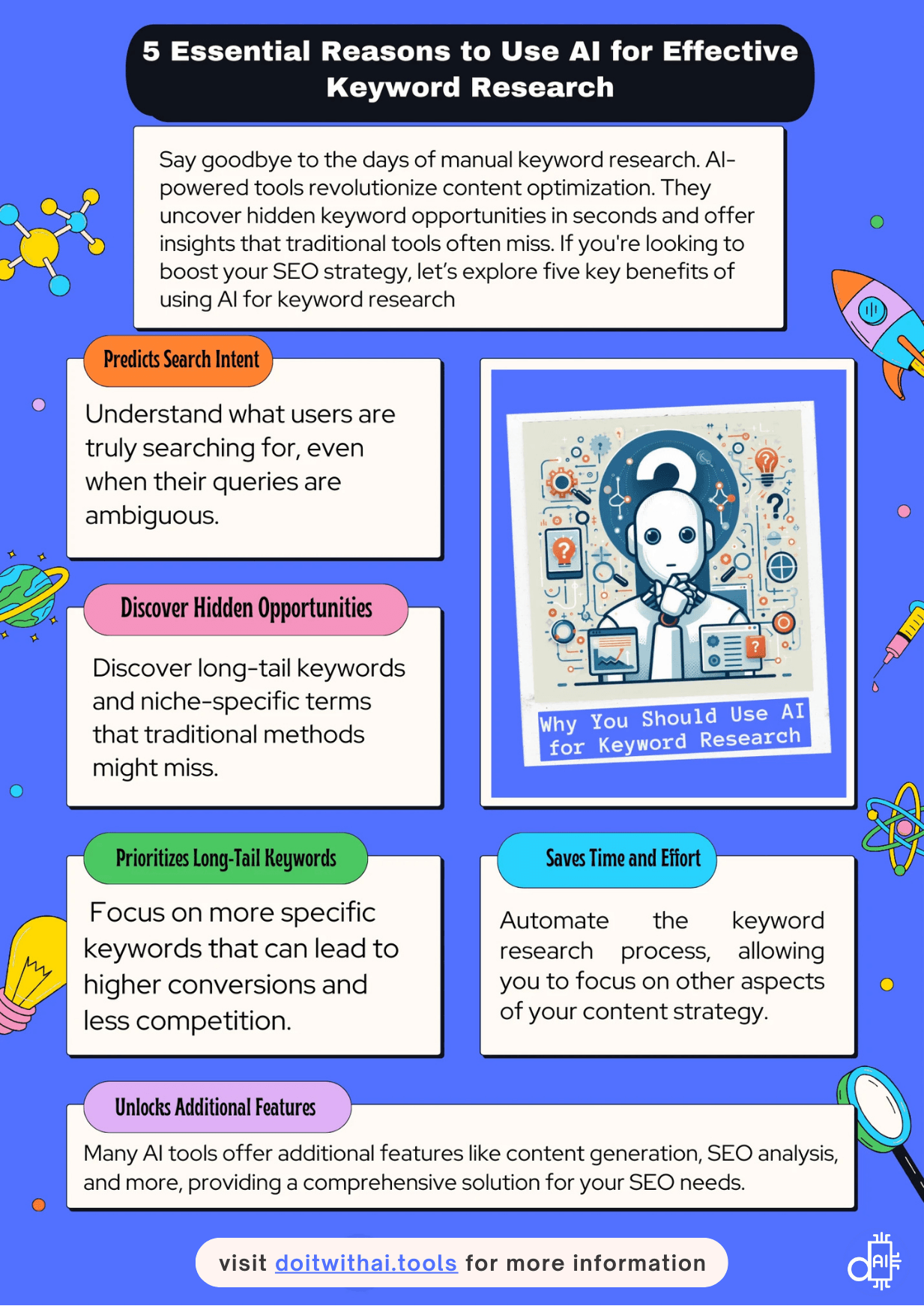
AI tools enhance keyword research with benefits like predicting search intent, improving efficiency, saving time, automated analysis and additional SEO features
The Criteria Behind Choosing These AI-Powered SEO Tools
Choosing the right AI keyword research tools can be overwhelming, but it doesn’t have to be. I’ve done the hard work for you by spending days researching the best tools. These tools meet industry standards and work for both beginners and experts.
How I Selected These Tools:
- Free Access to Core Features
- The tools I chose let you explore their main features for free.
- You don’t need a subscription or payment details to get started.
- Whether you’re a beginner or an expert, these tools are easy to test right away.
- Widespread Acceptance and Proven Accuracy
- I prioritized tools trusted by the SEO community.
- These tools are known for providing accurate and actionable data.
- With these tools, you’ll have the confidence to make informed SEO decisions.
- Simple and User-Friendly Interfaces
- User experience matters, especially for beginners.
- These tools are designed to be intuitive and easy to navigate.
- You can focus on results rather than spending time learning how to use the tool.
- AI-Driven Keyword Research
- AI-powered tools make keyword research faster and smarter.
- They analyze massive datasets in seconds to provide insights you’d never find manually.
- Many of these tools also offer extra features like SEO optimization and content creation.
- Some even include free lifetime access to select features, making them incredibly valuable.
- Innovative and Unique Features
- Each tool on the list offers something unique.
- Whether it’s a new feature or a capability that stands out, these tools provide exceptional value.
- They don’t just help—they’re essential for improving search rankings and staying ahead in SEO.
By following these criteria, I’ve carefully selected tools that will transform your keyword research process. These tools save time, improve accuracy, and give you an edge in creating data-driven SEO strategies.
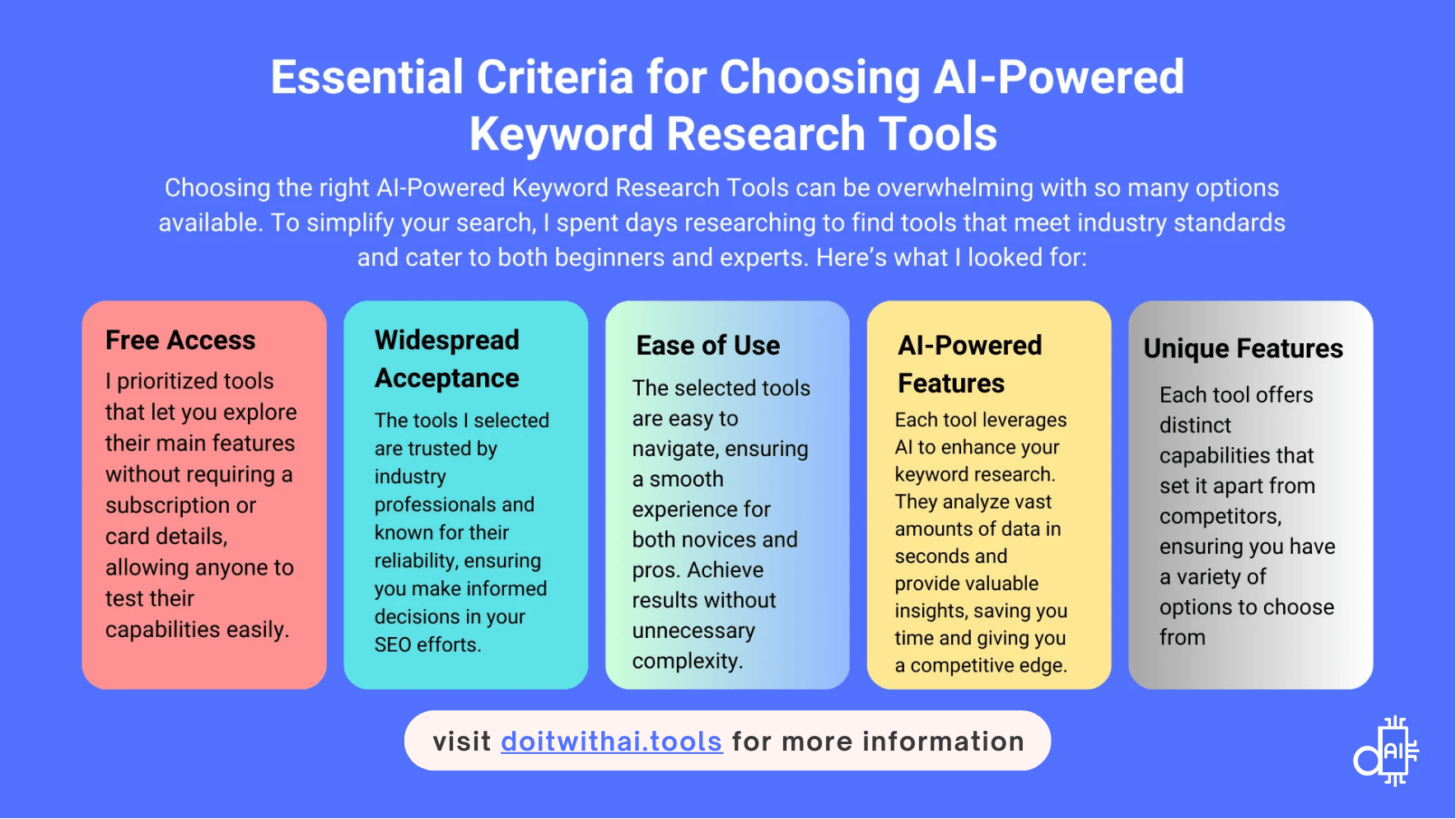
Finding the perfect AI keyword research tool can feel overwhelming. This infographic simplifies the process by outlining the 5 essential criteria we used to select the best options. From free access to unique AI-powered features, these tools will transform your SEO workflow. Ready to work smarter, not harder? Explore our top picks at doitwithai.tools!
The Best AI SEO Keyword Research Tools
Now that you understand how AI can transform your SEO and how to choose the right tools, let’s take a quick look at what’s ahead.
This guide is packed with valuable keyword research tools that deserve a place in your SEO toolkit. Each tool comes with:
- ✅ Detailed insights into its features, benefits, and limitations.
- ✅ Pricing details so you know exactly what’s free and what’s premium.
- ✅ Actionable tips whether you're a beginner or refining your strategy.
Every section is designed to help you make informed decisions. Ready? Let’s dive in!
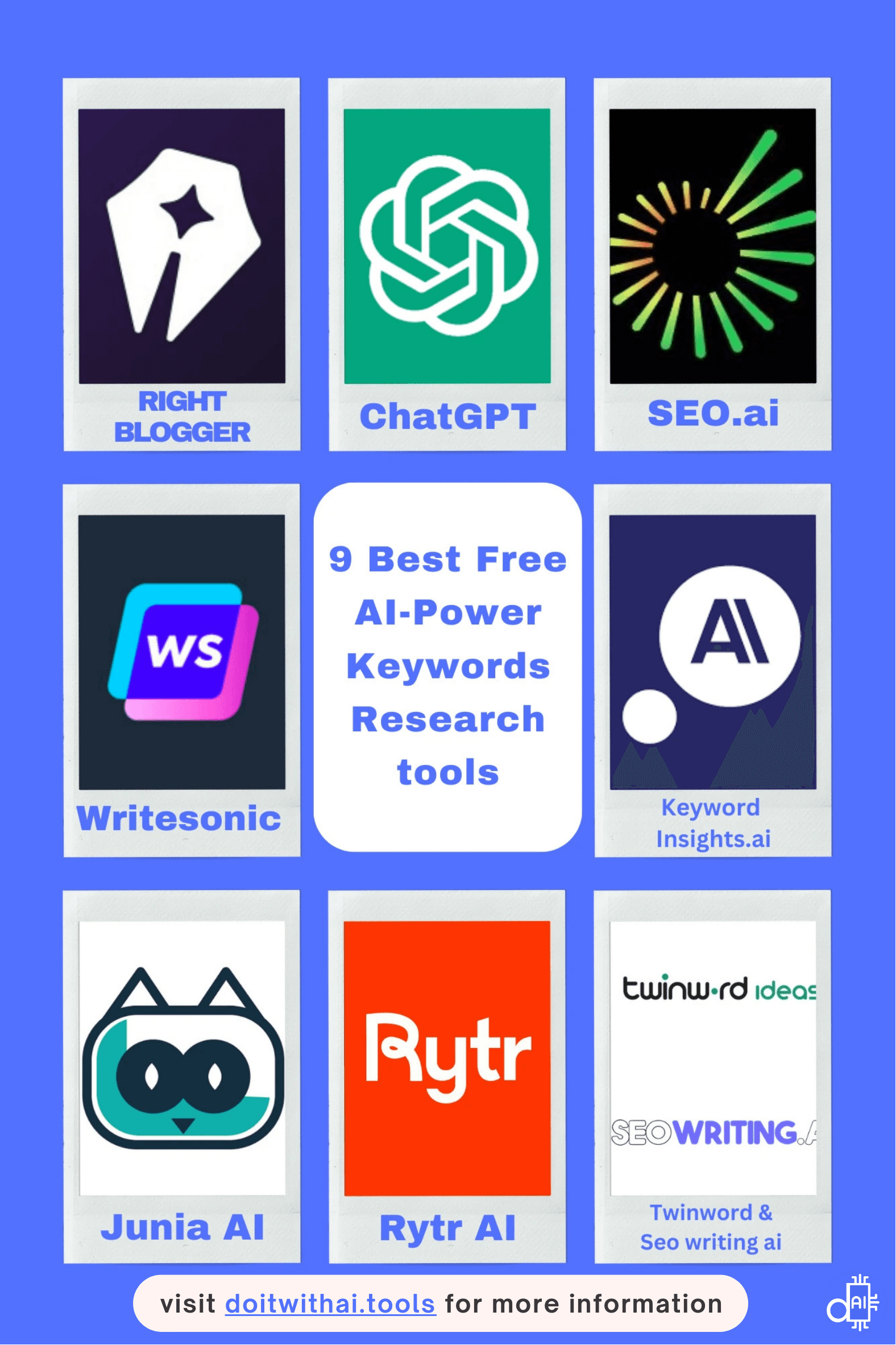
Explore top AI tools for keyword research: This image showcases a collection of free AI-powered solutions, including RightBlogger, ChatGPT, SEO.ai, Writesonic, Keyword Insights.ai, Junia AI, Rytr AI, Twinword & Seo writing AI, and more, that offer innovative solutions for keyword research. Elevate your SEO strategy with these efficient, user-friendly tools designed for precision.
ChatGPT: Innovative Keyword Research with NLP Insights for Better SEO
If you’ve been following the AI revolution, you’ve likely heard of ChatGPT.
This advanced language model, developed by OpenAI, is known for generating human-quality text.
ChatGPT is transforming content creation and becoming a valuable asset for SEO.
Unlike traditional keyword research methods, ChatGPT offers a unique approach. It combines advanced AI techniques with deep contextual understanding, all rooted in natural language processing (NLP).
SEO professionals are turning to ChatGPT to save time. Tasks that once took hours are now completed in minutes.
- Engaging Blog Posts: Quickly generate high-quality content.
- Keyword Analysis: Efficiently analyze and optimize keywords.
- Creative Ad Copy: Brainstorm unique and catchy ad copy.
ChatGPT’s efficiency and flexibility make it a must-have tool in today’s digital strategy.
Key Features and Benefits of ChatGPT for SEO and Keyword Research
- Effortless Keyword Generation
Save time and energy by letting ChatGPT handle your keyword generation. Instead of spending hours analyzing data, ChatGPT uses advanced NLP capabilities to quickly process large datasets. It provides you with a comprehensive list of relevant keywords. This tool is like an endless source of keyword ideas. It helps you identify high-value keywords faster and more efficiently.- Example Prompt: “Generate a list of 25 long-tail keywords related to [niche].”
- ChatGPT can assist you in identifying your target audience, helping you gain a deeper insight into the most relevant keywords to focus on.
- Discover Hidden Opportunities
ChatGPT goes beyond basic keyword generation. It uncovers related search terms and long-tail keywords that traditional tools might overlook. These keywords often have lower competition. As a result, they can lead to higher conversion rates. This makes them invaluable for your SEO strategy.- Example Prompt: “What are some long-tail keywords related to [niche] that have low competition?”
- Insightful and Versatile Content Creation
ChatGPT’s value extends far beyond keyword research. It’s a versatile tool for your entire content strategy. From content creation and idea generation to translation, ChatGPT adapts to your needs. Whether you're brainstorming blog post topics, generating creative outlines, or translating your content into multiple languages, ChatGPT can assist. - It also helps you understand user search intent by analyzing queries. This enables you to create highly relevant content that addresses user needs. Whether you’re crafting SEO-friendly headlines, meta descriptions, or full blog posts, ChatGPT tailors its writing style and tone. It ensures your content resonates with your audience
- This versatility boosts engagement and aligns your content with search intent and your brand voice. As a result, it improves your overall SEO strategy.
- Enhanced Functionality with GPT-4o Mini and Free GPT-4o Queries
Take your SEO research to the next level with GPT-4o Mini and GPT-4o, both available for free with limited queries. GPT-4o Mini offers enhanced textual intelligence and deeper insights. It surpasses GPT-3.5, helping you dive deeper into SEO and keyword analysis. - Explore the “Explore GPTs” section to discover custom SEO tools and keyword research options developed by the community.
- Topical Authority for SEO GPT Generator
Use the Explore GPTs feature to experiment with various SEO-focused research tools. One standout option is the Topical Authority for SEO GPT Generator. This custom assistant creates comprehensive topic maps for your niche. It generates:- 20 pillar pages covering sub-niches
- 20 sub-pillar pages for each pillar (resulting in 400 keyword ideas)
- This tool helps you build topical authority, refine your SEO strategy, boost content relevance, and boost organic traffic through SEO.
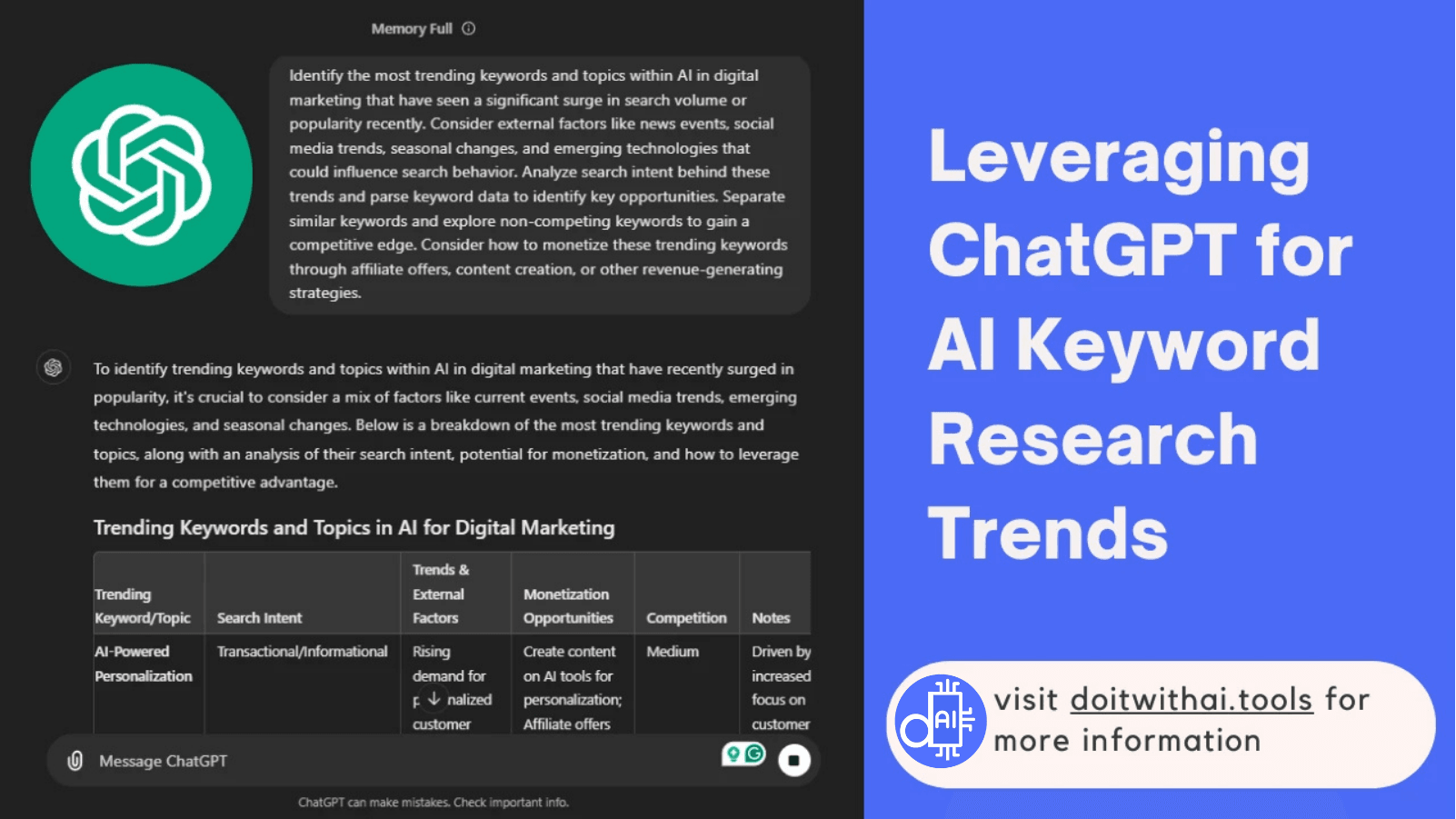
ChatGPT harnesses NLP to deliver valuable insights for identifying trending topics and keywords in digital marketing. Unlock innovative keyword research capabilities and refine your strategies with this AI-powered tool
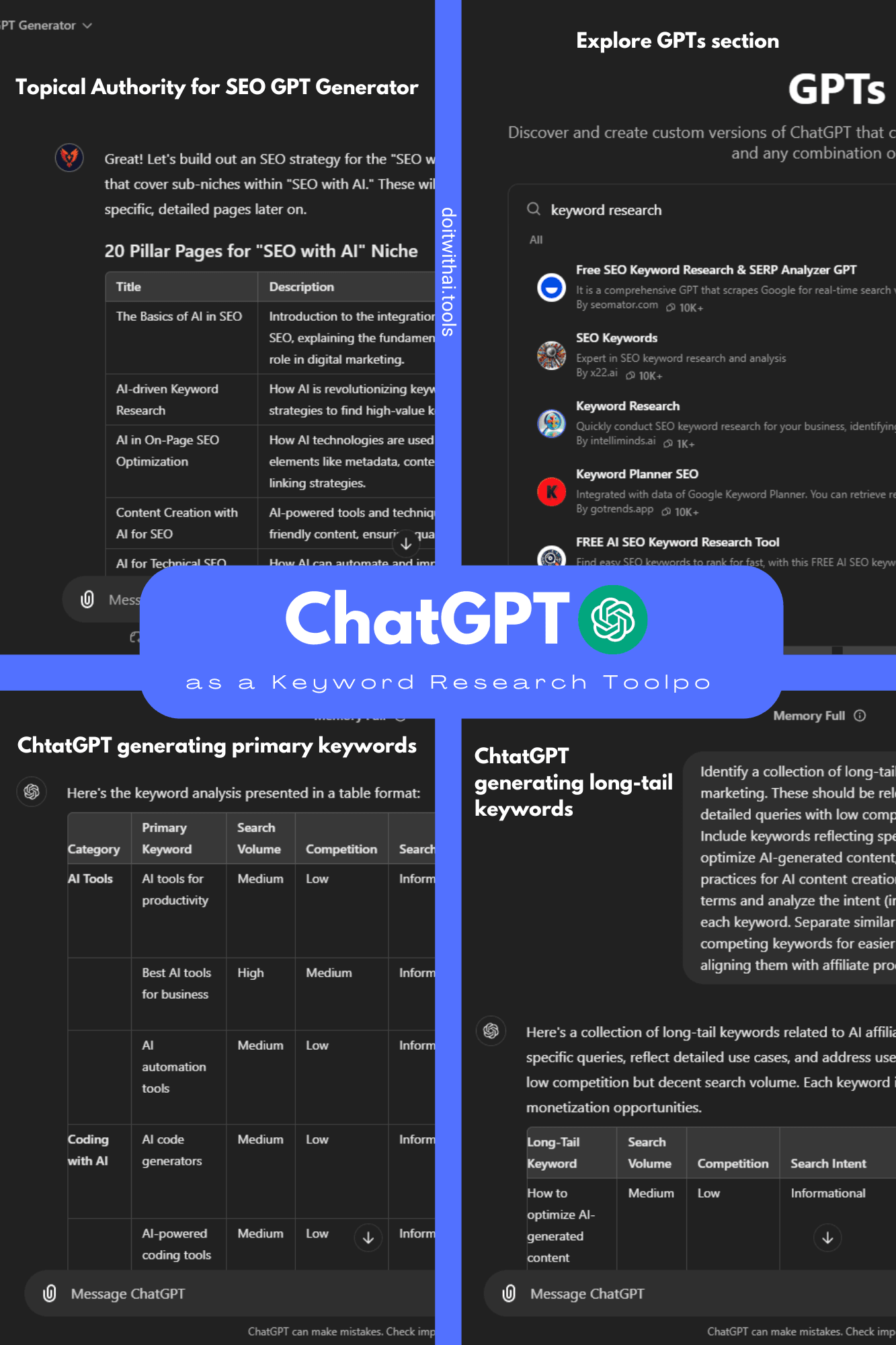
Maximize SEO with ChatGPT's diverse capabilities: This collage demonstrates how ChatGPT can generate pillar pages, analyze keywords, and utilize custom GPTs for comprehensive SEO strategies.
Limitations of ChatGPT for SEO Keyword Research
- No Exact Metrics: ChatGPT provides keyword ideas but lacks detailed metrics like exact search volume, CPC, and competition levels. For precise data, you'll need additional SEO tools.
- Limited Free Access: Free access to GPT-4o Mini and GPT-4 is restricted to a limited number of queries, which might not be sufficient for extensive SEO research.
- Basic SEO Features: ChatGPT’s SEO capabilities are primarily focused on keyword generation and search intent analysis, lacking advanced features like backlink analysis and site audits.
- Limited Data Access: ChatGPT's knowledge is based on the data it was trained on. If the data is outdated or incomplete, it may not provide the most accurate or up-to-date keyword suggestions.
- Generality: ChatGPT can sometimes generate overly broad or generic keywords that may not be highly relevant to your specific niche or target audience.
- Dependency on Prompts: The quality of the output from ChatGPT depends heavily on the quality of the prompts you provide. If you don't provide clear and specific prompts, you may not get the desired results.
Pricing and Plans of ChatGPT
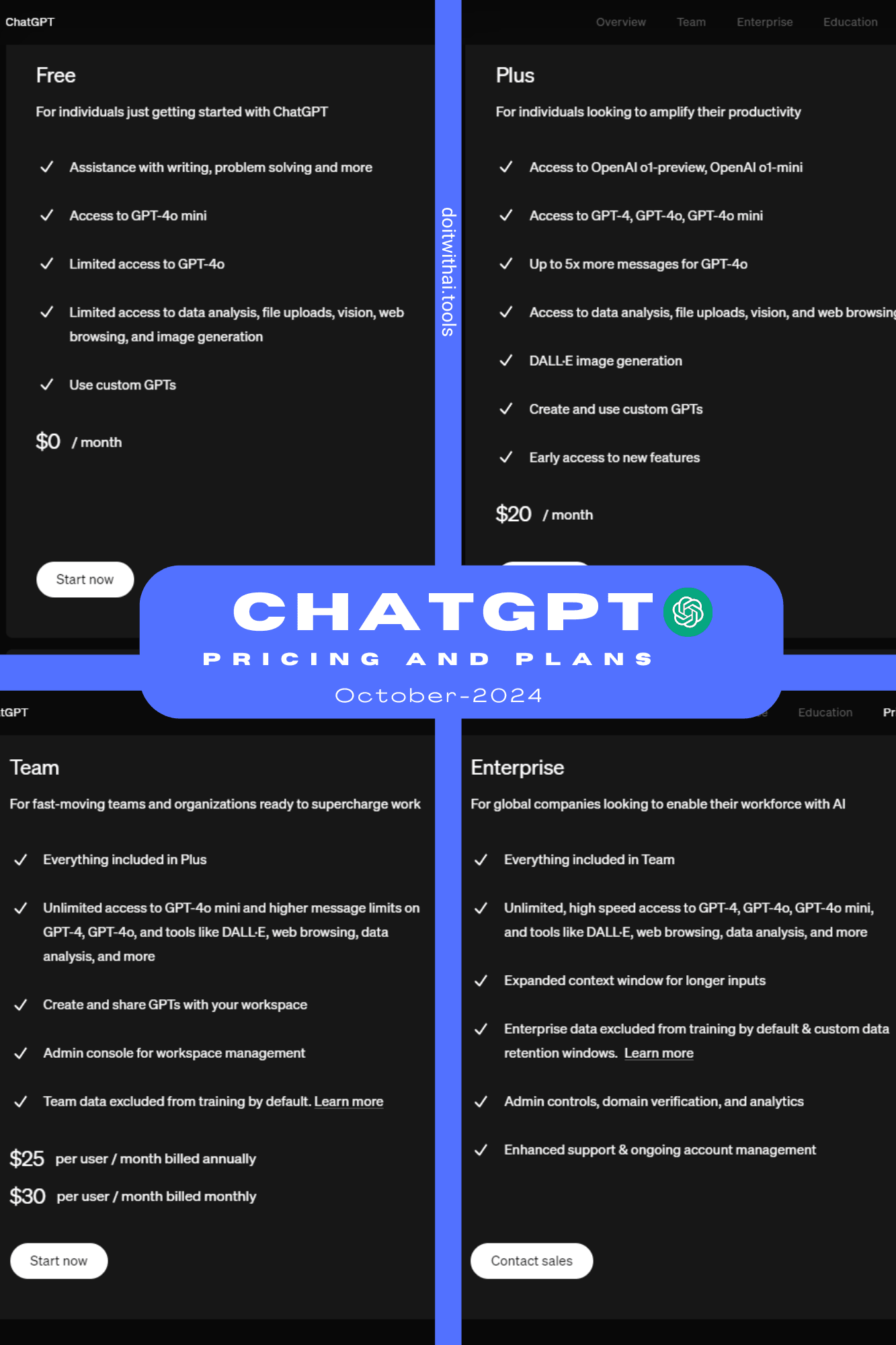
Choose the right ChatGPT plan for your needs: This chart compares the Free, Plus, Team, and Enterprise plans, highlighting access to GPT-4o, custom GPTs, and more.
Bonus Tip: Explore My Article on Mastering Keyword Research with ChatGPT Prompts
If you want to become an expert in keyword research using ChatGPT, I have an article that can help.
It shows you a 10-step process, from basic keywords to checking out competitors, and provides you with advanced, well-crafted prompts for each step to get the best results from ChatGPT.
Junia AI: Fast and Efficient Keyword Research and Content Creation with Real-Time Google Data
Next on our list is Junia AI, an advanced SEO tool that stands out for its unique features.
It combines keyword research and content creation into one easy-to-use platform, providing effective accuracy for both tasks.
Junia AI offers:
- Precise search volume data
- Competition levels
- Predictive analysis
This makes it invaluable for keyword research and SEO, helping streamline and optimize your entire SEO workflow.
Whether you're an SEO professional, a content creator, or a business of any size, Junia AI is perfect for you.
With this AI-powered tool, you can create high-ranking content while staying ahead of trends and your competitors.
To make sure your keyword-optimized content genuinely engages your audience, you can use AI tools to improve its readability.
Key Features and Benefits of Junia AI’s Keyword Research Tool
- Exact Search Volume Data: Say goodbye to the broad ranges of Google Keyword Planner. Junia AI provides precise search volume numbers, allowing you to select the most effective keywords with confidence. This ensures your content targets the right audience every time, making your keyword research more accurate and impactful.
- Comprehensive Keyword Competition and CPC Insights: With Junia AI, you’ll gain valuable insights into keyword difficulty levels and cost-per-click (CPC) rates. This means you can choose keywords that align perfectly with your SEO and paid ad strategies. Optimize your budget while increasing your chances of ranking higher in search results through AI-powered keyword research.
- Seamless Keyword-to-Content Creation: As we’ve highlighted, Junia AI excels in both keyword research and content creation. After finding top keywords, effortlessly generate SEO-friendly blog posts using its Blog Post Generator. Powered by Natural Language Processing and Deep Learning, it crafts engaging, up-to-3,000-word posts in multiple languages, integrating real-time data for optimized content that resonates with both search engines and readers.
- Speed and Efficiency: Tired of slow keyword research? Junia AI accelerates the process, making it faster and more efficient than traditional methods. Spend less time digging for keywords and more time creating great content that enhances your SEO strategy.
- Predictive Analysis: Stay one step ahead of your competition. Junia AI offers real-time data and trend predictions, helping you discover new keyword opportunities before they become mainstream. This proactive approach keeps your SEO strategy fresh and relevant in a rapidly changing landscape.
- Competitor Insights: Curious about what works for your competitors? Junia AI gives you a sneak peek into their keyword research strategies. By providing valuable insights, this feature helps you refine your own approach and gain an edge in your SEO efforts.
- Up-to-date Information: SEO trends evolve quickly, and Junia AI keeps you informed with the latest data. Ensure your keyword research remains relevant and effective in a fast-moving digital landscape.
- User-Friendly Interface: Whether you're just starting out with SEO tools or have years of experience, Junia AI’s intuitive interface makes navigation a breeze. You can easily utilize its powerful features without facing a steep learning curve.
- Additional Free AI SEO Tools: Enhance your SEO efforts even further with Junia AI’s suite of extra tools. From Blog Post Generators to AI Internal Linking and Meta Title and Description Generators, these resources streamline your SEO tasks and help you optimize your content efficiently.
Use Junia AI today to simplify your keyword research and take your SEO strategy to the next level.
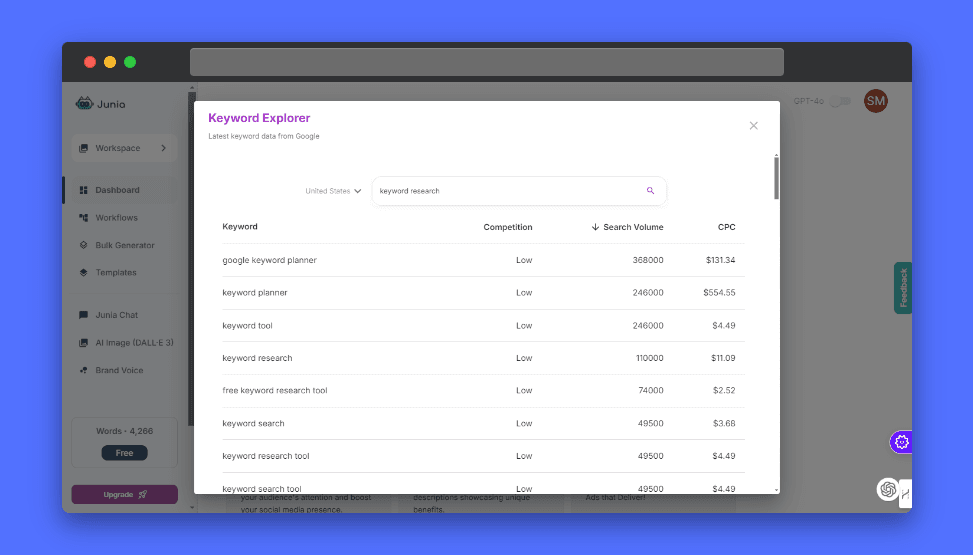
Junia AI transforms keyword research by leveraging real-time Google data for precise search volume and competition insights. Unlock efficient keyword-to-content creation with AI, enriched by predictive analysis and valuable competitor insights.
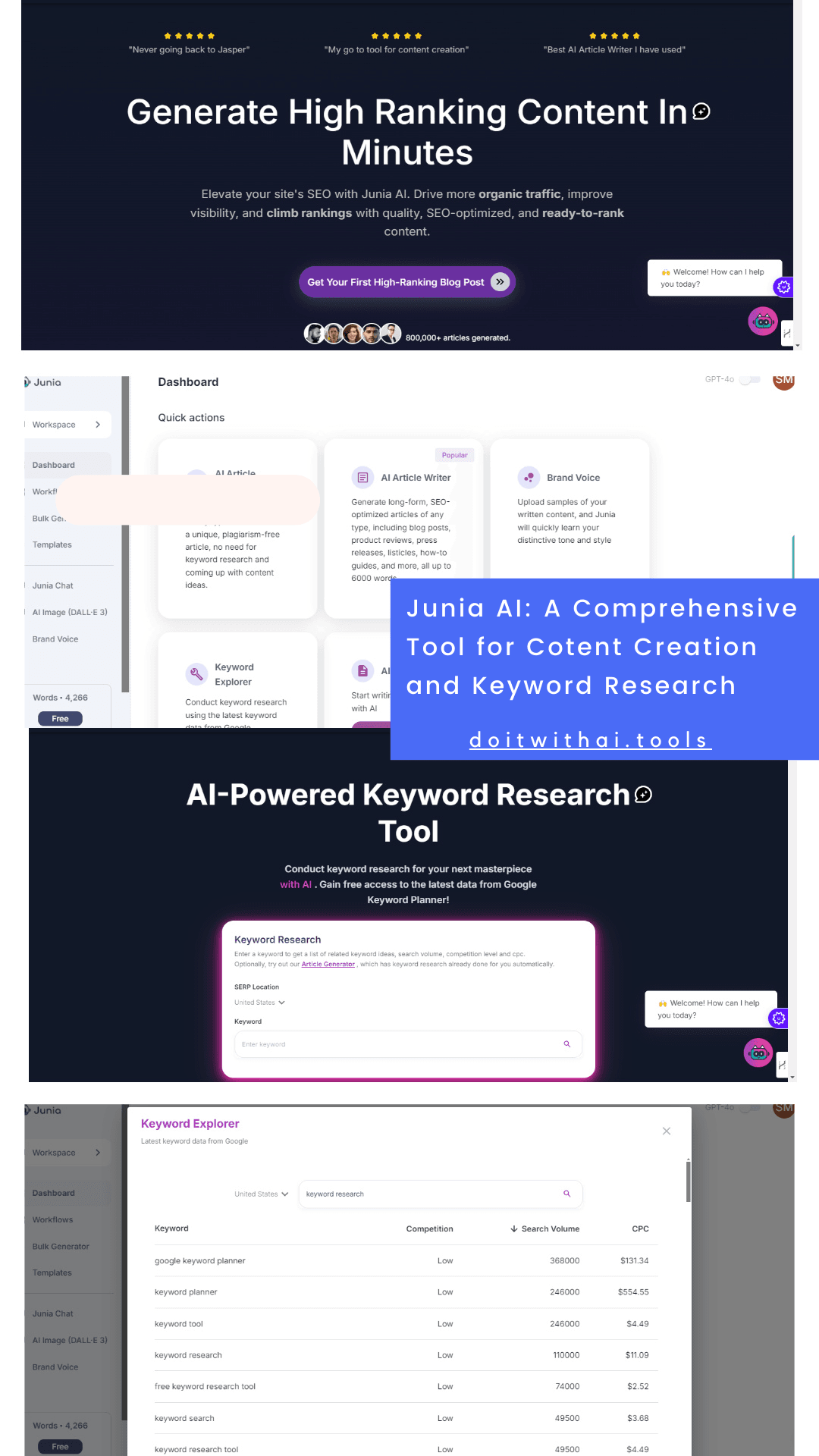
Junia AI elevates your content and SEO with advanced tools like AI-driven article writing and comprehensive keyword research. Streamline your workflow, boost efficiency, and achieve top rankings effortlessly with this innovative platform tailored for impactful results.
Limitations of Junia AI
- Free Plan Restricts Usage: The free version of Junia AI may have limitations on the number of queries or features available. To access all features and enjoy unlimited usage, you’ll need to upgrade to a paid plan.
- Dependency on AI: The effectiveness of Junia AI's keyword research tool relies on the accuracy and sophistication of the AI algorithms it uses. If these algorithms are not up-to-date or robust, the tool's performance may be limited.
- Data Limitations: Junia AI may not have access to the same extensive data as Google Keyword Planner, potentially impacting the accuracy of its search volume estimates and competitive analysis.
- Feature Limitations: While Junia AI offers a wide range of features, it may not have the same depth or breadth of features as other dedicated keyword research tools, especially for advanced users.
Junia AI Pricing
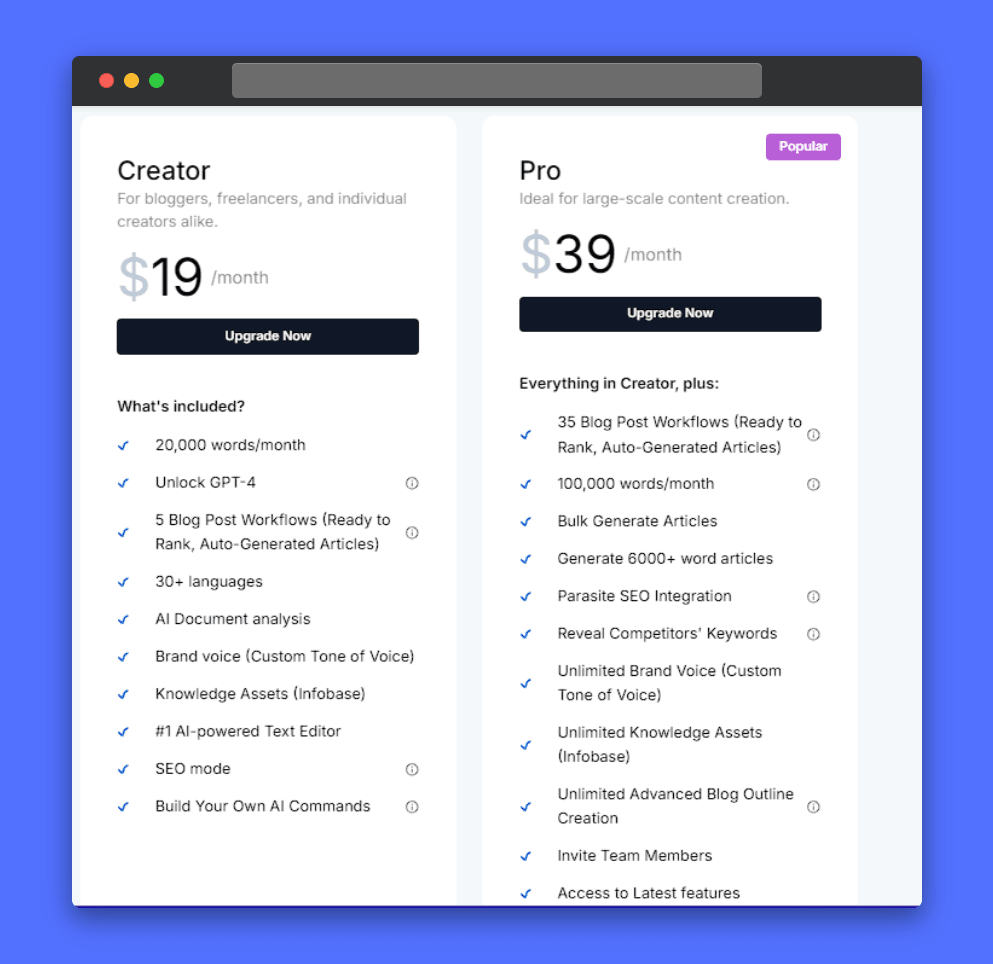
Choose the right Junia AI plan for your needs: This chart compares the Creator and Pro plans, highlighting features like bulk article generation and competitor keyword analysis.
RightBlogger: Effortless Keyword Research for Bloggers and Creators
If you're looking to elevate your blogging game, RightBlogger is here to help. Created by Ryan Robinson and Andy Feliciotti, RightBlogger acts like a top-notch blogging assistant right at your fingertips. With its clean, user-friendly design and smart AI, finding the right keywords has never been easier.
Simply enter your target keyword, and RightBlogger will suggest similar keywords to get you started. Then, you can explore additional tools like "People Also Ask," "Generate Article," "Generate Post Ideas," and "Keyword Clusters."
Why You’ll Love RightBlogger Developed by Ryan Robinson and Andy Feliciotti, this innovative tool combines a beautiful, modern interface with smart AI to make keyword research quick and effortless. The real magic happens when you dive into its additional features. You can easily access tools like:
- People Also Ask
- Generate Article
- Generate Post Ideas
- Keyword Clusters
RightBlogger is an all-in-one platform designed for bloggers and content creators eager to enhance their SEO game. Its intuitive design and efficient workflow streamline content creation, helping you connect with your audience more effectively.
If you're looking to expand your content formats, remember that you can also create engaging video scripts with the help of AI to reach a wider audience.
Best of all? It's budget-friendly and constantly evolving, making it the ideal tool to grow your blog and reach your goals.
Key Features and Benefits of RightBlogger:
- AI-Powered Keyword Research Tool: The first and most popular tool is the AI-Powered Keyword Research Tool. It helps you easily discover high-performing keywords by providing detailed insights into search volume, cost-per-click (CPC), and competition. With this tool, optimizing for organic traffic is simple, even if you're new to SEO.
- People Also Ask Tool: Ever wondered what people are searching for related to your keyword? The People Also Ask Tool uncovers keyword ideas based on autocomplete suggestions. This feature helps you expand your content’s reach by discovering new topics and keywords that resonate with your audience.
- Smart Suggest Tool: One of RightBlogger's standout features, Smart Suggest uses AI to analyze your blog content and generate fresh, relevant post ideas. Just enter your blog’s URL, and it’ll help you overcome writer’s block with tailored suggestions, keeping your content fresh and engaging.
- SEO Keyword Cluster Generator: Want to boost your on-page SEO effortlessly? This tool groups related keywords into clusters, so you can rank for multiple terms with less effort. It’s a smart way to enhance your blog’s visibility and relevance across search engines.
- Competitor Analysis: The Competitor Analysis Tool is essential for staying competitive. While other platforms charge for similar features, you can now use this tool for free. It compares your content against competitors, revealing opportunities to improve or expand your articles and helping you stay ahead in your niche without the extra cost.
- Backlink Tracking: Finally, the Backlink Tracking tool helps you monitor the quality and quantity of your backlinks. This allows you to understand how they’re improving your blog’s authority and focus on growing your off-page SEO.
- Comprehensive Toolset: But wait, RightBlogger doesn’t stop at just the tools we’ve covered. It boasts a whopping 83 AI-powered tools that cover everything from blogging and SEO to social media, sales, and productivity. This extensive toolset means you can manage every aspect of your online strategy from one easy-to-use platform. It’s a powerhouse designed to streamline your workflow and boost your success.
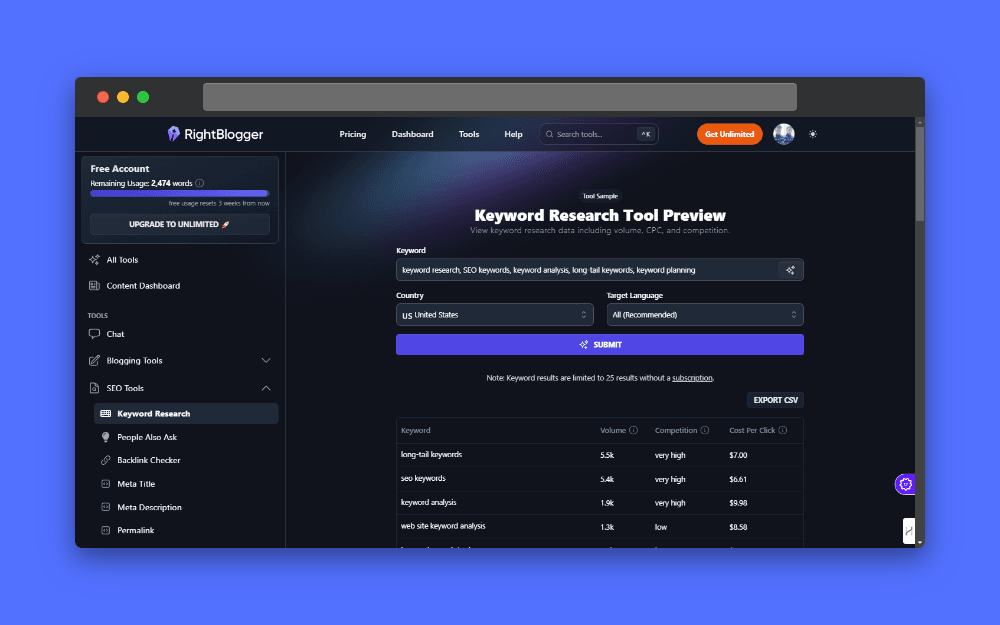
RightBlogger's AI-powered tool delivers detailed insights into search volume, CPC, and competition, streamlining keyword research. Enhance your SEO strategies with precise data, enabling you to identify opportunities and optimize content for maximum visibility and impact.
Limitations of RightBlogger:
- Potential Overwhelm: With 83 different tools available, users might feel overwhelmed by the sheer number of options. It could be challenging to navigate and focus on the most relevant tools for their specific needs.
- Free Plan Restrictions: The free plan may have limitations on the number of features or usage, which could impact your ability to fully utilize the platform
- Limited Advanced Features: While the tool is great for basic keyword research, it may lack some advanced features found in premium tools, such as in-depth competitor analysis or backlink tracking.
- Data Accuracy: As with many free tools, the accuracy of search volume and competition data might not be as precise as that provided by paid alternatives.
- Scalability: For larger websites or more extensive SEO campaigns, the tool might not offer the scalability needed to handle high volumes of keyword research efficiently.
Pricing and Plans of RightBlogger

RightBlogger offers flexible pricing plans to fit your needs. This screenshot compares the Free Trial (perfect for testing the waters) and the Unlimited plan (unlocking full access to all tools and features). Find the plan that best fuels your content creation and SEO success!
Bonus Resource: Ryrob’s 30+ Free Blogging Tools Collection
As a bonus, be sure to check out Ryrob.com—a fantastic resource created by Ryan Robinson.
This site features an AI-powered keyword research tool that simplifies finding the right keywords. Just enter a keyword or phrase, and it will generate related keywords, search volumes, and competition levels to help you target high-potential, low-competition terms.
But that’s not all. Ryrob.com also offers over 30 free tools covering everything from content creation to SEO. These are designed to streamline your blogging process—completely free.
If you’re serious about growing your blog, Ryrob.com is a must-visit!
Twinword: AI-Powered Comprehensive Keyword Research with Advanced Filtering Options
Twinword is a groundbreaking AI-powered tool that transforms how you approach keyword research and SEO. It goes beyond simple keyword generation by using advanced artificial intelligence to provide precise search volume data and evaluate SEO difficulty.
What truly sets Twinword apart are its unique features. For example, the keyword efficiency tool highlights the best terms for your content, while the title suggestions feature offers keyword-based titles that resonate with your audience.
This means you can easily identify high-value keywords, assess competition, and choose the best titles to optimize your content effectively.
With its advanced AI capabilities, Twinword helps you make strategic decisions that not only boost your search engine rankings but also drive relevant traffic.
I personally appreciate how this tool enhances my SEO strategy, allowing me to connect with my audience more effectively.
Key Features and Benefits of Twinword:
Twinword provides six powerful tools designed to streamline your keyword research and content strategy. These tools offer a range of functionalities that cater to different aspects of SEO and content creation, ensuring that you can efficiently manage and optimize your digital presence.
- Simplified Keyword Suggestions: With Twinword’s Suggest tool, you can effortlessly gather related keywords. The tool groups them by popular topics, user intent, and patterns. You can click on any keyword to dive into Google SERP results or hover to check its stats. This feature not only saves you time but also helps you refine your content strategy effectively.
- Effortless Keyword Importing: If you have a large list of keywords, Twinword’s Import feature allows you to upload it in seconds. The tool then provides you with essential metrics like search volume and competition, all neatly sorted by user intent and trending topics. This turns a tedious task into a streamlined process, making your keyword research more efficient.
- Stay Ahead with Trending Keywords: The Trending Keywords tool helps you capture emerging trends. By revealing the latest buzz in your industry, you can create timely content that resonates with your audience, keeping your strategy fresh and aligned with current search interests.
- Discover High-Impact Keywords: The Top Keywords tool is essential for finding powerful keywords tailored to specific markets. This feature segments keywords by language and geographical targets, guiding you in optimizing your SEO strategy for diverse audiences. You’ll uncover the right terms to enhance your visibility and engagement.
- Competitive Keyword Analysis: Twinword’s Site Keywords tool offers deep insights into your competitors' strategies. By entering a domain or URL, you can explore relevant keywords that competitors are using. This feature enables you to refine your own keyword approach based on real-world data, helping you make informed decisions.
- Creative Keyword Expansion: With the LSI Graph tool, Twinword allows you to visualize related Latent Semantic Indexing (LSI) keywords. This comprehensive view helps you creatively enhance your keyword strategy, ensuring your content remains relevant and engaging to your audience.
For every keyword generated using these tools, Twinword provides detailed insights that help you fine-tune your SEO strategy:
- Accurate Search Volume Data: Get precise statistics on how your keywords perform across various regions. Twinword’s search volume data feature lets you select different countries and languages, making it perfect for tailoring your SEO strategy to global markets.
- SEO Difficulty Score: Understand the competition level for each keyword with Twinword’s SEO difficulty score. This insight allows you to choose keywords that strike the right balance between competition and traffic potential, making your SEO efforts more targeted.
- Competition Score: Assess your competitive landscape with Twinword’s competition score, ranging from 0 to 100. This score indicates how competitive each keyword is in Google Ads, guiding you in selecting keywords that can give you a strategic advantage in both organic and paid searches.
- Keyword Efficiency: What attracts me to this tool is Twinword’s keyword efficiency score, which highlights the keywords that will have the most significant impact on your content. This ensures you direct your efforts toward the most effective keywords, making your SEO strategy focused and powerful.
- Title Optimization: I like how Twinword’s title optimization feature helps you craft engaging titles effortlessly. It suggests compelling titles based on keyword performance, ensuring that your content not only ranks well but also attracts clicks, boosting your traffic.
- Relevance Analysis: This feature assesses how closely each keyword aligns with your main topic, ensuring that your content remains focused and relevant, which is key to maintaining reader engagement and improving SEO performance.
- Automatic Keyword Grouping: Twinword’s automatic keyword grouping simplifies your research process by categorizing keywords based on popular topics and user intent, revealing valuable insights and helping you discover new concepts that might otherwise be overlooked.
- Comprehensive Filtering Options: Twinword offers an extensive range of filters to refine your keyword selection, including Popular Topics, User Intent, Keyword Patterns, Search Volume, and more. These filters allow you to zero in on the most relevant keywords for your strategy, tailoring your content to meet specific goals and audience needs. With features like Title Score and Relevance Score, you can confidently craft content that is both engaging and optimized for search engines.
All these features and tools make Twinword a comprehensive solution for anyone serious about SEO. You’ll love how it simplifies keyword research and enhances your ability to create impactful content.
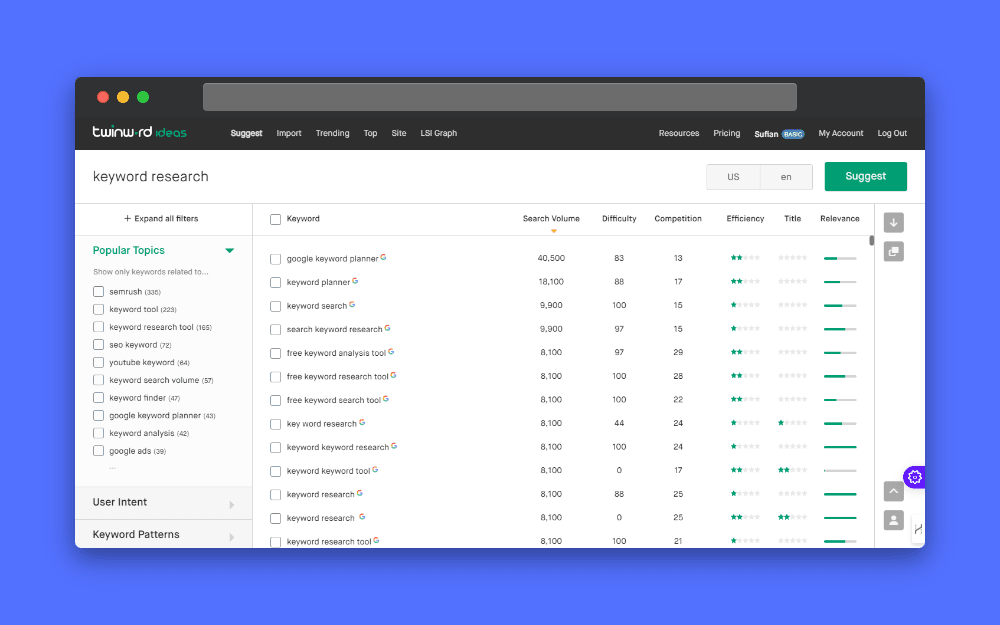
Explore keyword efficiency and title suggestions directly within Twinword's interface, ensuring your content ranks well and attracts clicks.
Potential Limitations of Twinword
- Complex User Interface: Some users may find Twinword’s interface and range of features overwhelming at first. There might be a learning curve involved in fully leveraging all of the tool’s capabilities.
- Data Accuracy Variability: Although Twinword offers accurate search volume data, the precision of this data can vary based on region and language settings. Users may encounter discrepancies in search volume statistics when targeting less common languages or specific geographical areas.
- Focus on Advertising Metrics: While Twinword provides valuable competition scores, it's important to note that these scores are specifically geared towards advertisers. This means that the competition score reflects data relevant to paid search campaigns, which may not fully capture organic search competition or the nuances of SEO competition beyond advertising.
- Limited Access in Free Version: While Twinword offers a free plan, accessing the full range of features and unlimited usage may require a paid subscription.
Pricing and Plans of Twinword
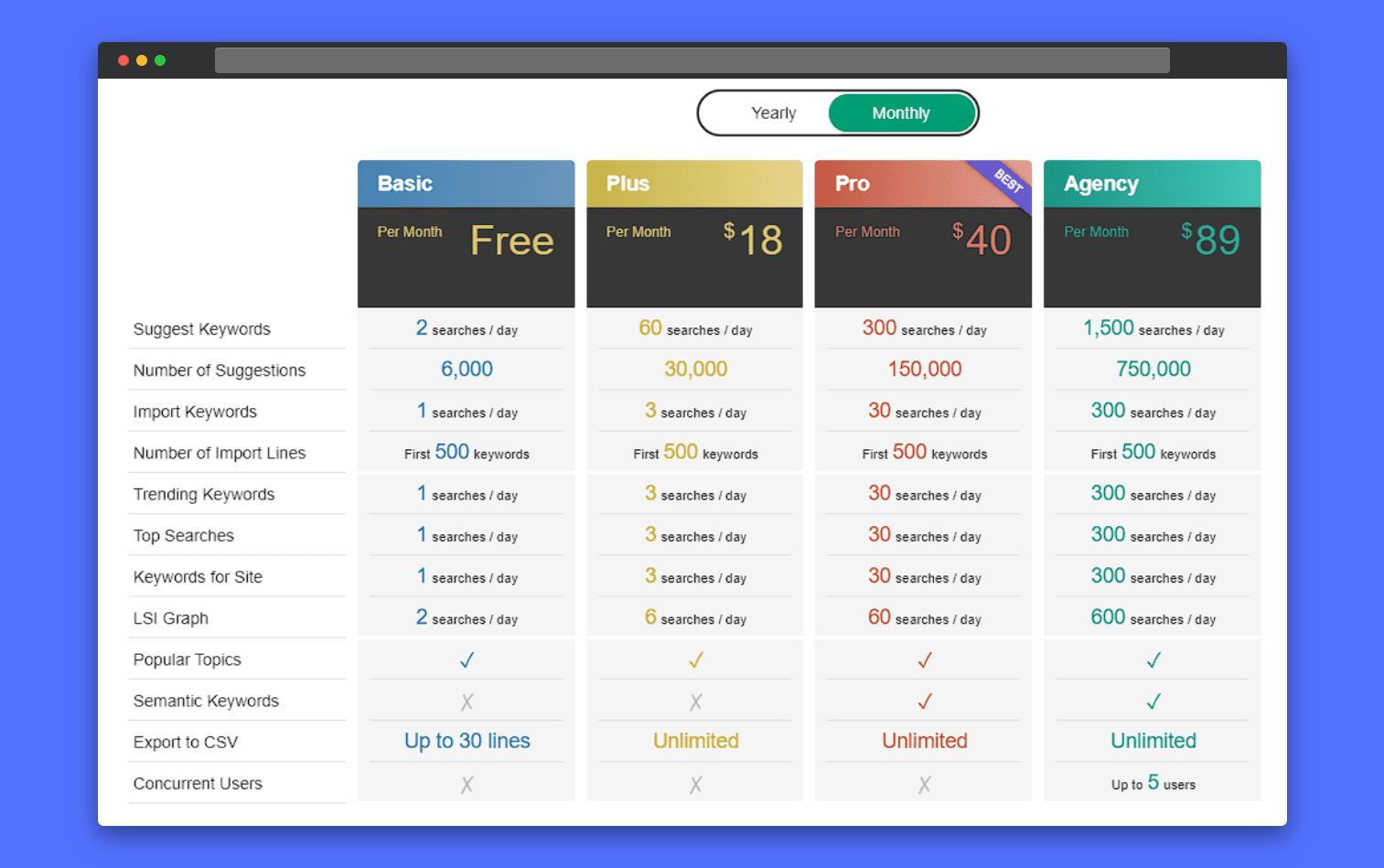
Explore keyword research tool plans tailored for diverse needs. Compare features like daily search limits, keyword suggestions, and export capabilities. Choose the 'Pro' plan for optimal value, or opt for the 'Agency' plan for team collaboration. Select the plan that aligns with your SEO strategy and budget.
Bonus Tool: SEO.ai: Get Free Lifetime Access to a Wide Range of AI Tools for Keyword Research and SEO
SEO.ai is more than just another content tool—it’s a powerful, trusted SEO platform.
With a suite of free AI-powered tools, SEO.ai makes it easier to improve your website’s ranking in search results. Its user-friendly features simplify SEO strategies, making them more effective and accessible.
What makes SEO.ai stand out?
- ✅ Completely free for a lifetime—no hidden costs
- ✅ Designed for both beginners and advanced users
- ✅ All-in-one solution for keyword research and content optimization
If you’re serious about boosting your SEO without spending a dime, SEO.ai is a must-try.
- Smart Keyword Discovery: The AI Keyword Tool takes the guesswork out of finding the right keywords. Just input a brief description, and within seconds, you’ll receive a curated list of keywords tailored to your specific needs. This tool ensures your content aligns perfectly with what your audience is searching for.
- Optimize Internal Links Seamlessly: With the Internal Linking Tool, you can quickly identify the best pages on your website for internal linking. By simply entering a target keyword and URL, you'll be provided with a list of pages that can be strategically linked to enhance your site’s structure and improve search engine visibility.
- Tackle Keyword Cannibalization: The Keyword Cannibalization Tool is your go-to for identifying overlapping keywords that might be diluting your SEO efforts. It analyzes similarities in Google SERPs, providing you with keyword clusters and a similarity matrix to fine-tune your strategy and avoid unnecessary competition between your pages.
- Track Your Rankings with Precision: Keeping an eye on where your website stands is crucial. The Keyword Rank Checker lets you monitor your domain’s position in the top 100 Google search results for specific keywords, ensuring you stay informed about your SEO performance and can make adjustments as needed.
- Free Keyword Generator Tool for SEO: Speed up your keyword research with the Free Keyword Generator Tool. It offers hundreds of valuable keywords in seconds, complete with Google search volume and keyword difficulty metrics. Input a seed keyword, choose your target country, and click 'Generate Keywords' to get started. It’s an essential tool for anyone looking to build a solid keyword strategy.
- Experiment with a Variety of Tools: What I really like about SEO.ai is the wide range of tools it offers. It provides a diverse selection of free tools across categories like content generation, analysis and tracking, and even some staff-picked favorites. By experimenting with these tools, you’ll be able to accelerate your keyword research and refine your overall SEO strategy, ultimately leading to better search engine rankings. So why wait? Dive in and see how SEO.ai can transform your approach to SEO today!
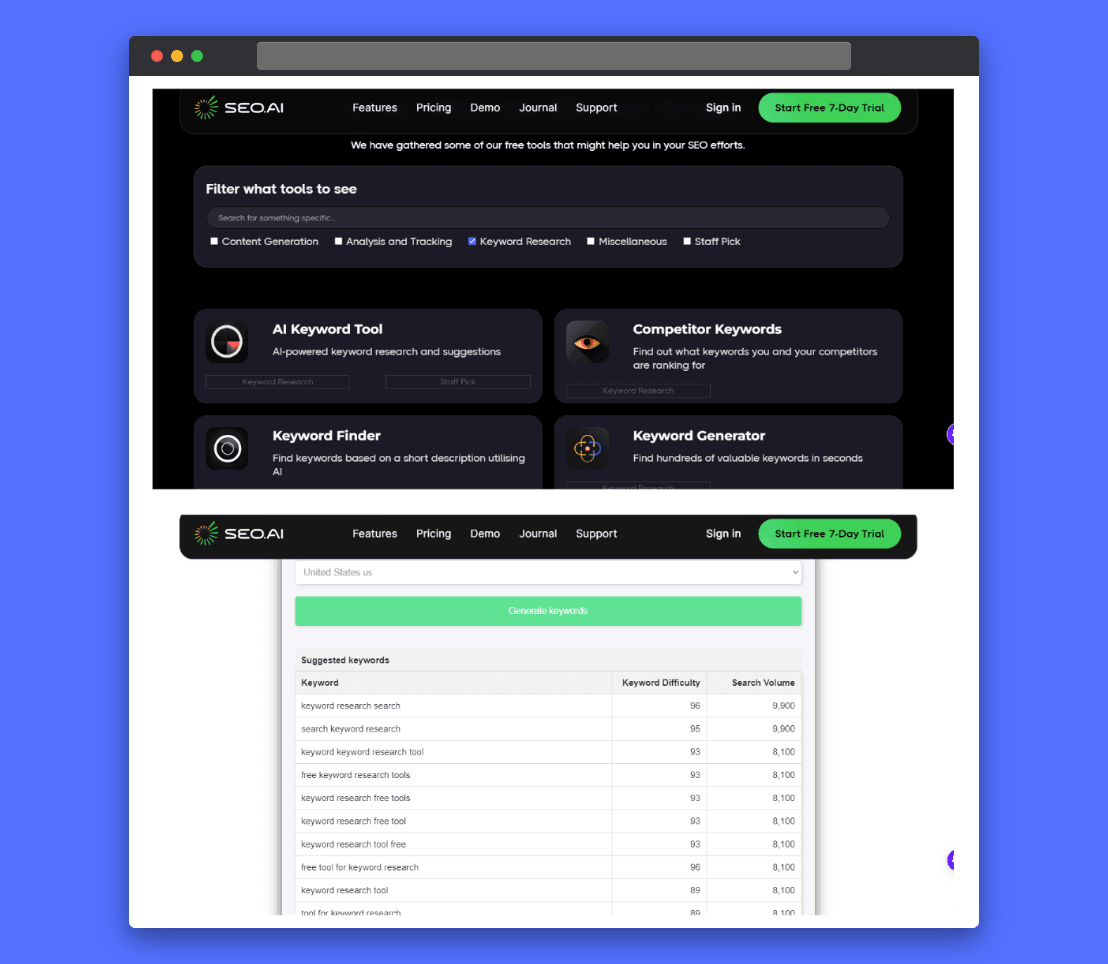
SEO.ai empowers users with a suite of free, AI-driven tools, including keyword generation and rank tracking, to simplify and enhance SEO strategies for lifetime use.
Keyword Insights.ai: Master Topical Authority Through Effective Keyword Research
Keyword Insights.ai offers a revolutionary approach to SEO by focusing on topical authority. As the first platform dedicated to this approach, Keyword Insights.ai equips you with everything needed to excel in your niche. Discover and organize thousands of relevant keywords effortlessly with its advanced AI features.
Keyword Insights.ai's AI-driven clustering groups keywords effectively, while unique features like Google Search Console integration and real-time SERP exploration provide valuable insights. These insights help you create content that ranks and establishes your brand as a topical authority.
After establishing your topical authority, you can then create a portfolio with the help of AI to showcase your expertise and the content you've developed.
From keyword discovery to refining your content strategy, Keyword Insights.ai streamlines every step. It gives you the actionable insights required to stay ahead in your niche.
Key Features and Benefits of Keyword Insights.ai
- Live SERP Overview: This feature provides a live overview of search engine results pages (SERPs) from various countries without needing a VPN or proxy. I appreciate how Keyword Insights.ai integrates Google Trends data, allowing you to see keyword popularity changes over time, which helps in planning timely content.
- Keyword Discovery and Filtering: Even with the free version of Keyword Insights.ai, you can download thousands of related keywords. Apply filters like search volume, CPC, and competition to narrow down your results effectively.
- Google Autocomplete and More: Keyword Insights.ai provides insights from hundreds of Google Autocomplete suggestions for your seed keyword. I find it particularly compelling that it also reveals what people are asking on Quora and in the “People Also Ask” section. This feature gives you a broader understanding of user intent, helping ensure your content addresses real questions from your audience. It’s this comprehensive approach that makes me want to include Keyword Insights.ai in your SEO toolkit.
- Advanced SERP Insights: Analyze keyword similarity and overlap quickly to determine if new pages are necessary. The SERP Explorer feature in Keyword Insights.ai provides real-time, location-specific search results and insights into competition and ranking features. I find this particularly useful for making informed decisions about content optimization, ensuring you target the right keywords effectively.
- Efficient Keyword Clustering and Search Intent Analysis: Cluster up to 2.5 million keywords with Keyword Insights.ai to see which should be combined or separated. Upload your keyword list to analyze search intent—informational or transactional—to tailor your content effectively.
- Mastering Topical Authority and Competitor Insights: Use strategic keyword clusters in Keyword Insights.ai to streamline content creation and build authority. Benchmark your performance against competitors to spot gaps and opportunities, boosting your visibility and traffic.
- AI-Powered Content Creation: Finally, streamline your content planning and creation with Keyword Insights.ai. Generate detailed content briefs quickly, covering all essential headings and questions. Then, leverage the AI Writing Assistant within Keyword Insights.ai to simplify your writing process with tone adjustments, sentence rewording, and metadata generation.
This seamless integration ensures your content is not only comprehensive but also stands out in a competitive landscape, making Keyword Insights.ai a powerful tool to end your SEO journey on a high note.
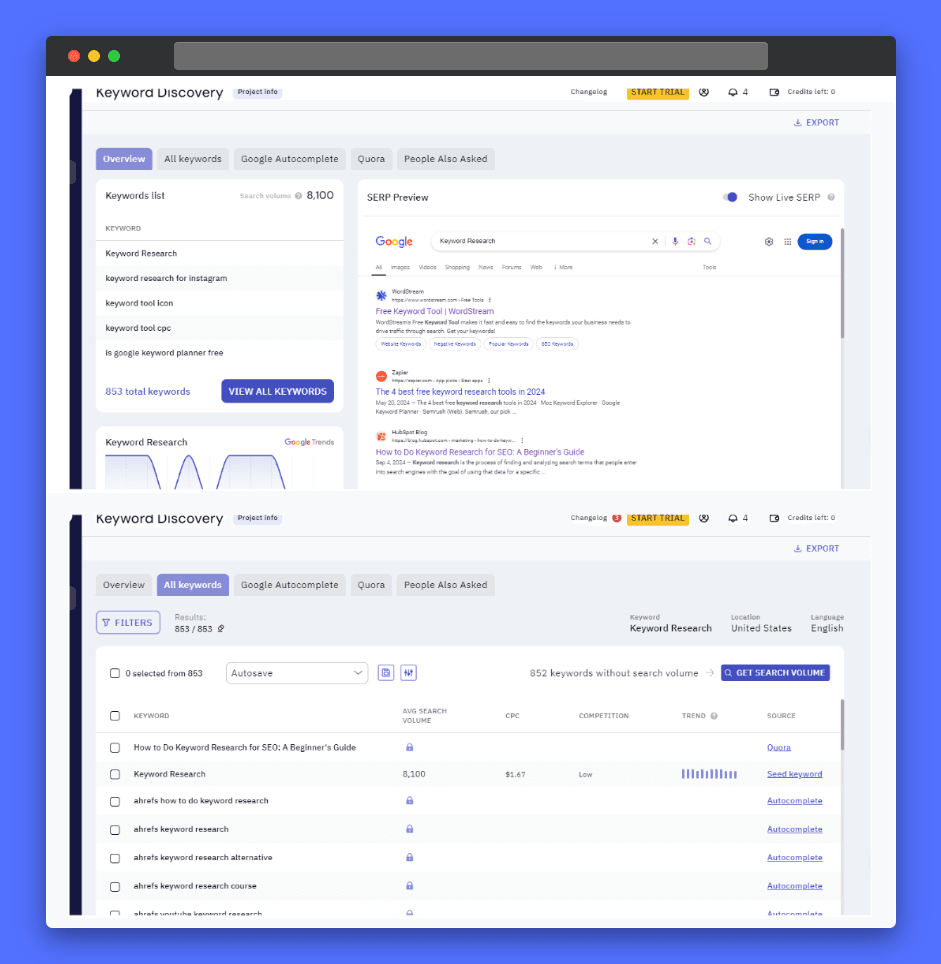
Keyword Insights.ai enables users to master topical authority by providing live SERP overviews and detailed keyword filtering, ensuring content relevance and timely planning.
Limitations of Keyword Insights.ai
- No Search Volume, CPC, or Competition Metrics: While it excels at keyword clustering and topical authority, Keyword Insights.ai doesn’t provide essential keyword metrics like search volume, cost-per-click (CPC), or competition level directly, which can limit its usefulness for comprehensive SEO strategies.
- No Keyword Trend Analysis: The tool lacks the ability to display keyword trends over time, making it difficult to identify rising or declining keyword opportunities that could be crucial for content planning.
- Keyword Clustering Accuracy Can Vary: The AI-driven keyword clustering is powerful, but it’s not perfect. In some cases, you might find that the clusters need manual adjustments to better match search intent or context.
Price and Plans Keyword Insights.ai
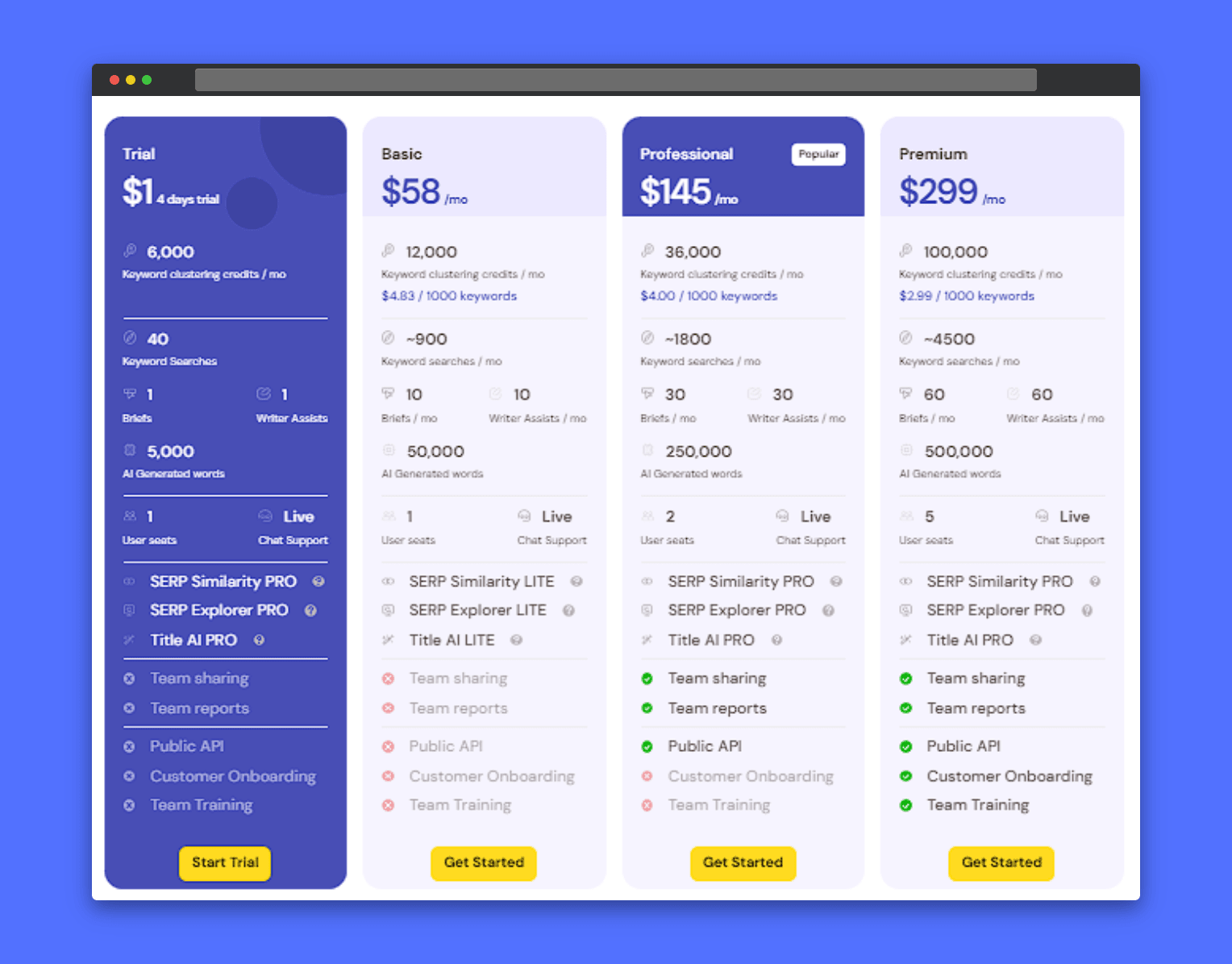
Compare SEO tool pricing plans, from free trial to premium features. Choose the 'Professional' plan for popular features, or opt for the 'Premium' plan for extensive capabilities.
Writesonic: My Go-to AI Tool for Keyword Research and SEO Success
As we’ve explored various AI-powered keyword research tools, each has its strengths. But among them, Writesonic stands out as the most exceptional.
Whether you need to:
- ✅ Dive deep into keyword research
- ✅ Optimize your SEO strategies
- ✅ Generate high-quality content
Writesonic delivers all of this in a user-friendly experience packed with advanced AI features.
It combines powerful keyword research with AI-driven precision, offering a level of detail that other tools can’t match.
With real-time, AI-generated insights, Writesonic helps you:
- 🚀 Discover high-ranking keywords effortlessly
- 🚀 Simplify your SEO strategy
- 🚀 Boost traffic and search rankings—without extra work
For anyone looking to supercharge their SEO, Writesonic is a top choice.
Key Features and Benefits of Writesonic:
- Powerful Keyword Research Tool: I’ve found Writesonic’s keyword research feature to be incredibly thorough, offering detailed insights into search volume, keyword difficulty, and competition levels. With its real-time Google data integration, you get the latest keywords, search volume, and competitor metrics. This helps you pinpoint the exact keywords that will drive traffic to your site and keep your SEO strategy current
- Visual Keyword Trends: One of my favorite features is the graphical representation of keyword trends, letting me see how a keyword’s popularity has evolved over time—similar to Google Trends.
- Extensive Keyword Suggestions with SERP Overview: Writesonic generates a range of related, same, and competitor keywords to build a robust SEO strategy. Plus, the SERP overview feature shows you how top-ranking competitors are performing. This insight makes it easy to refine your SEO tactics and increase your website’s traffic.
- Powerful Research and AI Tools: Chatsonic’s real-time search helps you dive deep into content research, like summarizing PDFs or creating AI-generated voiceovers and images. Writesonic also uses advanced AI models like GPT-4 for fast and accurate results.
- Smart SEO and Content Optimization: With Writesonic, you can easily optimize your content for search engines. Its real-time suggestions help you tweak your SEO with just a few clicks, keeping your blogs and web pages SEO-ready. You can also reach a global audience with its multilingual support, driving traffic from various regions.
- Secure and Easy to Use: Writesonic keeps your data safe with strong encryption (AES-256) and a zero-retention policy, so you can trust your information is completely protected. Plus, its user-friendly interface makes it easy to navigate, whether you're doing keyword research or optimizing your content.
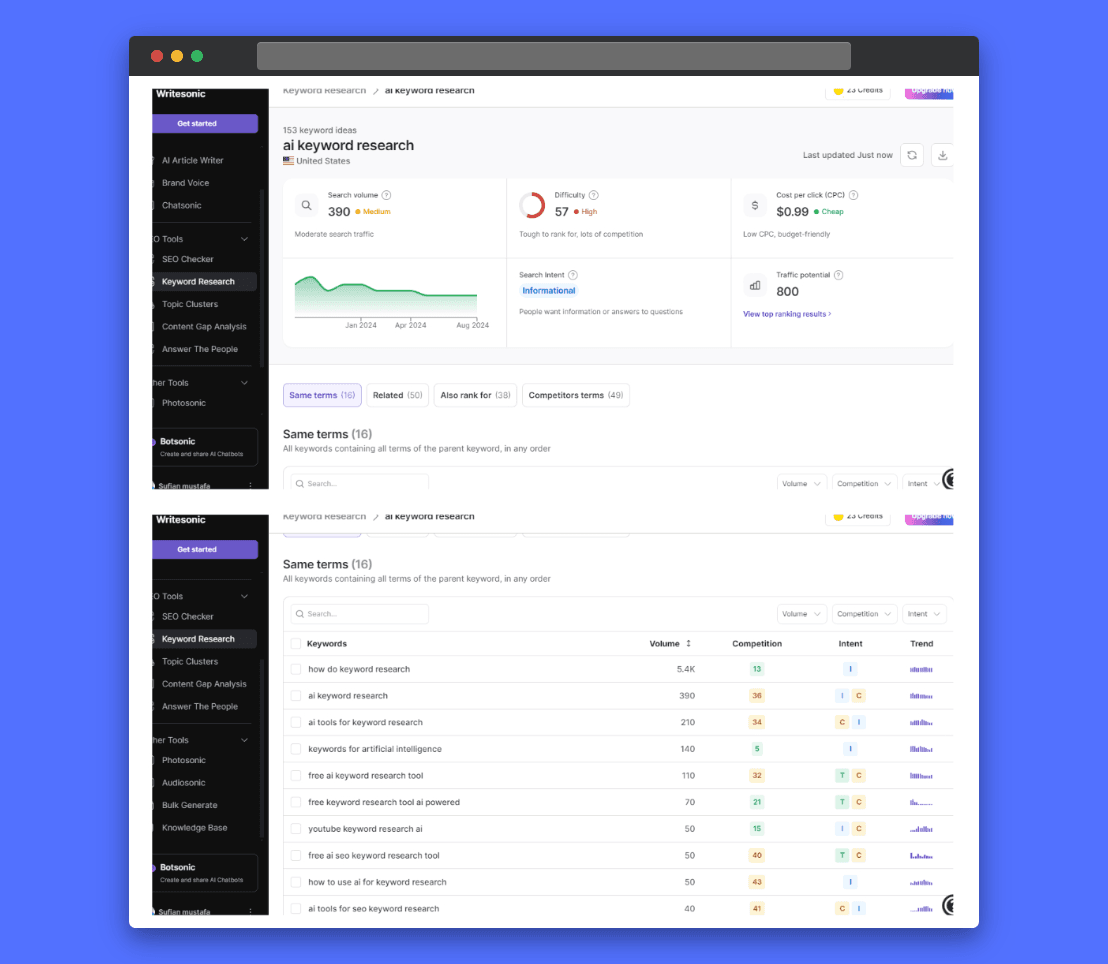
Writesonic provides detailed keyword insights, including real-time Google data and visual trend graphs, empowering users to make informed SEO decisions.
Limitations of Writesonic
- Accuracy of Keyword Data: The keyword suggestions and metrics such as search volume, CPC, and competition score provided by Writesonic might not always align perfectly with the results from other established keyword research tools like Ahrefs or SEMrush. It's a good idea to cross-check the data with multiple tools to ensure accuracy and make more informed decisions.
- Real-Time Data Integration Limitations: The integration of real-time Google data is valuable, but it might not always reflect the most current trends or changes immediately, which could impact the timeliness of SEO recommendations.
- Cost: While Writesonic offers a free plan, accessing the full range of features and unlimited usage may require a paid subscription, which can be a limitation for budget-conscious users.
Price and Plans of Writesonic
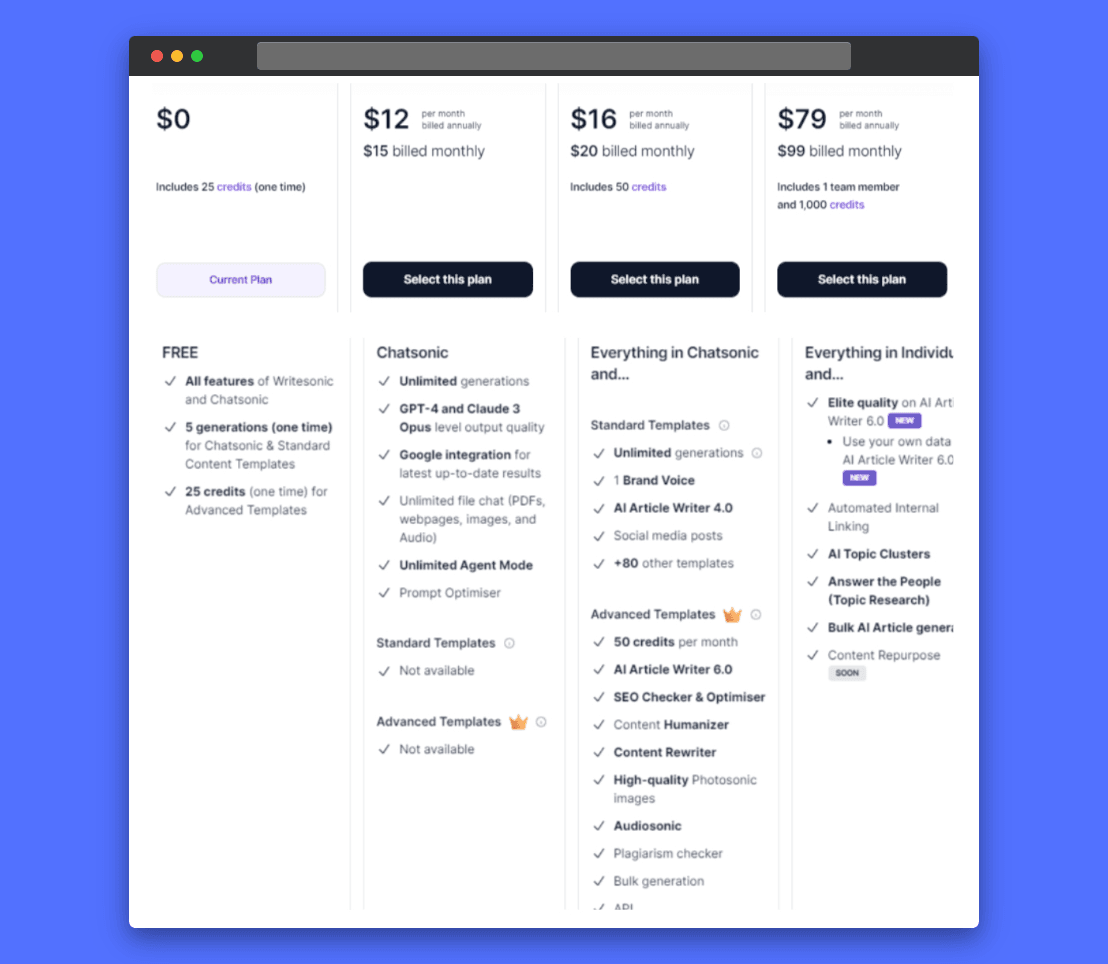
Find the perfect Writesonic plan to fuel your content marketing! This screenshot breaks down the pricing options, from free access to powerful enterprise solutions. Whether you're a solo creator or part of a growing business, there's a plan to fit your needs and budget. Ready to get started? Explore Writesonic's pricing and choose the plan that's right for you!
From Keywords to Content: AI Tools That Turn Your Research into Ready-to-Publish Articles
Alright, we’ve covered a lot of ground so far, and I know it might feel like a lot to take in!
But before you get overwhelmed by the world of AI keyword research, let’s lighten the mood with a quick joke:
"Why did the SEO specialist break up with their partner? Because they couldn’t find the right keyword!"
Okay, maybe not the funniest, but hey—sometimes you need a little laugh when navigating all these tools.
Now, let’s get back to business.
Up until now, we’ve explored a range of keyword research tools, each with its own unique strengths to help you find the perfect keywords.
But here’s the big question: What’s the end goal of all this keyword research?
If it’s content creation, I’ve got something exciting to share. What if I told you that you can handle both keyword research and content creation in one place?
That’s right. The next two tools I’m about to introduce aren’t your typical keyword research tools. They go a step further.
- Find the Best Keywords: They help you discover the most effective keywords.
- Generate Human-Friendly, SEO-Optimized Content: These tools write content that reads naturally while being optimized for SEO.
As you know, my criteria for selecting tools are all about ensuring quality and effectiveness. While many SEO content creation tools are out there, only these two meet my high standards.
They tick all the boxes:
- Free access to core features
- Widespread acceptance
- Accuracy
- Ease of use
I’ve added two more important criteria for these tools:
- Human-like and Engaging Content: The content they generate must resonate with readers.
- Easy Adjustments: You can easily tweak the content to incorporate as many keywords as you need.
Stay tuned—these tools are going to revolutionize your content creation process!
Here’s how you can take full advantage of them in just three simple steps:
- Find Your Target Keyword: Use the keyword research tools we’ve already discussed to pick the perfect keyword that fits your niche and goals.
- Insert Your Keywords into These AI Tools: Once you’ve got your target keyword and any related keywords, feed them into the AI content creation tools I’m about to introduce. These tools will craft human-friendly, SEO-optimized content around your keywords.
- Refine and Perfect: After the AI creates the content, all you have to do is review it, make any necessary tweaks, and voila—your content is ready to publish!
Doesn’t that sound like a game-changer?
Let’s dive into the two tools that will make this process a breeze.
SEO Writing AI: The Ultimate Tool for SEO-Optimized Content Creation
Simplify Keyword Research with SEO Writing AI
If you’ve ever felt overwhelmed by turning keyword research into optimized content, SEO Writing AI is here to make it easy. This tool is designed to generate SEO-friendly articles that focus on keyword integration, saving you time on manual optimization.
Powerful Features for SEO-Driven Content
SEO Writing AI offers several powerful features, but three stand out:
- 1-Click Blog Post: Input your main and optional keywords, and the AI generates a fully optimized article, complete with headings and meta descriptions.
- Bulk Article Generation: Ideal for producing large amounts of content quickly.
- Humanizer Tool: Enhances readability, making your content more natural and engaging while still SEO-friendly.
These features work together to help you create relevant, search engine-optimized content.
Customizable Options for Better Content
What’s great about this tool is its flexibility. You can adjust the tone, point of view, and structure of your content. You can also add hooks, tables, and lists—all important for SEO. Plus, the AI can automatically generate relevant keywords to keep your content fully optimized.
Enhance Readability with the Humanizer Tool
The Humanizer Tool is especially helpful for improving readability. It rewrites your content to make it feel more natural and engaging, ensuring that it resonates with readers while still following SEO best practices.
Effortless Publishing
You can also generate and post content directly to WordPress with just one click.
SEO Writing AI handles everything—from writing to publishing. It supports 48 languages and AI-generated images. It’s a complete solution for keyword research and content creation.
When incorporating AI-generated images, remember that you can also write SEO-friendly alt text with the help of AI to further enhance their visibility.
SEO Writing AI isn’t just a writing tool.
It’s an all-in-one solution for creating SEO-optimized, human-friendly content that ranks and connects with your audience.
If you’re tired of using multiple tools for research, writing, and optimization, this is the tool for you.
In short, SEO Writing AI isn't just a writing tool. It’s your all-in-one solution for creating SEO-optimized, human-friendly content that ranks and resonates.
If you’re tired of juggling multiple tools for research, writing, and optimization, this is the tool you’ve been waiting for.
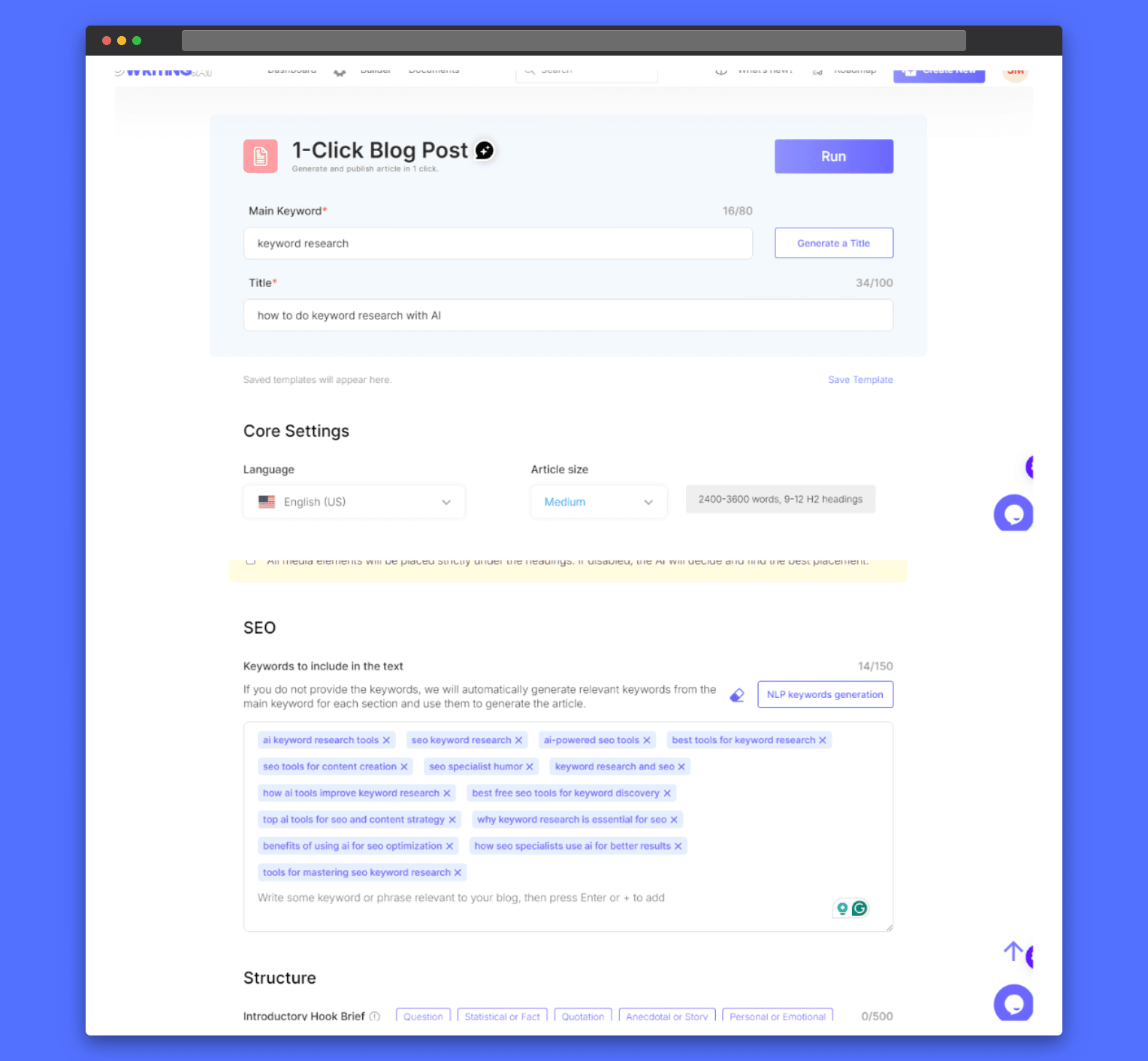
SEO Writing AI streamlines content creation by generating SEO-friendly articles with its 1-Click Blog Post feature, focusing on keyword integration and automated optimization.
Price and Plans of SEO Writing AI
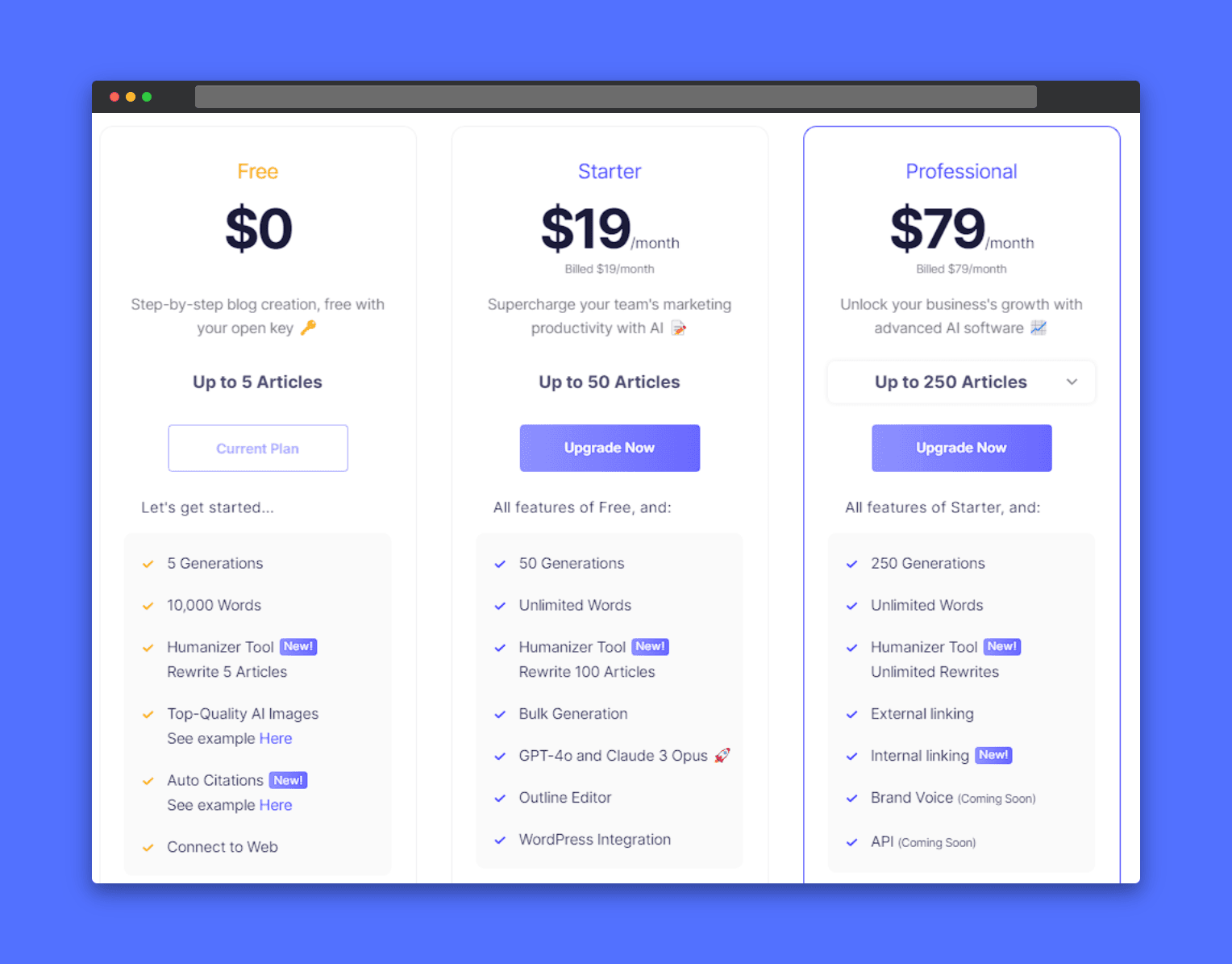
Compare SEO AI writing tool plans, from free to professional, to find the right fit. Evaluate article limits, AI generations, and word counts. Choose the 'Starter' plan for team productivity or the 'Professional' plan for advanced features. Consider integrations and API access for seamless workflow. Select the plan that aligns with your content creation needs
Next Up: Rytr AI – A Game Changer for Effortless Content Creation
After exploring a tool with customizable options to enhance your content creation, the next tool worth diving into is Rytr AI.
This AI-powered writing assistant stands out by making content creation fast and efficient. It’s also deeply personal. With Rytr, you get much more than just content generation. You get content that mirrors your unique voice—something that many AI tools struggle to deliver.
Personalized Content Creation at Its Best
Rytr's user-friendly interface makes it easy to create content quickly.
- Choose Your Target Language, Tone, and Voice: Effortlessly select your preferred language, tone, and voice to suit your needs.
- Create Diverse Content: Whether you’re drafting a blog post, generating keywords, or brainstorming ideas, Rytr excels at maintaining a natural, human-friendly tone throughout its AI-generated content.
- To further diversify your content and engage your audience visually, you can also create infographics with the help of AI.
What sets Rytr apart is its ability to analyze your writing samples. It matches the tone to ensure the output sounds just like you. This is a feature many other AI tools fail to offer.
Moreover, Rytr allows you to create multiple custom tones. This makes it ideal for different clients or projects, ensuring your content always feels authentic.
Once you select your use case—be it a blog post, email, Facebook post, or SEO meta description—you simply provide a brief topic overview. Then, you add relevant keywords. Rytr’s AI generates SEO-optimized, engaging content in minutes.
It makes content creation effortless. At the same time, it offers the flexibility to customize and format your content easily with its rich text editor.
Chrome Extension for Streamlined Writing
Rytr also offers a convenient Chrome extension, which allows you to create or enhance content anywhere you write.
Whether you're posting on social media, writing emails, or editing meta descriptions, this extension makes generating or improving content fast and efficient. It’s the perfect solution for creators who want to streamline their workflow across platforms.
To further enhance your productivity and unlock creative possibilities, consider using an all-in-one Chrome extension like Merlin AI. It can be incredibly valuable for improving your entire browsing experience.
Trusted by Millions for Efficient, Original Content
What sets Rytr apart is its massive impact on the content creation community.
With over 8 million satisfied users and a 4.9/5 rating from thousands of reviews, Rytr has quickly become a go-to tool for content creators, marketers, and entrepreneurs.
It’s designed to save you time and effort without sacrificing quality, ensuring that everything you create is:
- Plagiarism-free
- Engaging
- Personalized to your style
So, if you’re looking for a tool that combines ease of use, flexibility, and personalized content, Rytr is a fantastic option to consider for your content creation needs.
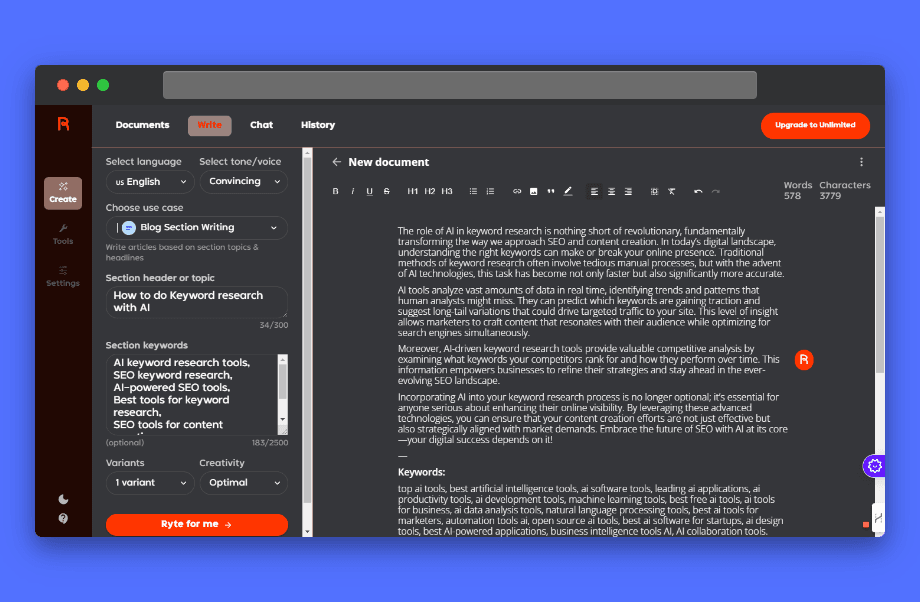
Rytr AI crafts personalized content by allowing users to select language, tone, and voice, ensuring outputs align with individual styles and preferences.
Price and Plans for Rytr AI
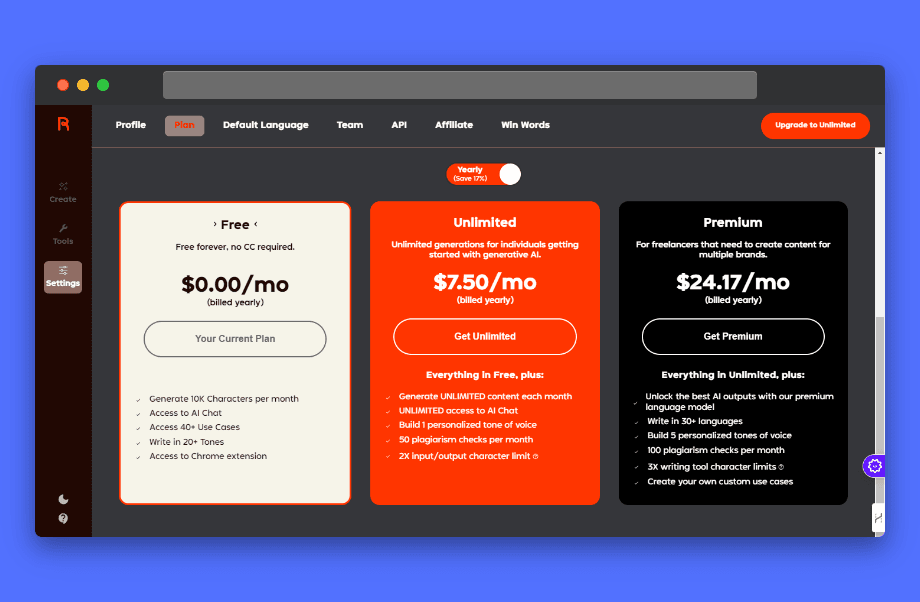
Compare Rytr AI writing tool plans, from free to premium, to find the right fit. Evaluate character limits, AI chat access, and plagiarism checks. Choose the 'Unlimited' plan for increased content generation or the 'Premium' plan for advanced features like custom use cases. Select the plan that matches your content creation needs and budget.
Conclusion
In conclusion, harnessing these advanced AI tools can truly elevate your keyword research and content creation game.
Picture this: effortlessly generating engaging, SEO-optimized content that resonates with your audience—all while saving precious time!
It’s not just about finding the right keywords; it’s about leveraging AI-powered keyword research tools to enhance your overall digital strategy.
So, why wait? Start using these powerful AI tools today and watch your SEO and keyword game soar to the next level.
With artificial intelligence by your side, your audience—and your rankings—will thank you!
Let’s unlock the full potential of your content together!